Collecting feedback is easy for most companies. But when the time comes to do something with the collected data, the problems start. What is the best way to analyse the feedback? How do you share findings with the rest of your team, and how do you close the loop? With Mopinion, it’s easy. In this edition of Feedback Flash, we are diving into smart and efficient ways of analysing your data with our platform.
We believe that a customer feedback strategy should be easy. From start to finish. That’s why you’ll find a multitude of analysis solutions within our platform, helping you to turn data into insights. Not to mention, share them with the rest of the team.
In this article, we’ll cover:
- Direct Insights: Use automated dashboards for quick insights
- Custom Dashboards: Control exactly what data you want to see
- Dashboard Exports: Democratise feedback to your entire company
- Smart Recaps: Let AI summarise your open feedback comments
TL;DR – Article summary
This blog covers how to quickly and easily get to the most important feedback data in the Mopinion platform by using Direct Insights automated dashboards. It also goes into how AI-generated summaries of open feedback comments allow you to close the loop quicker and more accurately, how to set up custom dashboards and how Dashboard Exports helps you ensure that the insights from your feedback campaigns reach the right people.
Direct Insights: Use automated dashboards for quick insights
Do you want to quickly see how a certain feedback form is performing without spending time building a dashboard? Or perhaps analytics isn’t really your thing, and you are unsure where to start digging into your data. Direct Insights solves this for you.
By going to the reporting tab and clicking ‘Direct Insights’, you can simply choose the feedback form you are curious about. The platform will then automatically create a dashboard showcasing the most important data for you. Easy and effortless!
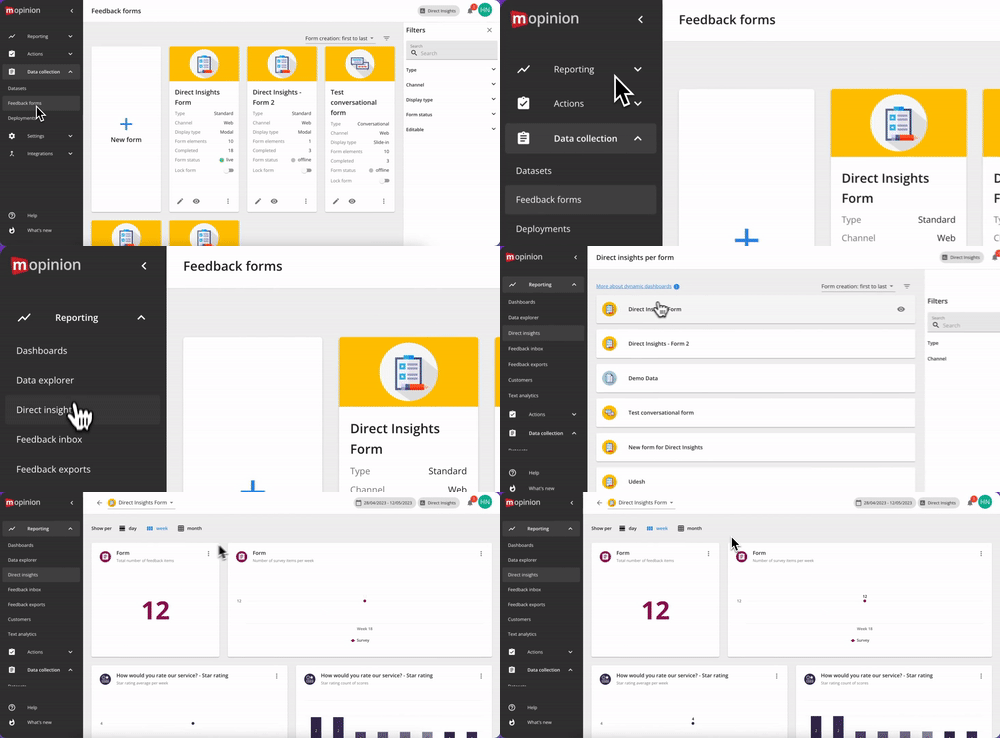
The type of charts it builds for you is decided based on which questions you have included in the feedback form you choose to analyse.
Pro tip: Find a specific chart you want to include in one of your other dashboards? Perhaps for an overarching campaign dashboard that you use for monthly reporting.
Simply click the three dots at the top right of the chart, choose ‘Copy chart to’ and select the dashboard you want to include it in and voíla!
Custom Dashboards: Control exactly what data you want to see
While accessing automatically generated dashboards with Direct Insights is handy, sometimes you might need to create something more specific. Perhaps you want to consolidate a dashboard for your monthly marketing meetings that includes data from your entire feedback campaign.
With Mopinion, it’s easy to create custom dashboards, containing exactly the charts that are relevant to you and your business.
In the sidebar navigation, go to ‘Reporting’ and ‘Dashboards’. Click ‘Create dashboard’ and give it a name. By clicking ‘Add a chart’, you can either choose to use templates or start from scratch.
- Templates: Allows you to choose which feedback forms you want to include and which template charts you feel best represent them
- Start from scratch: Let’s you drag and drop question elements from each of your feedback forms, creating an even more custom experience
As mentioned before, you can also copy charts from Direct Insights (or any other dashboards you might be using) to another existing dashboard. This saves you time from having to recreate the same charts for your different reporting needs.
Dashboard Exports: Democratise feedback to your entire company
Feedback is most effective when it flows through every department that can benefit from it. But to manually compile multiple graphs and ensure they reach the right people is quite time-consuming.
Dashboard Exports makes this whole process a lot easier. It allows you to:
- Easily share insights with other departments and colleagues: Send entire dashboards directly to other Mopinion users’ inboxes to keep them in the loop about the latest digital feedback insights. This encourages data-driven decisions, designed to boost the user experience, throughout the entire organisation.
- Have your favourite charts delivered straight to your inbox: By setting up daily, weekly or monthly dashboard exports, you can easily analyse your feedback data. All directly from your email!
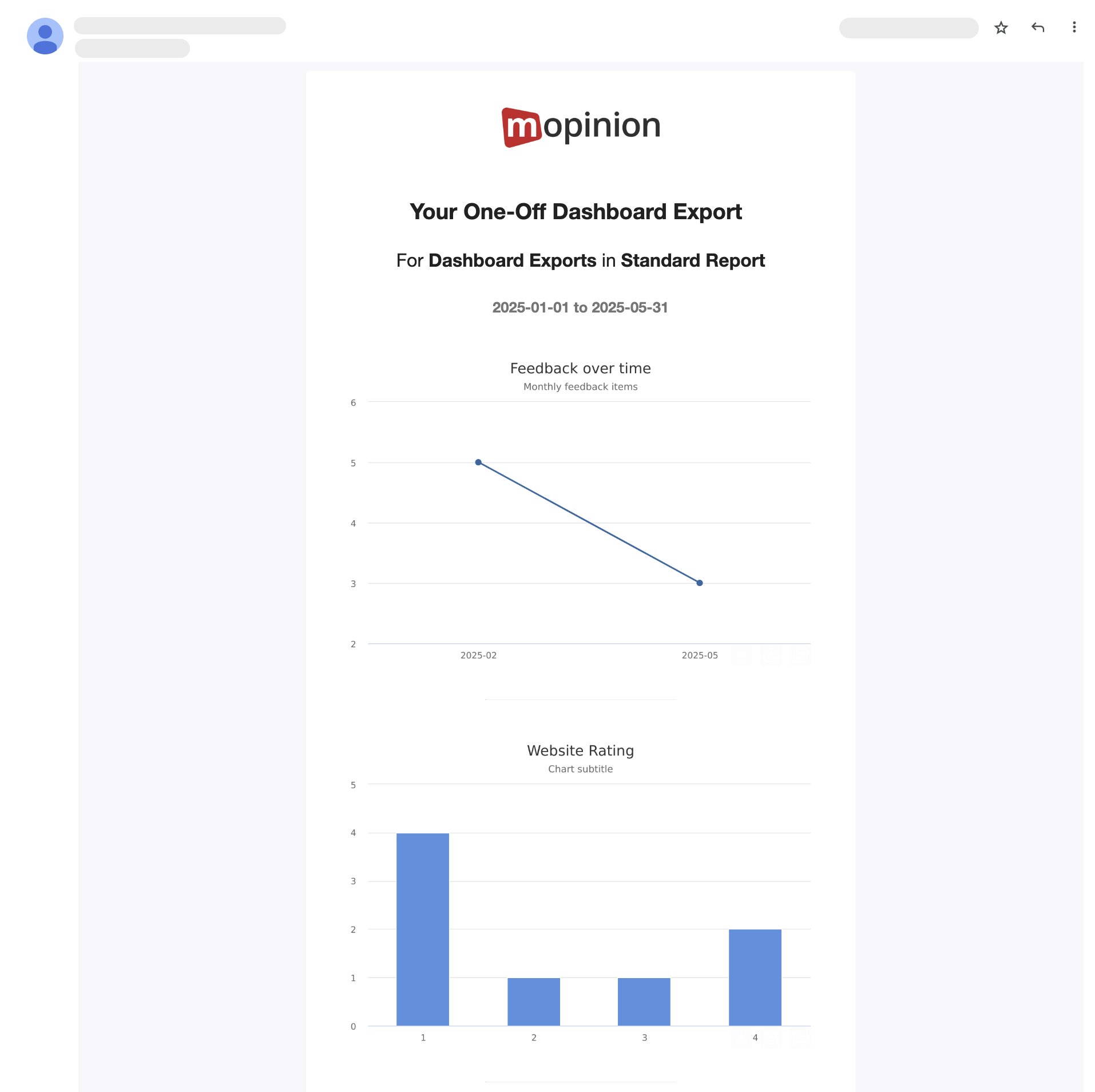

An example of what a dashboard export could look like.
How do I set up a Dashboard Export?
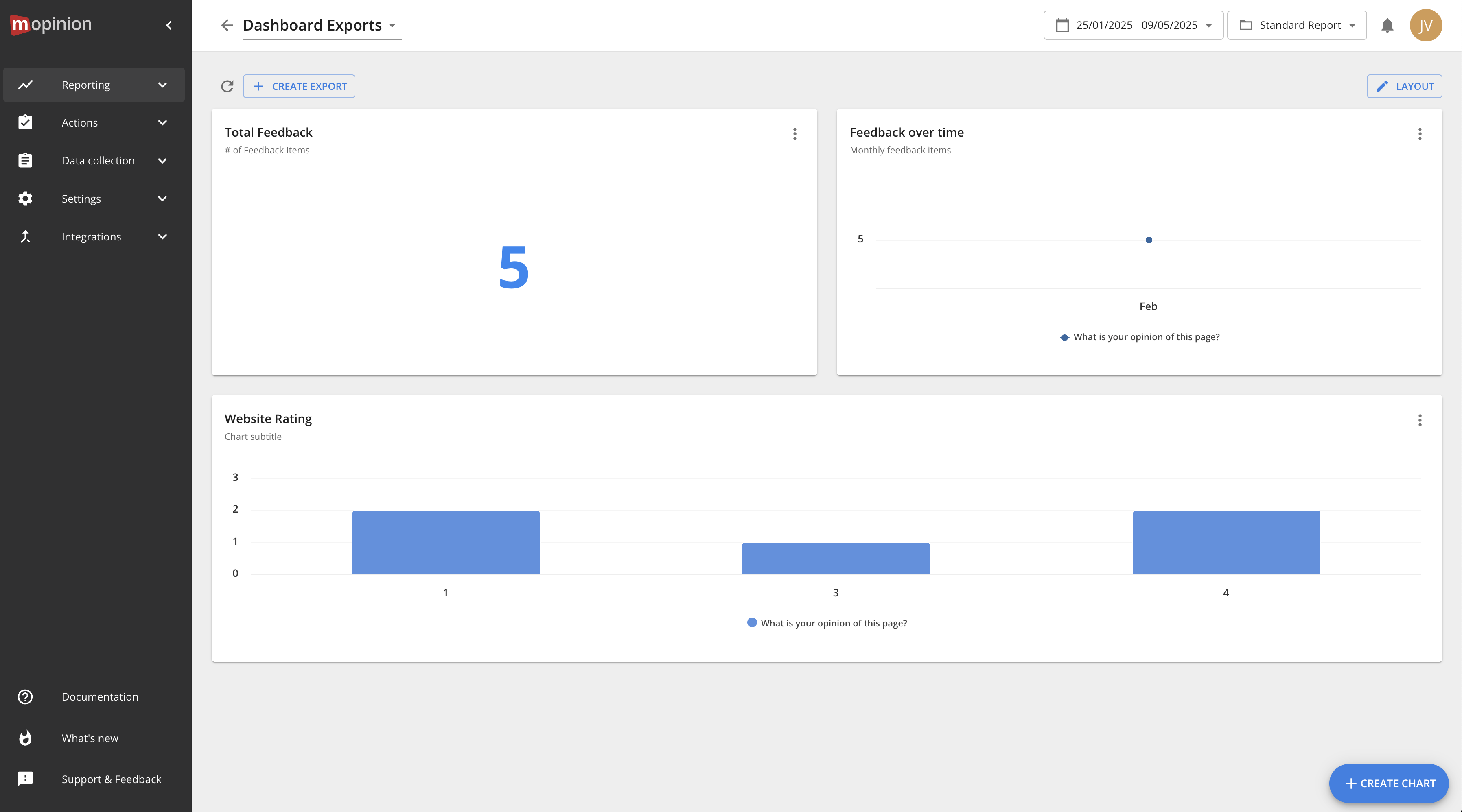
After logging into Mopinion, go to ‘Reporting’ in the navigation bar to the left. Then click ‘Dashboards’. Choose the dashboard you want to export and click the button above your dashboard that reads ‘Create Export’. A pop-up window will appear with two options: ‘One time’ or ‘Recurring’.
Choose the one that you prefer and ta-dah! All your favourite charts from your dashboard are now sent directly to your or any other Mopinion user of your choice’s inbox.
Smart Recaps: Let AI summarise your open feedback comments
Many of the insights that allow you to take action are found in open comments, where your customers and users can express themselves freely. That’s where they describe the bug they found, what is blocking them from converting or what kind of content they can’t seem to find on your website. In other words, concrete examples of how to improve your user journey.
However, manually going through hundreds or even thousands of these open feedback comments is both time-consuming and prone to error. It’s easy to look for trends you expect and miss important improvement points that your customers are expressing. This is where generative AI really comes in handy.

Our solution, Smart Recaps, reads all your open feedback comments, categorises them and creates a summary, giving you an easy overview.
It also includes sentiment analysis, showing you if the feedback collected on a certain topic is mostly positive, negative or neutral. Combined, this helps you see feedback trends more quickly and prioritise urgent issues.
How do I access Smart Recaps?
Simply go to the ‘Reporting’ tab in your sidebar navigation, click ‘Feedback inbox’ and select Smart Recaps. From here, at the top right, you can adjust which time span you want to look at, and your summaries will automatically be generated for you.

Do you want to read the specific feedback that has been left on a certain topic? No problem.
Simply hover over the red, yellow and green colours, indicating sentiment, and click ‘View feedback’. Here you will find a list of all the feedback comments that have been categorised into this specific topic.
Netigate Insights – AI-powered analysis from even more sources
As of September 2025, Mopinion is now part of Netigate, creating Europe’s most comprehensive AI-driven Experience Management platform. With Netigate and Mopinion combined, new, exciting possibilities are now open for our customers.
Are you, for example, interested in consolidating feedback from even more sources, like reviews, text messages, customer service centres and more? Then Netigate Insights is the solution to try out. This AI-driven capability allows you to collect feedback from all different sources and analyse it for you. Much like Smart Recaps, you can find quick-to-read summaries, sorted into topics, complete with sentiment analysis.
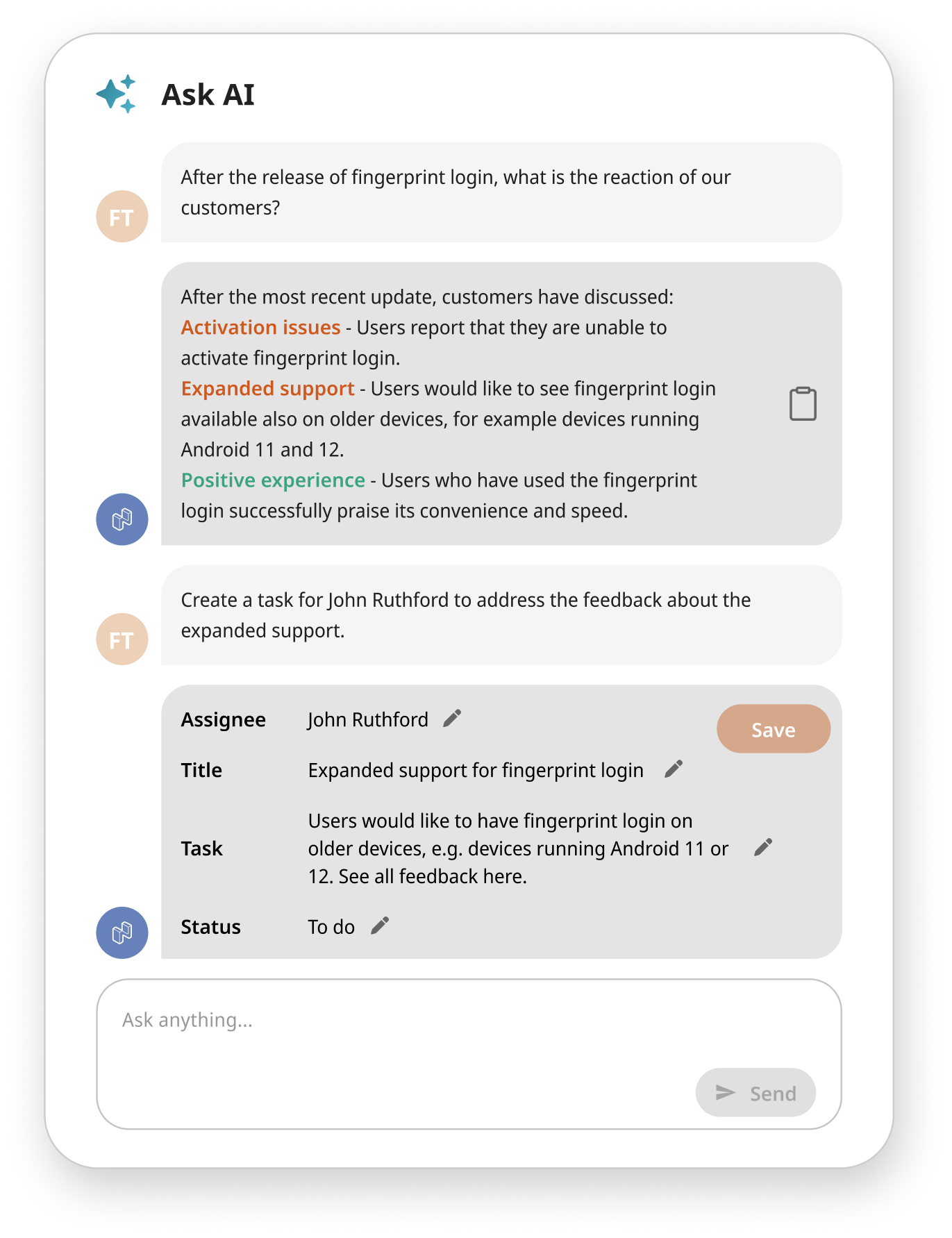
Netigate Insights also offers Ask AI, a functionality that allows you to ask the analysis platform questions like “What three actions should we take to improve our checkout process?”. This makes the analytics part of customer experience optimisation even quicker and smoother.
“Sounds great, but I’m not a Mopinion customer yet”
First of all, hi! Glad you made your way to our website. Mopinion is the European #1 Feedback Software for Web, App and Email. We offer the possibility to create highly customised feedback forms and allow you to target them to specific parts of your audience. This allows you to capture feedback in real time, at the moments that are most relevant to your customers and/or users.
Once the feedback has been collected, Mopinion is a powerful tool to analyse your data, helping you pinpoint improvement points to optimise your digital journeys. Try it out for free today.
Ready to see Mopinion in action?
Want to learn more about Mopinion’s all-in-1 user feedback platform? Don’t be shy and take our software for a spin! Do you prefer it a bit more personal? Just book a demo. One of our feedback pro’s will guide you through the software and answer any questions you may have.