
“I tried to enter your return policy page, and everything just suddenly crashed”. This kind of feedback undoubtedly helps improve the user or customer experience on your website. Without further context, however, it’s hard to offer a quick resolution to the issue. That’s why we are now introducing Feedback Trails: a new Mopinion solution that allows you to see the actions your visitors have taken before leaving feedback on your website.
Feedback Trails is now available for every customer using Mopinion for Websites. It has already been turned on, and you can find it in your Feedback Inbox in the Mopinion platform. This solution is designed to make problem shooting easier and speed up the process from receiving feedback to closing the loop. Let’s take a look at how it works!
This article includes:
TL;DR – Article Summary
Mopinion’s Feedback Trails lets you see what visitors did on your website before submitting feedback, including which pages they visited, what they clicked, how they interacted on a page ( for example, how far they’ve scrolled) and any custom events you choose to track. By adding this behavioural context to each individual feedback item, it reduces guesswork, helps you understand user journeys and patterns and enables faster, more informed fixes – all directly within the Mopinion platform.
See your website from your users’ eyes
Receiving feedback that includes information about technical errors, bugs or tedious journeys is crucial to optimising your user or customer experience (CX).
The same goes for when someone gives a low Customer Satisfaction or Customer Effort score without leaving an open comment.
Both of these cases are gold mines when it comes to identifying CX improvements. However, because they don’t provide much context, reaching a solution often involves a lot of detective work.
Finding the root cause of the problem takes time and effort you could better spend implementing optimisations.

With Feedback Trails, a big part of this detective work is done for you. Click your way into the Mopinion software and gain:
- More context: Get more information about why someone left certain feedback
- Better insights into user behaviour: See more of the customer journey and discover trends in user behaviour
- Faster decision making: By skipping the detective work, you can address issues more quickly
- Stronger business cases: Backing up your CX decisions with even more data can lead to faster decision-making
What is Feedback Trails?
Feedback Trails is a solution that allows you to see the actions a visitor has taken before leaving feedback, all without leaving the Mopinion platform.
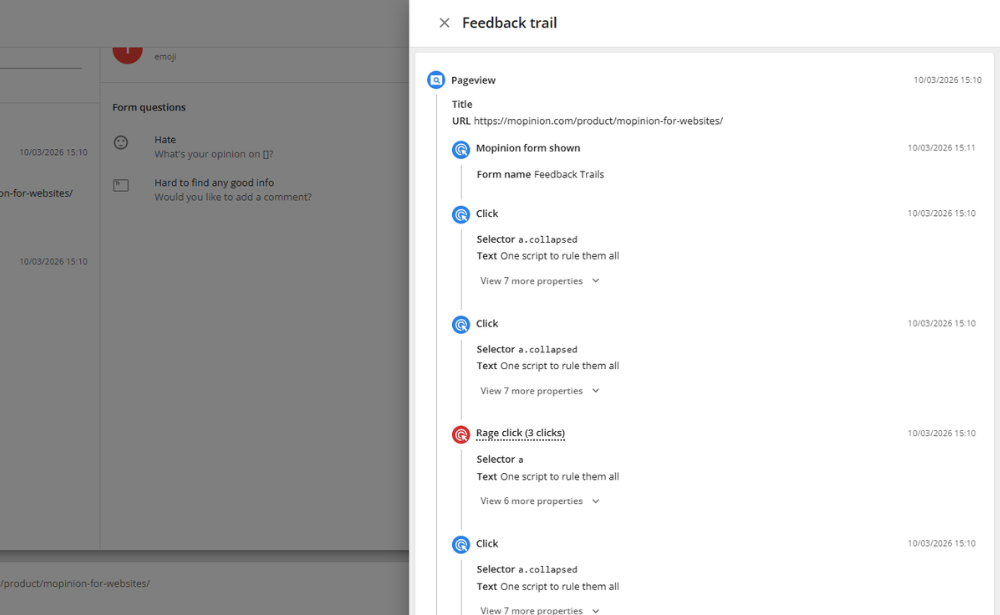
With Feedback Trails, you can see the actions leading up to a visitor leaving feedback. This includes:
- Which pages your users visited
- What items the visitors clicked on, on each page they visited
- Frustration actions, like rage-clicks
- How far the visitor scrolled on a page
- Any other custom event that you choose to track. This can be anything from a product being added to the cart and a completed purchase to a login attempt.
This will give you all the information you need to take immediate action after having received feedback.
For example, has a visitor left feedback saying that a button doesn’t work, but doesn’t specify which button and on what page?
With a quick check of Feedback Trails, you can easily see what page they visited and what they clicked on. Let us walk you through it.
How does Feedback Trails work?
Feedback Trails work on a feedback item basis. This means that the additional information around visitor behaviour you receive through it is tied to an individual piece of feedback.

To access it, you navigate to ‘Reporting’ in the sidebar and then choose ‘Feedback inbox’.
Choose the feedback you want to learn more about. In the left panel, you can see your website visitor’s activity in the 30 minutes leading up to their feedback. If you want to dig deeper from here, simply click ‘View full trail’.
Here, you get a list of all the events that took place before your visitor left their feedback. I.e. which pages they were on, what they clicked (and if it was a normal click or a rage click) and how far down each page they scrolled.
Are you interested in adding a custom event? Please reach out to our Support team.
Is Feedback Trails GDPR compliant?
Yes, all the data that is collected via Mopinion is stored in agreement with the GDPR. There are no changes made to how the rest of your data is stored.
Want to learn more? Read our privacy statement here.
This sounds great! But I’m not yet a Mopinion customer
Lovely to see that you found your way here! Mopinion is the European #1 digital feedback software for web, app and email. We believe feedback strategy should be easy, from collection to analysis and democratisation.
To deliver this, we constantly innovate our software to create an even smoother user experience. Feedback Trails is the latest addition designed from this ambition. Try it out for free today!
Ready to see Mopinion in action?
Want to learn more about Mopinion’s all-in-1 user feedback platform? Don’t be shy and take our software for a spin! Do you prefer it a bit more personal? Just book a demo. One of our feedback pro’s will guide you through the software and answer any questions you may have.