
Customer feedback management is the process of collecting, organising, analysing and acting on customer feedback across different channels. It helps organisations turn feedback from websites, mobile apps, email campaigns and other digital touchpoints into clear insights and follow-up actions.
Without a structured approach, feedback can quickly become scattered across tools, teams and inboxes. Customer feedback management brings this data together, making it easier to spot recurring issues, understand customer needs and improve the digital experiences that matter most.
TL;DR – Article summary
- Customer feedback management is the process of collecting, organising, analysing and acting on customer feedback across different channels.
- A strong feedback management process helps teams uncover recurring pain points, improve customer journeys and make more informed business decisions.
- The main steps are simple: collect relevant feedback, analyse it for trends and turn those insights into action.
- Customer feedback management software helps centralise feedback, automate analysis, track performance and close the feedback loop faster.
- The right tool depends on your channels, team structure, reporting needs, integrations and how much support you need for open-text feedback analysis.
In this blog, we’ll cover:
- What is customer feedback management?
- Why is customer feedback management important?
- How does customer feedback management work?
- What are the best customer feedback management tools?
- How can Mopinion support customer feedback management?
- Frequently Asked Questions
What is customer feedback management?
A customer feedback management system is software that helps businesses collect, organise, analyse and act on customer feedback from different channels in one place. It usually includes feedback forms, dashboards, reporting, alerts, integrations and tools for closing the feedback loop.
For digital teams, this often means collecting feedback across websites, mobile apps and email campaigns, then using those insights to understand where customers struggle, what they value and which parts of the journey need attention.
Customer feedback management vs Voice of the Customer
Customer feedback management and Voice of the Customer are closely related, but they are not exactly the same. Voice of the Customer, or VoC, is the broader strategy of understanding customer needs, expectations and experiences across the entire customer journey.
Customer feedback management is the process and technology used to support that strategy. It focuses on collecting, organising, analysing and acting on feedback from channels such as websites, mobile apps, email campaigns and customer support interactions.
In simple terms, Voice of the Customer is the overall programme, while customer feedback management is how teams turn customer input into measurable insights and follow-up actions.

Why is customer feedback management important?
Customer feedback management is important because it helps businesses understand what customers need, where they experience friction and which improvements should be prioritised. Instead of relying on assumptions, teams can use direct customer input to improve digital journeys, products, services and overall satisfaction.
The impact is also commercial. According to PwC’s 2025 Customer Experience Survey, 29% of consumers stopped using or buying from a brand because of poor customer experience. McKinsey also found that improving customer journeys can increase revenue by 10 to 15% while lowering cost to serve by 15 to 20%.
Customer feedback management supports better decisions
When feedback is collected and organised properly, teams can see which issues matter most and prioritise improvements based on real customer needs.
- Product roadmap: Identify which features, fixes or improvements customers ask for most often.
- Customer satisfaction: Understand what customers value, where they struggle and what causes frustration.
- UX and design: Spot confusing pages, broken journeys, unclear messaging or design issues.
- Testing and optimisation: Add context to A/B tests, usability tests and conversion data by understanding why customers behave the way they do.
Customer feedback management improves digital journeys
Customer journeys often span websites, mobile apps, email campaigns and support touchpoints. Feedback management brings these signals together, helping teams spot recurring friction points and route insights to the people who can act on them.
Customer feedback management builds trust
Customers are more likely to trust a brand when they feel heard. By tracking feedback, assigning ownership and closing the feedback loop, businesses can show customers that their input leads to real improvements.
How does customer feedback management work?
Customer feedback management usually works in three steps: collecting customer feedback, analysing the results and taking action on the insights. Together, these steps help teams turn scattered customer input into clear priorities for improving digital journeys, products and services.
The most effective feedback management processes are structured, ongoing and connected to the teams responsible for acting on customer insights.
How do you collect customer feedback?
You collect customer feedback by asking the right questions at the right moment in the customer journey. This can include feedback forms, surveys, ratings, open-text questions and targeted feedback prompts across digital channels.
The process will look different for every organisation, but strong feedback programmes usually have one thing in common: they collect feedback where the customer experience is actually happening.

Where to collect customer feedback
Many organisations start by collecting feedback on their website, but customer feedback management should not stop there. Valuable feedback can come from several digital touchpoints, including:
- Websites: Website feedback helps teams understand where visitors experience friction, what prevents conversions and which pages need improvement.
- Mobile apps: Mobile feedback helps teams identify in-app obstacles, usability issues, bugs and moments where users need support.
- Email campaigns: Email feedback can show how customers respond to newsletters, post-purchase emails, onboarding flows and loyalty campaigns.
- Support and service touchpoints: Feedback after a support interaction can help teams measure satisfaction, identify recurring issues and improve service quality.
Collecting feedback across these channels gives teams a more complete view of the customer journey. Instead of looking at one touchpoint in isolation, organisations can connect feedback from websites, apps, email and support to understand where customers struggle and what needs to improve.
For a broader overview of feedback types and collection methods, read our guide on user feedback.
Which customer feedback metrics should you use?
The best customer feedback metrics depend on what you want to measure. Some metrics focus on loyalty, while others measure satisfaction, effort or whether users were able to complete a specific goal.
Common customer feedback metrics include:
- Net Promoter Score (NPS): Measures customer loyalty by asking how likely a customer is to recommend your brand, product or service.
- Customer Satisfaction Score (CSAT): Measures how satisfied customers are with a specific experience, interaction or stage of the journey.
- Goal Completion Rate (GCR): Shows whether users were able to complete a specific goal on a website, mobile app or digital service.
- Customer Effort Score (CES): Measures how easy or difficult it was for customers to complete a task, such as finding information, making a purchase or contacting support.
There is no one-size-fits-all approach to feedback metrics. The right choice depends on your business goals, the customer journey stage and the type of insight you need. Learn more about how to apply different customer feedback metrics.
When should you collect customer feedback?
You should collect customer feedback at key moments in the customer journey, especially when customers are actively browsing, buying, comparing, completing a task or asking for support. This helps teams capture feedback while the experience is still fresh.
A strong customer feedback management process usually combines two types of feedback collection:
- Passive feedback: Always-available feedback options, such as a feedback button or embedded survey, that let customers share input whenever they choose.
- Active feedback: Behaviour-triggered surveys that appear at specific moments, such as when a visitor is about to leave a page, abandon a cart or complete a purchase.
Using both methods gives teams a more complete view of the customer experience. Passive feedback captures ongoing input, while active feedback helps collect more contextual insights at important moments in the journey.
How do you analyse customer feedback?
You analyse customer feedback by organising responses, identifying patterns and turning feedback data into insights that teams can act on. This usually involves looking at feedback scores, open-text responses, recurring topics, sentiment, trends over time and differences between channels, countries or customer segments.
Customer feedback analytics helps teams answer questions such as:
- Which issues are customers mentioning most often?
- Where are satisfaction scores dropping?
- Which pages, campaigns or app screens create the most friction?
- How do feedback scores change after product, website or service updates?
- Which channels, regions or customer segments need the most attention?
Dashboards and charts make this analysis easier by bringing feedback data together in one place. For example, teams can monitor changes in NPS, CSAT, CES or GCR over time and spot sudden increases or decreases that may signal a problem.
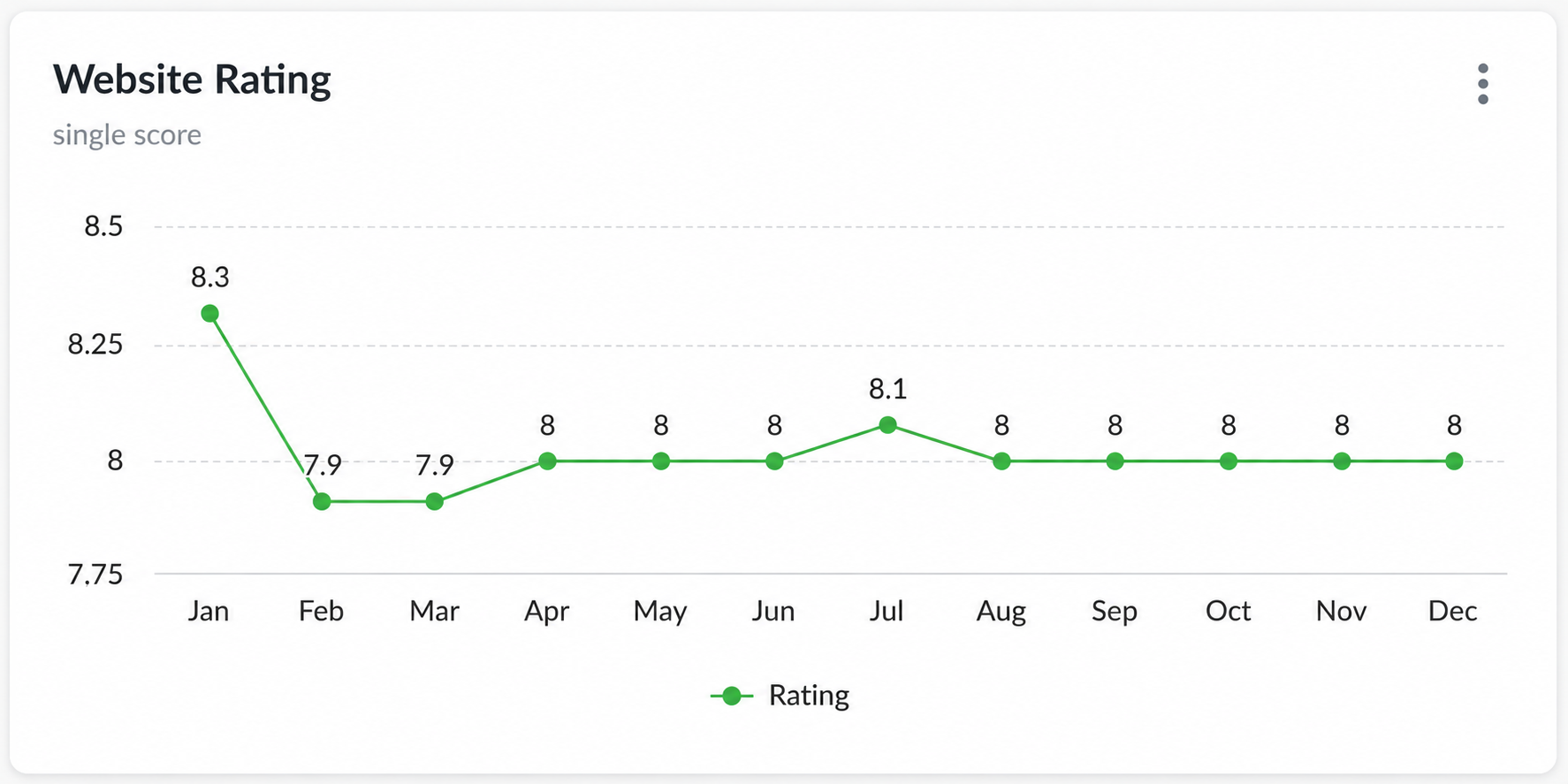
For organisations working across multiple digital channels, feedback analysis can also help compare performance between websites, mobile apps, email campaigns, domains, countries or customer groups. This makes it easier to understand where the customer experience is performing well and where improvements are needed.
There are several ways to analyse customer feedback data. The right approach depends on what you want to learn, but most teams start by looking for trends, recurring issues and differences between channels or customer segments.
1. Identify feedback trends over time
One of the most effective ways to analyse customer feedback is to track how key metrics change over time. Metrics such as Net Promoter Score (NPS), Customer Satisfaction Score (CSAT), Customer Effort Score (CES) and Goal Completion Rate (GCR) can help teams understand whether the customer experience is improving, declining or staying the same.
For example, NPS data can be visualised in a bar chart that shows the percentage of promoters, passives and detractors over a specific period:
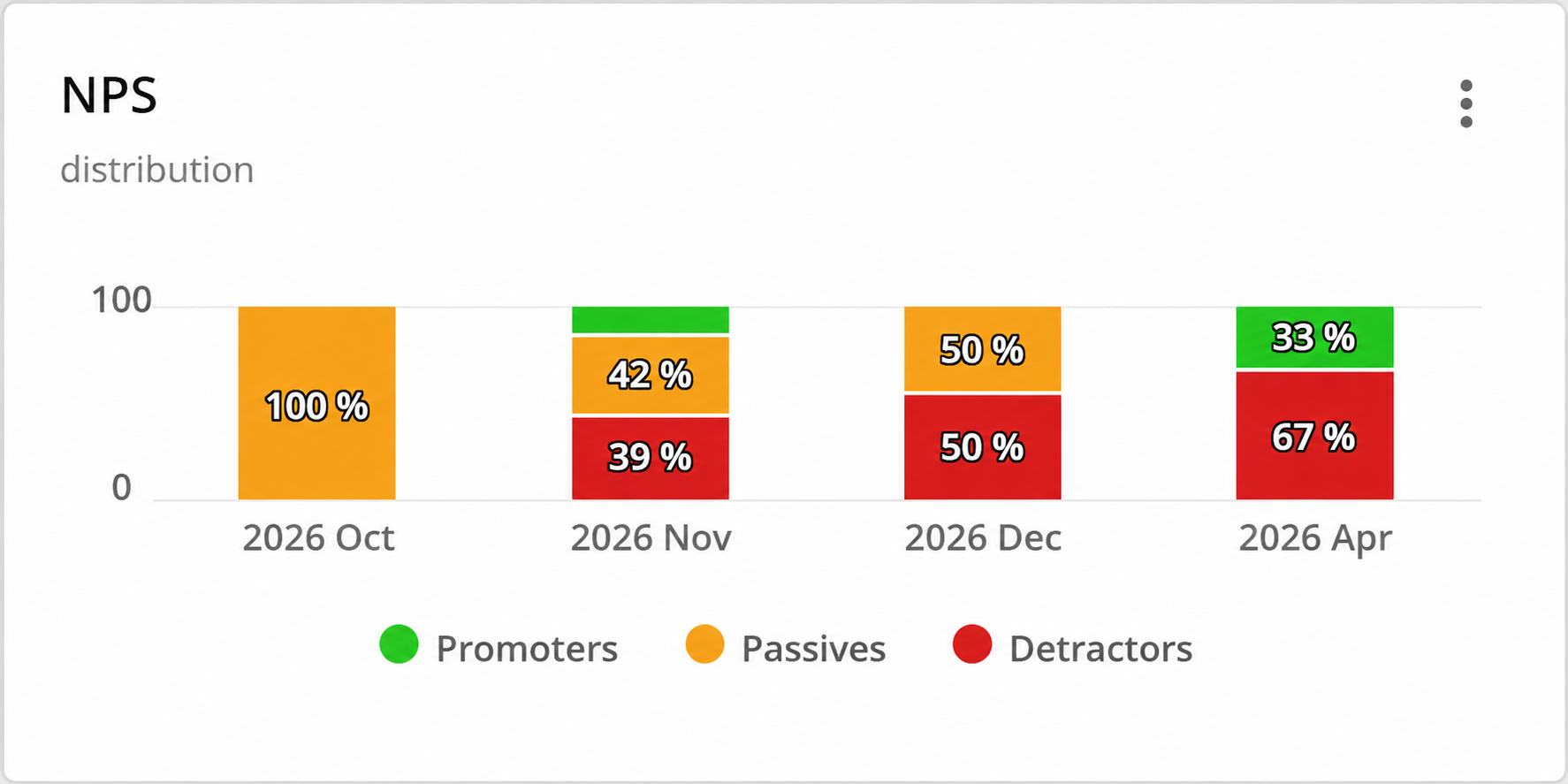
Tracking feedback trends over time helps teams spot sudden drops, improvements or recurring patterns. A drop in CSAT after a website update, for example, may point to a usability issue, while a steady improvement in NPS could show that recent changes are having a positive impact.
With customer feedback management software such as Mopinion, teams can also zoom in on individual feedback responses to understand the reasons behind changes in scores. This helps connect quantitative feedback metrics with open-text comments, so teams can see both what is happening and why.
2. Bring different feedback sources together
Customer feedback often comes from several sources, including websites, mobile apps, email campaigns, surveys and support interactions. Analysing these sources separately can make it difficult to understand the full customer journey.
By bringing different feedback sources together, teams can compare performance across channels, domains, countries or customer segments. This makes it easier to see where customers are most satisfied, where friction is increasing and which parts of the digital experience need attention.
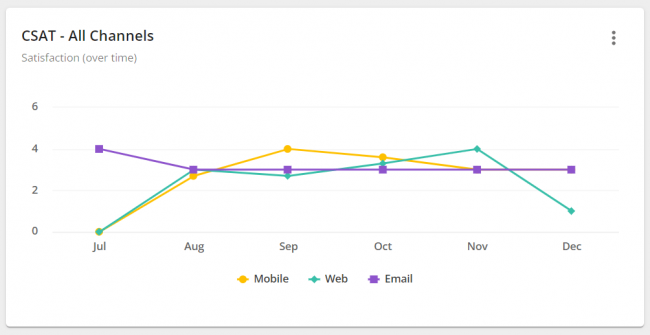
For example, an organisation might track CSAT across its website, mobile app and email campaigns. Comparing these scores in one dashboard can show whether one channel is underperforming or whether a specific issue appears across multiple touchpoints.
This broader view is especially useful for teams managing several digital channels, markets or brands. Instead of relying on isolated feedback reports, they can identify patterns across the entire digital customer experience and prioritise improvements more effectively.
Here are several practical ways to analyse customer feedback data and turn it into useful insights.
1. Compare feedback across channels, countries and domains
If your organisation collects the same feedback metrics across different channels, domains, countries or brands, it can be useful to compare those results in one dashboard. This gives teams a clearer view of where the customer experience is performing well and where friction is increasing.
For example, you might compare Customer Satisfaction Score (CSAT) across your website, mobile app and email campaigns to see which channel needs the most attention:
You can also compare a metric such as NPS across different countries or markets. This helps international teams understand whether customer sentiment differs by region and whether specific markets need localised follow-up:

Bringing multiple data sources together makes it easier to spot patterns that would be harder to see in separate reports. Learn more about how Mopinion brings multiple data sources into one chart.
2. Build a dashboard around the decisions you need to make
The ideal customer feedback dashboard is not the same for every organisation. It depends on your goals, KPIs, channels and internal teams.
A useful dashboard should make it easy to spot changes, compare feedback sources and identify priorities. For example, you might place your most important KPIs at the top, followed by charts for specific journeys, campaigns, countries or touchpoints.
The goal is to make feedback easy to understand and act on, not just easy to report.
3. Monitor online tests and specific pages
Customer feedback can also help teams understand how users respond to website changes, app updates, experiments or specific page designs. This is especially useful when feedback is combined with A/B testing, usability testing or conversion data.
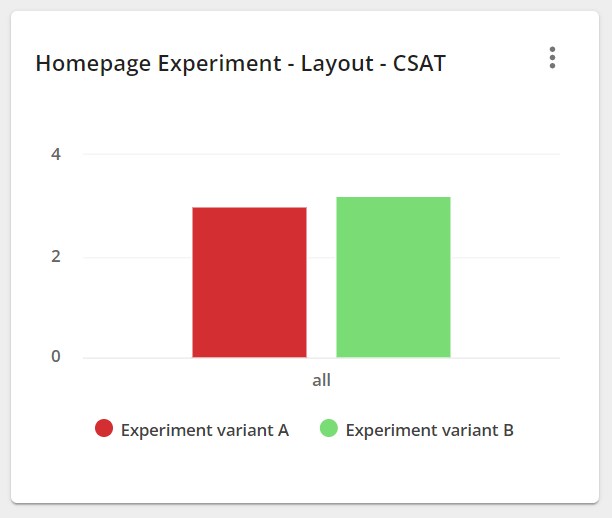
For example, if you are testing two versions of a homepage, you can compare feedback scores such as CSAT or CES for each version. This helps you understand not only which version performs better, but also how users experience the change.
You can also analyse feedback at page level. For example, a chart showing the top-rated or most-rated URLs can help content, UX and product teams understand which pages receive the most feedback and which ones may need improvement.
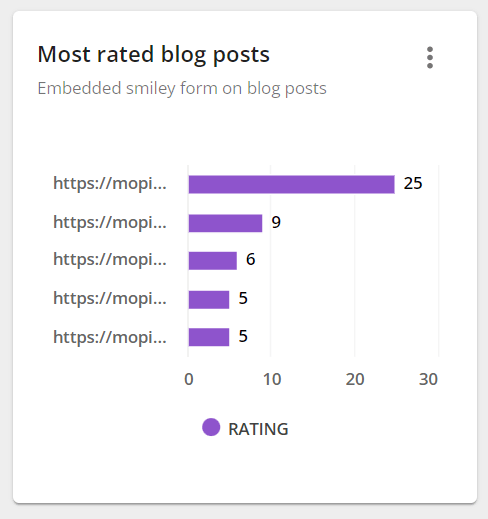
This can help teams prioritise content updates, landing page improvements or UX fixes based on direct customer input.
4. Track sentiment on key pages and campaigns
Sentiment feedback helps teams quickly understand whether customers are having a positive or negative experience. This can be collected through simple feedback elements such as thumbs up/down buttons, smiley ratings or short satisfaction questions.
These feedback options are often used on blog posts, FAQ pages, knowledge base articles, emails and product pages because they are quick for customers to answer.

Once collected, sentiment feedback can be visualised over time to show whether a page, email campaign or support article is becoming more or less helpful.
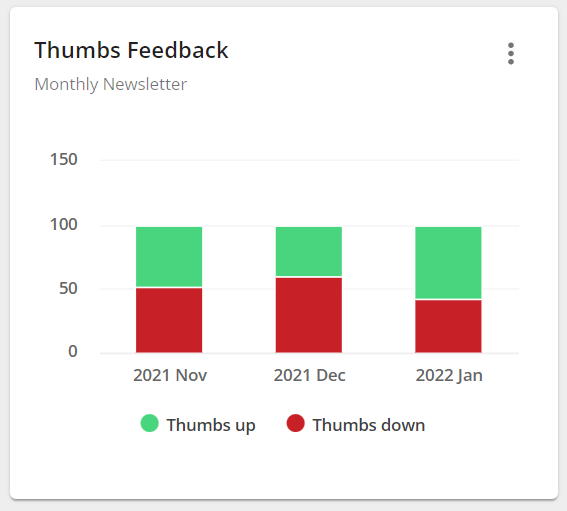
This gives teams a quick signal when something changes. For example, a sudden increase in negative feedback on a help page may indicate that the content is unclear, outdated or not answering the customer’s question.
5. Use comments and metadata to explain changes in scores
Dashboards are useful for detecting changes, but feedback scores rarely explain the full story on their own. To understand why a metric has changed, teams should also analyse open-text comments and metadata such as browser, device type, operating system, page URL, app version or customer segment.
For example, if CSAT suddenly drops on your mobile channel, metadata can help you identify whether the issue is linked to a specific device, browser or app version. Open-text comments can then explain what customers were trying to do and where they struggled.
This is where customer feedback management becomes more actionable. Instead of only reporting that a score has changed, teams can investigate the cause and route the issue to the right department.
6. Measure the total amount of feedback collected
The volume of feedback collected can also reveal useful patterns. A sudden increase in feedback may indicate that many customers are experiencing the same problem. A drop in feedback volume may suggest that a survey is not visible enough, is triggered at the wrong moment or no longer fits the journey.
Feedback volume can also be compared across channels, pages or campaigns to understand where customers are most engaged or where problems are most common.
Tracking feedback volume alongside metrics such as NPS, CSAT, CES and sentiment gives teams a more complete view of the customer experience.
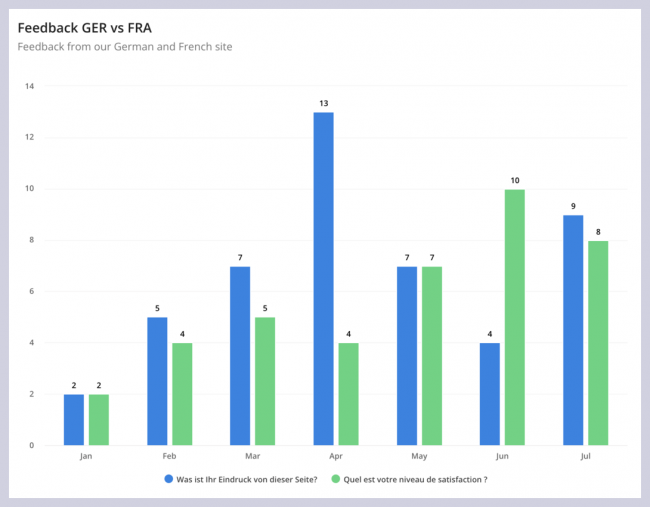
For example, you can visualise the number of feedback items collected over a specific period to understand whether feedback volume is increasing, decreasing or staying stable:

You can also compare feedback volume across multiple sources, such as websites, mobile apps, email campaigns or different domains:
7. Analyse open-text feedback and customer sentiment
Feedback scores are useful, but open-text comments often explain the reason behind those scores. This is where techniques such as text analytics can help.
In customer feedback management, text analytics is used to analyse written feedback from open-text fields. It can help teams identify recurring topics, detect sentiment, group similar responses and spot patterns that would be difficult to find manually.
For example, if customers repeatedly mention words such as “confusing”, “slow”, “broken” or “difficult”, those comments can point to specific issues on a website, mobile app or email journey. Analysing this feedback helps teams understand not only what customers rated, but why they gave that score.
This makes open-text analysis especially useful for prioritising improvements, understanding customer emotions and identifying the root cause behind changes in metrics such as NPS, CSAT or CES.
How do you act on customer feedback?
The final step in customer feedback management is taking action. This is also known as closing the customer feedback loop. It means making sure feedback does not stay hidden in dashboards, inboxes or separate team tools, but is routed to the people who can do something with it.
Acting on customer feedback is important because collecting feedback alone does not improve the customer experience. Teams need a clear process for reviewing insights, assigning ownership, following up with customers and making improvements based on what customers have shared.
Harvard Business Review also highlights the importance of keeping the customer visible across the organisation, rather than limiting feedback to frontline teams or a small group of decision-makers. A strong feedback loop helps different departments understand what customers are experiencing and where action is needed.
There are two main ways to act on feedback: internally and externally. Internal actions help teams route, manage and resolve feedback behind the scenes. External actions involve following up with customers, communicating improvements or letting customers know their feedback has been heard.
Internal actions for closing the customer feedback loop
Internal action starts with getting feedback to the right people. For example, product teams may need to see feature requests, UX teams may need feedback about confusing journeys, and customer support teams may need alerts about urgent issues.
Common internal actions include:
- Assigning feedback to the right team: Route feedback to product, marketing, UX, customer support or development teams based on the topic or channel.
- Setting up alerts: Notify teams when specific scores drop, negative comments come in or urgent issues are reported.
- Labelling and categorising responses: Group feedback by topic, sentiment, journey stage, product area or customer segment.
- Tracking follow-up actions: Make sure feedback is reviewed, prioritised and followed up instead of being left unresolved.
- Sharing insights across departments: Use dashboards, reports or integrations to make feedback visible to the teams responsible for improving the experience.
These internal workflows help turn customer feedback from raw data into clear actions. The goal is to make sure feedback reaches the right team quickly and becomes part of the organisation’s decision-making process.
1. Categorise feedback with tags or labels
Tags and labels help keep customer feedback organised. For example, feedback can be tagged as “bug”, “pricing”, “UX issue”, “content”, “checkout”, “login” or “support”.
This makes it easier to group similar feedback items, identify recurring themes and route issues to the right team. Some customer feedback management tools can also automate this process by applying tags based on conditions, keywords, sentiment or topic detection.
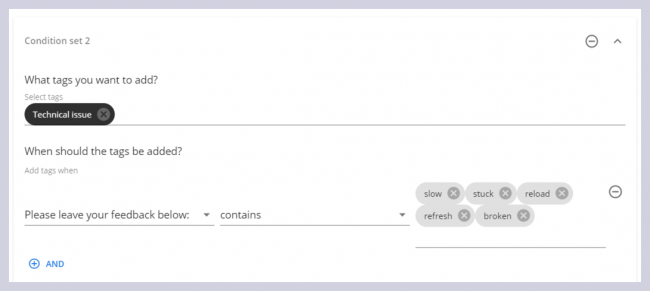
For example, a feedback item that mentions “checkout error” or receives a low satisfaction score can be automatically labelled and sent to the right team for review. This helps teams respond faster and keeps feedback from getting lost in a shared inbox or spreadsheet.
2. Assign feedback to team members or departments
Once feedback has been categorised, it should be assigned to the person or team responsible for handling it. This creates clear ownership and makes it easier to track progress.
For example, product feedback can be assigned to product teams, usability issues to UX teams, campaign feedback to marketing teams and urgent support issues to customer service teams.
Adding internal notes can also help teams collaborate on specific feedback items. Instead of discussing customer issues across separate emails or chat messages, teams can keep context, comments and next steps in one centralised location.
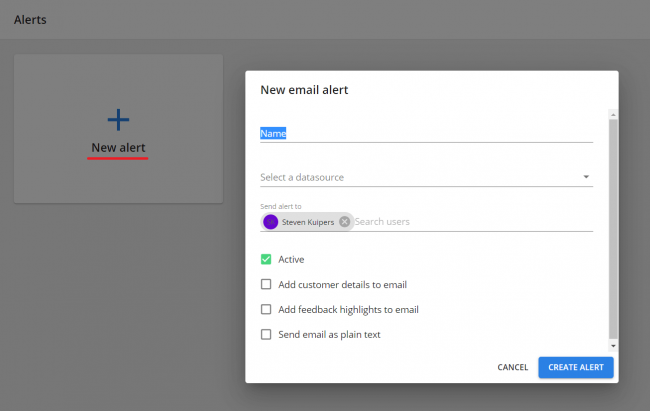
3. Set up feedback email alerts
Feedback email alerts help teams respond quickly when important feedback comes in. These alerts can be triggered by specific conditions, such as a low CSAT score, a negative comment, a bug report or feedback from a high-value customer segment.
This is especially useful for urgent issues. For example, if several customers report the same checkout problem, the relevant team can be notified immediately and start investigating before the issue affects more users.
4. Send feedback to external tools with webhooks
Webhooks help teams send customer feedback to other tools in real time. Instead of manually exporting feedback or checking dashboards, teams can automatically push feedback into project management, chat, CRM or collaboration tools.
For example, a webhook can send feedback to another tool when a customer leaves a low score, mentions a specific keyword, submits feedback from a certain URL or reports an issue on a specific device or browser.

This helps teams connect customer feedback to the tools they already use, making it easier to turn feedback into action without adding extra manual steps.
External actions for closing the customer feedback loop
External actions are the steps you take to follow up with customers after they share feedback. This can include acknowledging their input, explaining what happens next, sharing progress updates or letting them know when an issue has been resolved.
This part of the feedback loop is important because customers do not just want to submit feedback. They want to know whether their feedback has been heard and whether anything will change as a result.
Set realistic follow-up timescales
Not every issue can be resolved immediately, but customers should have a clear idea of what to expect. For urgent issues, such as broken checkout flows or app errors, teams should aim to respond as quickly as possible. For larger product improvements, it may be more realistic to explain that the feedback has been shared with the relevant team for review.
Setting internal timescales also helps teams prioritise follow-up. For example, critical issues may require same-day action, while feature requests or UX improvements can be reviewed as part of a broader roadmap process.
Track progress and keep customers informed
When an issue takes time to resolve, it is better to keep customers informed than to go silent. Updates can be shared through email, customer support channels, an online portal or other communication channels depending on the situation.
Keeping customers informed shows that their feedback is being taken seriously. It also helps manage expectations when a fix, improvement or internal review is still in progress.

Once the issue has been resolved, teams should close the loop by notifying the customer or customer group affected. This helps show that feedback led to action and can strengthen customer trust over time.
Connect internal and external actions
Internal and external feedback actions should work together. Internally, the right team needs to review, prioritise and resolve the issue. Externally, the customer should know that their feedback has been received and, where relevant, what has been done about it.
For example, if a customer reports a checkout issue, the internal action might be to alert the ecommerce or development team. The external action might be to confirm receipt, provide an update and notify the customer once the issue has been fixed.
This is where many feedback programmes fall short. Businesses collect feedback, but never tell customers what happened next. That can leave customers unsure whether their input mattered. Closing the loop properly means resolving the issue where possible and keeping the customer informed along the way.
To do this consistently, teams need a clear customer feedback management process and the right tools to collect, analyse, route and act on feedback.
What are the best customer feedback management tools?
Take a look at some of the tools we’ve selected for you below.
1. Mopinion, part of Netigate
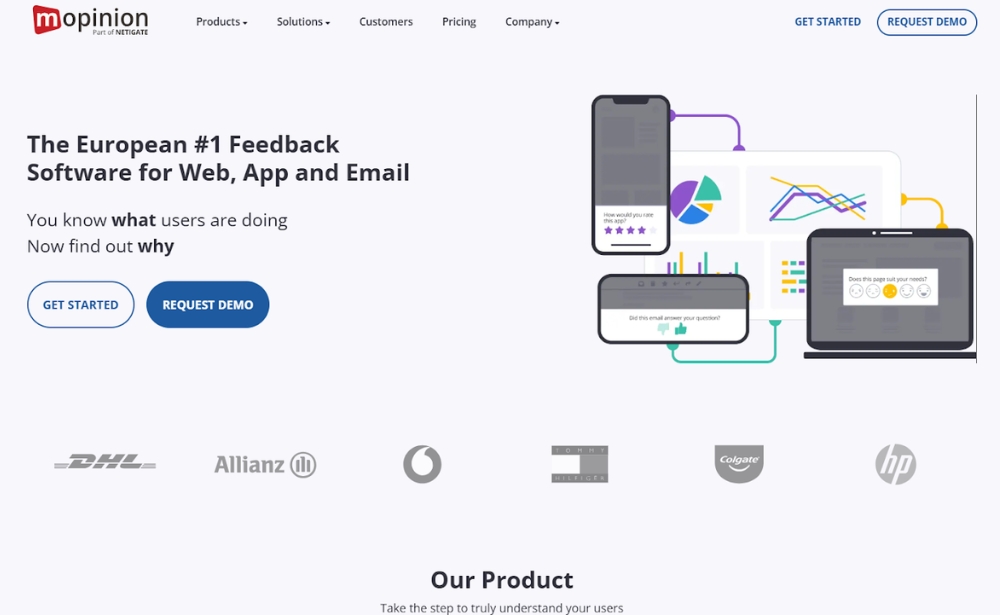
Mopinion, part of Netigate, is customer feedback software that helps organisations collect, analyse and act on feedback across websites, mobile apps and email campaigns.Users can build and customise feedback forms, choose from different question types and metrics and target specific visitor groups based on behaviour or journey stage. Feedback can then be visualised in custom dashboards and charts, making it easier to monitor digital performance and identify where customers are struggling.
Additionally, digital teams can share and take action on these feedback items in a timely manner with the help of smart alerts. Mopinion also offers AI-powered analysis solutions like Smart Recaps. This functionality reads all your open feedback comments, sorts them into categories and summarises the insights – it even gives you a sentiment indication, giving you an easy overview of how much of the feedback per topic is positive, negative or neutral.
Interested in learning more? Start your free trial or request a demo
2. Feedier
Feedier (IXM) is an intuitive experience management solution that allows you to listen carefully to the Voice of the Customer in order to improve your customer experience. Collect in real-time direct and indirect feedback through gamified forms, analyse your data with an intuitive and visual dashboard via features such as analysis of the most used keywords in your responses, correlation matrix, User Stories, NPS and many others.
3. InMoment
InMoment is a cloud-based customer experience optimisation platform which offers multiple solutions, including a Voice of the Customer (VoC) platform. It’s VoC platform allows for feedback collection, online reporting, real-time alerts and occurrence management. It also offers unique features such as data exploration, an active listening studio and action planning. The platform combines the survey data it collects with customer data from other sources such as CRM, social and financials.
4. Survicate
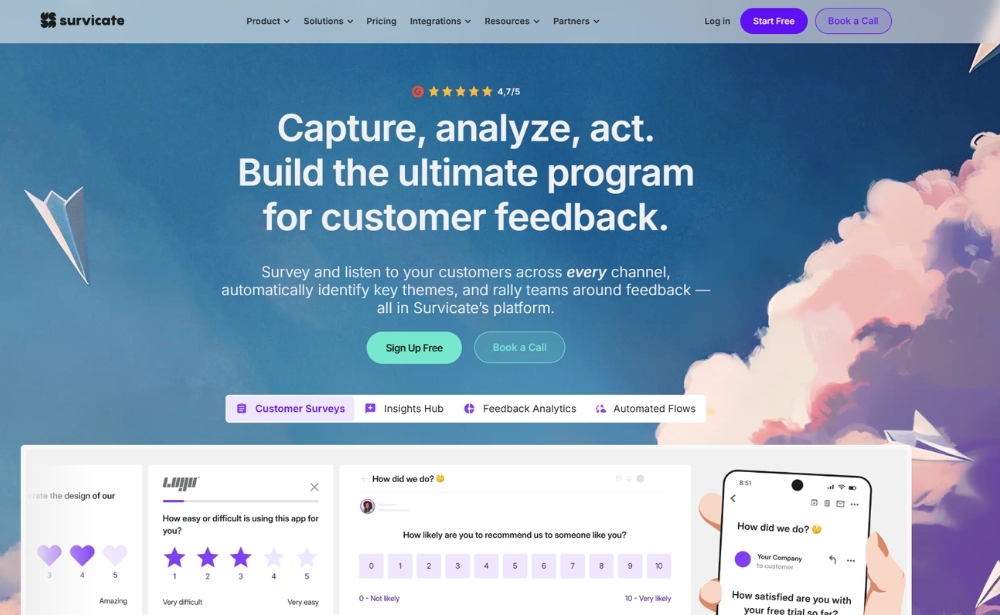
Survicate is a well-known web survey solution that lets users trigger targeted surveys across various funnels of the website. Alternatively, you can send out email questionnaires to different customers using digital CX metrics such as NPS, CSAT, CES, and more. Survicate also allows users to perform some analysis activities including dashboarding, NPS analysis and exporting feedback to XLS or CSV.
5. Qualtrics
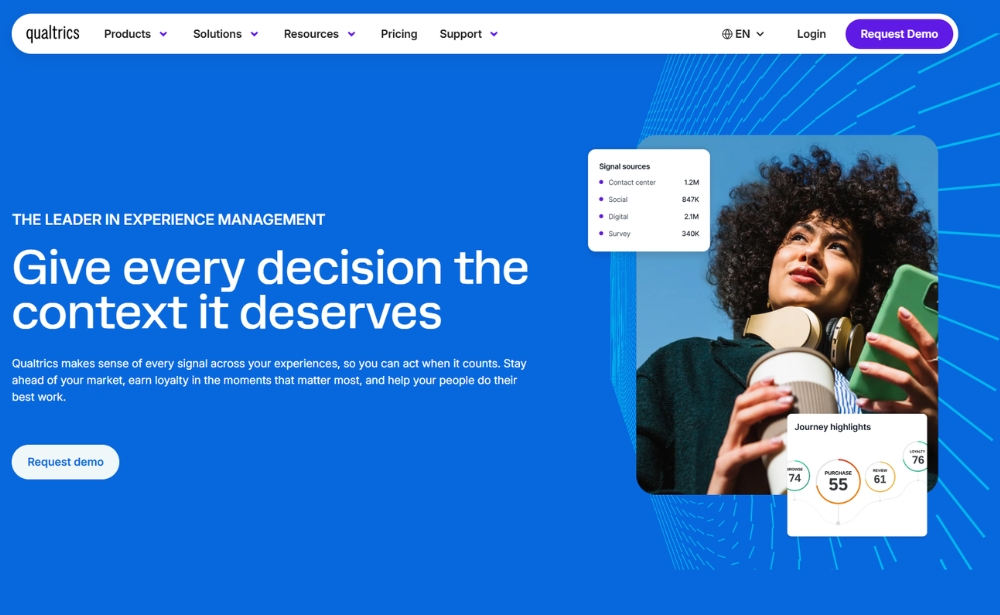
Qualtrics is an Experience Management Platform which offers various data collection methods such as website/mobile feedback, email surveys and social feedback for actionable customer, market and employee insights. Though this solution is more of a traditional survey software, it does offer a dedicated solution for digital. Users have access to their own role-based dashboards and can view results in trend vs. target charts. There is also a closed-loop ticketing feature that notifies users of customer interactions, such as the presence of a detractor.
Looking for a more comprehensive list. Here is our roundup of the best customer feedback tools.
How can Mopinion support customer feedback management?
Managing customer feedback can feel overwhelming when feedback comes from different channels, teams and touchpoints. But with the right process and tools in place, customer feedback becomes much easier to organise, analyse and act on.
Mopinion, part of Netigate, helps digital teams manage feedback across websites, mobile apps and email campaigns. With customisable feedback forms, journey-based targeting, dashboards, charts, alerts, integrations and AI-powered analysis features such as Smart Recaps, teams can better understand what customers are experiencing and turn those insights into action.
Whether you want to improve conversion, reduce friction, monitor digital journeys or close the feedback loop more effectively, customer feedback management helps you move beyond collecting feedback and start using it to improve the customer experience.
What are the best customer feedback management tools?
The best customer feedback management tool depends on your channels, team structure, reporting needs and how you want to act on customer insights. Some tools focus on digital feedback collection, while others are designed for broader experience management, Voice of the Customer programmes or survey-based feedback.
Here are a few customer feedback management tools to consider:
1. Mopinion, part of Netigate
Best for: Digital teams that want to collect, analyse and act on feedback across websites, mobile apps and email campaigns.
Mopinion, part of Netigate, helps organisations manage customer feedback across key digital touchpoints. Teams can build customisable feedback forms, use different question types and metrics, and target specific visitor groups based on behaviour, page, device, journey stage or customer segment.
Feedback can be visualised in dashboards and charts, making it easier to monitor digital performance, identify friction and compare results across channels. Mopinion also supports alerts, integrations and AI-powered analysis features such as Smart Recaps, which summarise open-text feedback and highlight recurring topics and sentiment.
Consider Mopinion if: you want a customer feedback management platform focused on digital channels such as websites, mobile apps and email.
2. Feedier
Best for: Teams looking for an AI-driven customer intelligence and Voice of the Customer platform.
Feedier helps organisations centralise customer feedback data, analyse customer insights and support Voice of the Customer programmes. The platform focuses on bringing feedback from different sources together and using AI to help teams identify trends, customer pain points and opportunities for improvement.
Consider Feedier if: your organisation wants to connect feedback insights to broader customer intelligence and VoC reporting.
3. InMoment
Best for: Larger organisations looking for a broader customer experience and Voice of the Customer platform.
InMoment offers customer experience management and Voice of the Customer solutions that help teams collect, analyse and act on customer feedback. The platform can support feedback collection, reporting, alerts, journey insights and action planning across different customer experience touchpoints.
Consider InMoment if: you need a broader CX platform that connects feedback insights with customer journey analysis and experience improvement workflows.
4. Survicate
Best for: Teams that want to collect customer feedback through surveys across multiple channels.
Survicate is a customer feedback platform that supports website surveys, mobile app surveys, email surveys and in-product surveys. Teams can use it to collect feedback through metrics such as NPS, CSAT and CES, analyse survey results and connect feedback with other tools in their stack.
Consider Survicate if: your feedback programme is mainly survey-based and you want to collect feedback across web, mobile, email and product touchpoints.
5. Qualtrics
Best for: Enterprise teams looking for a broader experience management and Voice of the Customer platform.
Qualtrics offers customer experience and Voice of the Customer solutions for collecting and analysing feedback across multiple channels, including digital experiences, email, support interactions, contact centre touchpoints, social media and reviews. The platform also includes dashboards, reporting and closed-loop feedback capabilities.
Consider Qualtrics if: your organisation needs an enterprise-level experience management platform across many teams, channels or regions.
Looking for a more comprehensive list? Read our roundup of the best customer feedback tools.
How can Mopinion support customer feedback management?
Mopinion helps digital teams manage customer feedback across websites, mobile apps and email campaigns. Instead of collecting feedback in separate tools or inboxes, teams can use Mopinion to collect, organise, analyse and act on feedback from one central platform.
With customisable feedback forms, journey-based targeting, dashboards, charts, alerts, integrations and AI-powered analysis features such as Smart Recaps, teams can better understand what customers are experiencing across digital touchpoints.
This helps organisations move beyond collecting feedback and start using it to improve conversion, reduce friction, monitor digital journeys and close the customer feedback loop more effectively.
Interested in learning more? Start your free trial or request a demo.
Frequently Asked Questions
Customer feedback management is the process of collecting, organising, analysing and acting on customer feedback. It helps businesses understand what customers think, where they experience friction and which improvements should be prioritised. With a platform like Mopinion, teams can manage feedback from digital channels such as websites, mobile apps and email campaigns in one place.
Customer feedback management is important because it helps businesses move from assumptions to actual customer insight. Instead of relying only on analytics or internal opinions, teams can hear directly from customers about what works, what causes frustration and what needs to improve. This makes it easier to optimise digital journeys, improve customer satisfaction and close the feedback loop.
Examples of customer feedback include website feedback forms, mobile app feedback, email campaign feedback, NPS surveys, CSAT surveys, CES surveys, product feedback, bug reports, feature requests, support feedback and open-text comments. In Mopinion, businesses can collect these different types of feedback across digital touchpoints and combine them with metadata such as page URL, device type, browser, customer segment or app version.
You can track customer feedback by collecting it consistently across key touchpoints, categorising responses and monitoring trends over time. This usually includes tracking feedback scores, recurring topics, sentiment, open-text responses and the status of follow-up actions. Mopinion helps teams track customer feedback with dashboards, reports, alerts and action management, so feedback does not stay hidden in separate tools or inboxes.
Customer feedback management software helps businesses collect, analyse and act on customer feedback at scale. It usually includes feedback forms, survey distribution, dashboards, text analysis, alerts, integrations and workflows for follow-up. Mopinion is an example of customer feedback management software for digital teams that want to manage feedback from websites, mobile apps and email campaigns in one platform.
Voice of the Customer, or VoC, is the broader strategy of understanding customer needs, expectations and experiences. Customer feedback management is one part of that strategy. It focuses on the practical process of collecting, organising, analysing and acting on feedback. In other words, VoC is the wider programme, while customer feedback management is the process and technology that helps bring customer insights into daily decision-making.
Closing the customer feedback loop means taking action after feedback is collected. This can include responding to individual customers, fixing recurring issues, sharing insights with the right teams and communicating what has changed. With Mopinion, teams can use alerts, labels, dashboards and integrations to route feedback to the right people and make follow-up part of the workflow.
When choosing a customer feedback management tool, look for multi-channel feedback collection, customisable forms, targeting options, dashboards, text analysis, alerts, integrations and action management. It is also important to consider security, privacy and whether the tool fits your digital channels. For teams collecting feedback across websites, mobile apps and email, Mopinion offers a centralised way to capture, analyse and act on customer insights.
Want to learn more about Mopinion’s all-in-1 user feedback platform? Don’t be shy and take our software for a spin! Do you prefer it a bit more personal? Just book a demo. One of our feedback pro’s will guide you through the software and answer any questions you may have.
Ready to see Mopinion in action?