

Sometimes, the most useful feedback starts with a vague answer.
A user says your page is confusing, your checkout does not work or they could not find what they needed. Helpful? Yes. Complete? Not quite.
Without the extra context, your team is left guessing what happened and what to fix next.
That’s where AI follow-up questions come in. With this new Mopinion feature, your conversational feedback forms can ask relevant follow-up questions based on what users actually say, helping you collect clearer, more actionable feedback while the experience is still fresh.
TL;DR – Article summary
- Mopinion is introducing AI follow-up questions for conversational and standard feedback forms.
- The feature automatically creates relevant follow-up questions based on a user’s previous answer.
- This helps teams collect more detailed, contextual and actionable feedback.
- Users get a more natural feedback experience, instead of a static one-size-fits-all form.
- AI follow-up questions are available to all customers at no extra charge.
In this article, we’ll cover:
- Why is vague feedback hard to act on?
- The problem with static feedback forms
- Meet AI follow-up questions
- How AI follow-up questions work in Mopinion
- Why AI follow-up questions improve feedback quality
- Example: from vague comment to useful insight
- Who can use AI follow-up questions?
- How to set up AI follow-up questions in Mopinion
- Start collecting feedback that gets to the point
- FAQ
Why is vague feedback hard to act on?
Not all feedback is instantly useful. Comments like “It doesn’t work,” “The page is confusing” or “This was frustrating” signal a problem, but they rarely explain what actually happened.
That missing context also limits AI feedback analysis. AI summaries can identify themes and patterns, but they can only work with the information users provide. If the original feedback is vague or nuanced, important details can still get lost.
AI follow-up questions help solve this at the source. By asking relevant questions while the user is still engaged, they uncover the context behind the initial response. This gives your team clearer feedback and gives tools like Mopinion’s Smart Recaps richer input to analyse.
In other words, better AI analysis starts with better feedback.
The problem with static feedback forms
Most feedback forms follow a fixed path. That works well for structured questions, but open-text feedback often needs clarification.
If someone writes, “The checkout was confusing,” a static form simply moves on. And when that feedback is analysed later, even AI cannot reliably explain what made the checkout confusing if the user never said.
Adding more questions to every form is not the answer either. It creates unnecessary friction for users who have already given enough detail.
AI follow-up questions offer a smarter middle ground. They respond to what each user actually says and ask for more context only when it is useful.
That means AI is not only analysing feedback after collection. It is helping improve the quality of the feedback before analysis even begins.
Meet AI follow-up questions
That’s where AI follow-up questions come in.
With this new Mopinion feature, you can add an AI follow-up question element to your conversational and standard feedback forms. When a user gives an answer, AI can generate a relevant follow-up question based on what was said.
So instead of collecting a vague comment and leaving it at that, the form can ask for the missing context in the moment.
For example, if a user says “I don’t like this page,” the form can ask what specifically they don’t like. If they say “I couldn’t finish my order,” it can ask where they got stuck. If they mention that something “doesn’t work,” it can ask them to explain what happened.
This makes the feedback experience feel more natural and conversational. Users are not pushed through a fixed set of questions. Instead, the form can adapt to their response and guide them towards giving more useful feedback.
At the same time, your team gets more than a surface-level comment. You get extra detail that can help you understand the issue, spot patterns faster and decide what needs to happen next.
In short, AI follow-up questions help your forms ask better questions, so your users can give better answers.
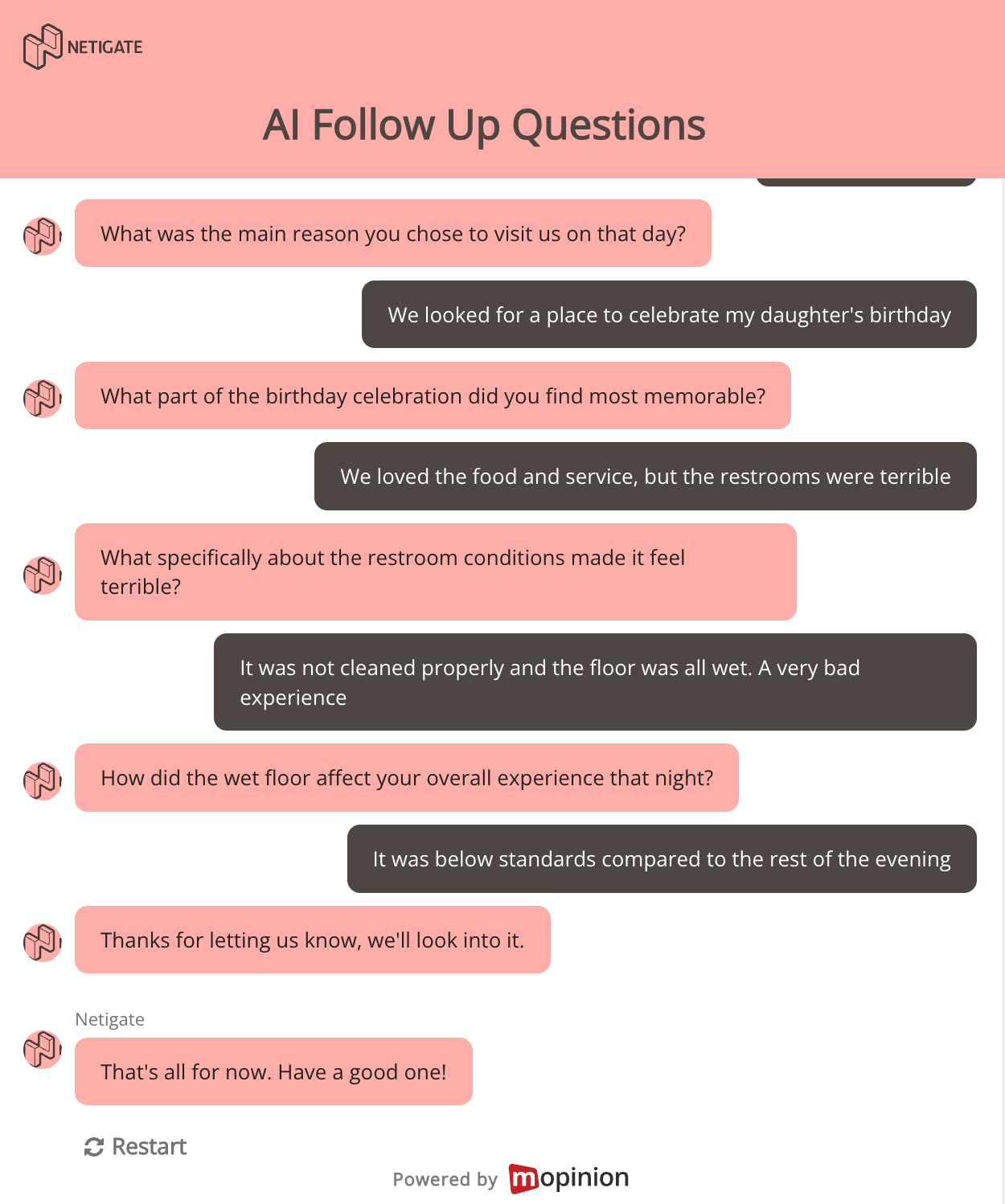
How AI follow-up questions work in Mopinion
Mopinion’s AI follow-up questions analyse a user’s response in real time, identifying its main message, sentiment and any contrasting points. Based on this analysis, the form generates a relevant follow-up question to gather more specific context.
For example, a customer might write: “I liked the drinks, but the food was horrible.” The AI recognises that the customer had a positive experience with the drinks but a negative experience with the food. It can then ask which drink they enjoyed, which dish disappointed them or what specifically was wrong with the meal.
How AI follow-up questions adapt to customer responses
AI follow-up questions can be added to both conversational and standard feedback forms in the Mopinion form builder. Once the element is enabled, it uses the user’s previous answer to generate a relevant question on the spot, rather than sending every respondent through the same fixed question path.
For instance, if someone writes, “The checkout was confusing,” the form can ask which part of the checkout caused the problem. If they say, “I couldn’t find what I needed,” it can ask what information or product they were looking for.
This allows you to collect more useful context while the user is still engaged, without making every feedback form longer or more complex.
You can also define boundaries for how the AI follow-up element behaves. This means you stay in control of the conversation, while AI helps create more relevant questions.
In Mopinion, you can set options such as:
- Which answers or scores should trigger a follow-up
- The context the AI should use
- The closing message users see after the follow-up flow
All collected answers are then shown neatly in the feedback inbox, so your team can review the full conversation in one place.
This makes it easier to understand not just what the user said first, but what they meant after being asked for more detail.
Why AI follow-up questions improve feedback quality
AI follow-up questions improve the quality of feedback before analysis even begins. By asking for clarification when a response is vague, short or nuanced, they give both your team and AI analysis tools richer context to work with.
More context behind every answer
Comments like “it was confusing” or “something went wrong” only tell part of the story. AI follow-up questions ask users to explain what happened, helping uncover the details behind the initial response.
More accurate AI analysis
AI analysis is only as good as the feedback it receives. Vague or incomplete feedback can only produce limited insights, no matter how sophisticated the analysis. AI follow-up questions improve the input by uncovering missing context and nuance, giving tools like Mopinion’s Smart Recaps richer feedback to analyse and, ultimately, more accurate summaries.
Better feedback without longer forms
Instead of adding extra questions for everyone, follow-ups appear only when more context is useful. Users who have already given a clear answer can simply move on.
A more natural feedback experience
Because each follow-up responds to what the user actually said, feedback feels more like a conversation and less like a fixed, one-size-fits-all survey.
A faster route to actionable insights
More specific feedback means less guessing. Your team can understand problems, identify patterns and decide what to improve faster.
No extra charge
AI follow-up questions are available to all Mopinion customers at no extra charge.
Example: from vague comment to useful insight
Let’s say a user leaves the following comment in a website feedback form:
“This page is confusing.”
Useful? Yes. Actionable? Not quite yet.
Your team knows the page caused friction, but not why. Was the layout unclear? Was the information hard to find? Did the user expect something else? Was there a broken button or a missing explanation?
With AI follow-up questions, the form can ask for more detail while the user is still engaged.
User:
“This page is confusing.”
AI follow-up question:
“What specifically made the page confusing for you?”
User:
“I was looking for pricing information, but I couldn’t find it. I kept clicking around and ended up on a product page instead.”
Now the feedback gives your team much more to work with.
Instead of only knowing that the page felt confusing, you now know the user was trying to find pricing information, struggled with navigation and ended up in the wrong place.
That is the difference between vague feedback and useful insight.
The first answer tells you there is a problem. The follow-up answer helps you understand what needs to be improved.
Who can use AI follow-up questions?
AI follow-up questions are useful for any team that wants to collect more context from open-text feedback without making forms longer for every user.
They are especially helpful for teams using conversational feedback forms to understand what users are experiencing in the moment. This could include friction on a website, confusion in an app, problems during checkout or unclear information on a product page.
For example:
- CX teams can better understand what causes frustration across the digital customer journey.
- UX teams can uncover why users find a page, flow or feature confusing.
- Product teams can collect more detail about bugs, feature requests or usability issues.
- Digital teams can learn where visitors get stuck and what prevents them from converting.
- Marketing teams can understand why users abandon landing pages, campaigns or sign-up flows.
- Customer support teams can capture more context around recurring issues before they become support tickets.
In short, AI follow-up questions are for teams that do not just want to know that something happened. They want to understand why it happened, what the user expected and what needs to be improved.
How to set up AI follow-up questions in Mopinion
Setting up AI follow-up questions in Mopinion is straightforward.
In the feedback form builder, go to Build > Add/Edit and add the AI follow-up question element to your conversational/standard feedback form. Once added, you can decide how the follow-up flow should behave and when the AI should ask for more detail.
From there, you can configure the settings around your feedback goal. For example, you can decide which answer or score should trigger a follow-up question, how much context the AI should use and how many follow-up questions can be asked.
This gives you the freedom to keep the conversation short and focused, or allow a little more room for users to explain what happened.
A basic setup could look like this:
1. Open your conversational feedback form in the Mopinion form builder.
2. Go to Build > Add/Edit.
3. Add the AI follow-up question element.
4. Choose when the AI follow-up should be triggered.
5. Set the maximum number of follow-up questions.
6. Add a closing message to end the conversation neatly.
7. Save and publish your form.
Once your form is live, users can answer the first question as usual. If their response matches your chosen settings, the AI follow-up question will appear and ask for more context.
The full conversation is then collected in your feedback inbox, so your team can review the original response and the follow-up answer together.
That way, you don’t just see the first thing a user said. You also see the extra context that helps explain what they actually meant.
Start collecting feedback that gets to the point
Feedback is only useful when it helps you understand what to do next.
A short comment can point you in the right direction, but it does not always give your team enough context to act with confidence. That is where AI follow-up questions can make a real difference.
By asking relevant follow-up questions in the moment, your forms can help users explain what they mean while the experience is still fresh. Instead of collecting vague comments and trying to interpret them later, you can gather clearer answers from the start.
That means less guessing for your team and a smoother feedback experience for your users.
With AI follow-up questions in Mopinion, you can collect more specific, contextual and actionable feedback without making every form longer. Your users get a more relevant conversation. Your team gets the details needed to understand the issue and take the next step.
Ready to turn short answers into sharper insights?
Ready to see Mopinion in action?
Want to learn more about Mopinion’s all-in-1 user feedback platform? Don’t be shy and take our software for a spin! Do you prefer it a bit more personal? Just book a demo. One of our feedback pro’s will guide you through the software and answer any questions you may have.
Frequently Asked Questions
AI follow-up questions are automatically generated questions that appear in a conversational feedback form based on a user’s previous answer. They help collect more context when a response is short, vague or unclear.
In Mopinion, you can add an AI follow-up question element to a conversational feedback form and any standard feedback form. When a user gives an answer, AI uses that response to generate a relevant follow-up question. This helps the form ask for more detail while the user is still engaged.
Currently, the maximum number of follow-ups is set to 5. However, our system is trained to know when to stop asking.
AI follow-up questions help you collect clearer and more actionable feedback. Instead of only receiving comments like “it was confusing” or “something went wrong”, you can ask users to explain what happened, where they got stuck or what they expected.
Not necessarily. AI follow-up questions only appear when they are relevant, depending on your settings. This means you can collect more detail without making every user answer a longer form from the start.
Yes. In Mopinion, you can define when AI follow-up questions should be triggered, how many follow-up questions can be asked and how the conversation should end. This helps keep the feedback experience focused and relevant.
You can add AI follow-up questions in the Mopinion feedback form builder. Go to Build > Add/Edit and add the AI follow-up question element to your conversational feedback form.
AI follow-up questions are useful for CX, UX, product, digital, marketing and support teams that want to collect more context from open-text feedback. They are especially helpful when teams want to understand why users are confused, frustrated or unable to complete an action.
Yes. AI follow-up questions are available to all Mopinion customers at no extra charge.