

Improving website usability starts with understanding where visitors struggle. Analytics can show where people drop off or hesitate, but feedback helps explain why.
By collecting feedback directly on your website, you can uncover what users find confusing, what information is missing and what gets in the way of a smoother experience.
TL;DR – Article summary
- Website usability is about how easily visitors can find information, understand your content and complete key actions on your website.
- Behavioural data shows what users do, but website feedback helps explain why they leave, hesitate or struggle.
- Feedback widgets, targeted surveys and passive feedback buttons help teams collect user input directly in the moment.
- The most useful feedback is contextual, meaning it is collected on the right page, at the right time and with the right question.
- By analysing recurring themes, sentiment and page-level feedback, teams can prioritise usability improvements based on real user experience.
In this article, we’ll cover:
- What is website usability?
- Why feedback is essential for improving website usability
- Common website usability issues feedback can uncover
- How to collect feedback to improve website usability
- How can I implement website feedback widgets to understand user experience?
- Best website feedback questions for usability
- How to analyse website feedback for usability improvements
- How to prioritise usability improvements based on feedback
- How Mopinion helps improve website usability with feedback
- Start improving website usability with feedback
What is website usability?
Website usability refers to how easily visitors can use your website to find information, understand your content and complete the actions they came for.
A usable website should feel clear, intuitive and accessible across the full journey. This includes clear navigation, fast access to important information, mobile-friendly design, accessible forms and buttons, a logical page structure and smooth checkout, sign-up or support flows.
In its simplest form, website usability is about how easy it is for visitors to use your website. This means they should be able to find information, understand your content and complete key actions without unnecessary effort or confusion.
Why feedback is essential for improving website usability
Behavioural data can show you what users do on your website, but it does not always explain why they do it. You may see that visitors leave a page, abandon a form or fail to complete a journey, but the reason behind that behaviour often remains unclear.
Website feedback helps fill that gap. By asking users for input at the right moment, you can understand whether they are confused by unclear wording, missing information, broken elements, pricing uncertainty, poor mobile layout or a form that asks for too much.
With a website feedback solution like Mopinion, teams can collect this feedback directly on the website and connect it to specific pages, journeys and user experiences. This makes it easier to identify usability issues and prioritise improvements based on real user input.
Common website usability issues feedback can uncover
Website feedback helps uncover usability issues that may not be obvious from analytics alone. By asking visitors what they experienced in the moment, you can better understand which parts of the website are causing confusion, hesitation or drop-off.
Confusing navigation
If visitors cannot find what they are looking for, they are more likely to leave before completing their journey. Feedback can reveal whether menu labels are unclear, important pages are difficult to find or users are unsure where to go next.
Unclear content or messaging
Visitors need to quickly understand what you offer, why it matters and what action they should take next. Feedback can show whether your messaging is too vague, your content lacks context or users do not immediately understand if your product or service is relevant to them.
Friction in forms or checkout flows
Forms and checkout flows are common points of friction. Users may abandon them because they are too long, unclear, difficult to complete or missing the reassurance they need to continue.
Poor mobile experience
A website that works well on desktop may still create problems on mobile. Feedback can help identify issues with small buttons, awkward layouts, slow loading times, unreadable text or steps that are difficult to complete on a smaller screen.
Missing information
Sometimes users hesitate because they do not have enough information to make a decision. Feedback can reveal missing details about pricing, delivery, features, support, security or product fit before those gaps lead to lost conversions.
Usability also depends on accessibility. According to the W3C Web Accessibility Initiative, websites should be designed so people can perceive, understand, navigate and interact with them. For website teams, this means paying attention to elements such as readable content, clear buttons, accessible forms and mobile-friendly layouts.
How to collect feedback to improve website usability
To improve website usability, feedback should be collected while the user experience is still fresh. Instead of asking visitors what they thought days or weeks later, collect feedback directly on the page, form or journey where the issue happens.
There are several ways to collect website feedback for usability improvements:
- On-page feedback widgets: Let visitors share feedback directly from a specific page, so you can understand what is working and what is causing friction.
- Targeted website surveys: Ask specific questions based on the page, audience, behaviour or stage of the journey.
- Exit-intent feedback: Ask visitors why they are about to leave, especially on important pages such as pricing, checkout or sign-up pages.
- Post-interaction surveys: Collect feedback after a user completes an action, such as submitting a form, using a search function or contacting support.
- Open-text feedback: Give users space to explain issues in their own words, so you can uncover problems you may not have anticipated.
- NPS, CSAT or CES surveys: Use customer experience metrics where relevant to measure satisfaction, loyalty or ease of use.
- Passive feedback buttons: Allow visitors to leave feedback whenever they notice something confusing, broken or missing.
The most useful feedback is contextual. When you ask the right question at the right moment, users can explain exactly what they experienced, making it easier to understand and improve website usability.
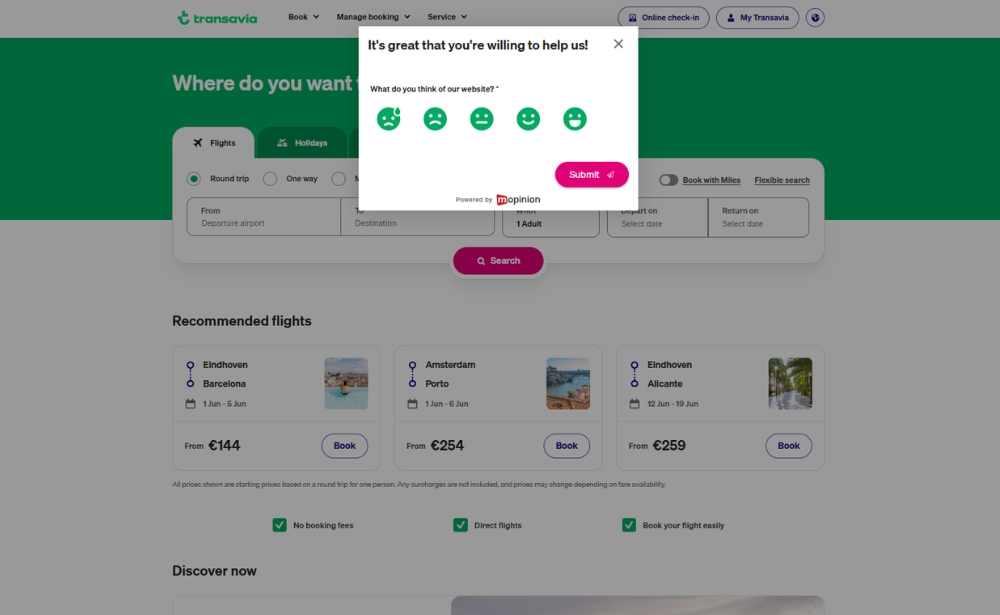
How can I implement website feedback widgets to understand user experience?
Website feedback widgets are most effective when they are implemented with a clear goal. Rather than placing the same generic survey across every page, use widgets to ask focused questions in the moments where user experience matters most.
1. Decide which user experience questions you want to answer
Start by defining what you want to understand. Are users leaving because they cannot find the right information? Is a form too difficult to complete? Are visitors unsure whether your product or service is right for them?
Useful questions to guide your setup include:
- Why are users leaving this page?
- What information is missing?
- What makes the form difficult to complete?
- Was this page helpful?
- What stopped the visitor from converting?
2. Choose where the widget should appear
Next, decide where feedback would be most useful. Website feedback widgets are especially valuable on pages where users make decisions, look for answers or complete important actions.
This could include:
- Product pages
- Pricing pages
- Checkout pages
- Contact forms
- Help centre pages
- Landing pages
- Logged-in customer portals
3. Use targeting rules to show the right question at the right moment
To understand user experience properly, feedback needs to be collected in context. With a feedback platform like Mopinion, you can use targeting rules to show specific widgets based on where users are, what they are doing and how they interact with your website.
For example, you can trigger feedback widgets based on page URL, user behaviour, time on page, scroll depth, exit intent, device type, visitor segment or campaign source. This helps you ask more relevant questions and collect feedback that is easier to act on.
4. Keep the feedback widget short and contextual
A website feedback widget should not interrupt the journey. Keep it short, focused and relevant to the page or action the user is currently completing.
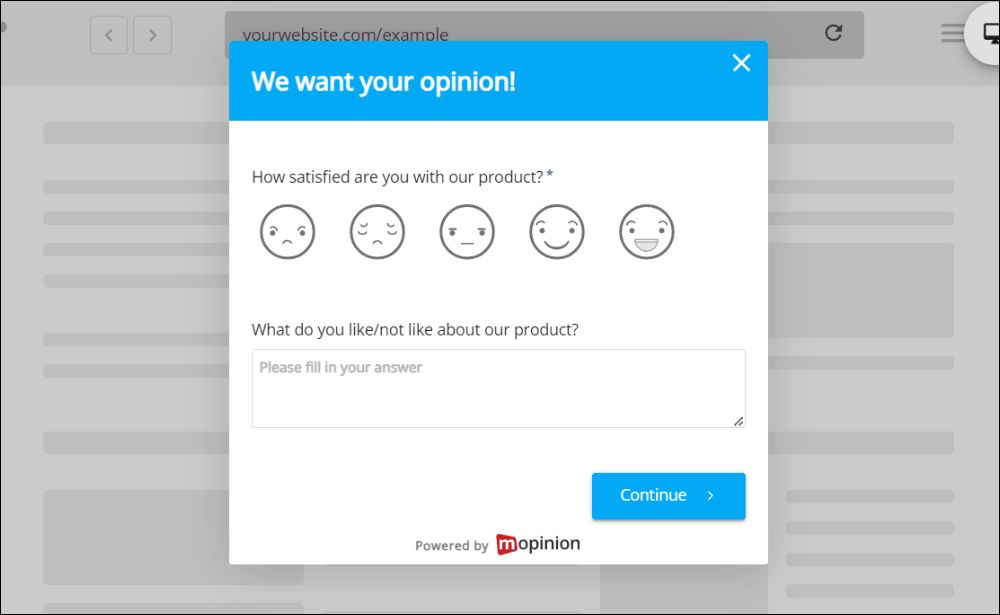
Examples of contextual feedback questions include:
- Was this page helpful?
- What information were you looking for?
- What stopped you from completing your purchase?
- How easy was it to find what you needed?
- What could we improve on this page?
5. Analyse feedback alongside behavioural data
Feedback becomes even more valuable when it is analysed together with behavioural data. Analytics can show what users are doing, while feedback helps explain why they are doing it.
For example, a high drop-off rate on a pricing page becomes more useful when feedback reveals that users cannot find the differences between plans or need clearer contract terms. Together, these insights give teams a more complete view of the user experience.
6. Turn feedback into usability improvements
Once feedback starts coming in, look for recurring issues and prioritise the ones that affect important pages, journeys or conversion points. Share these insights with UX, product, content and development teams so they can turn user input into concrete improvements.
After changes go live, continue collecting feedback to see whether the issue has improved. This turns website feedback widgets into an ongoing usability improvement tool, rather than a one-time research exercise.
Best website feedback questions for usability
The best website feedback examples are short, specific and connected to the page or journey the user is currently experiencing. Instead of asking broad questions, focus on what you need to understand in that moment.
Page-level usability questions
Use page-level questions to understand whether a specific page is clear, helpful and easy to use.
- Was this page easy to understand?
- Did you find what you were looking for?
- What information is missing from this page?
Navigation questions
Navigation questions help you understand whether visitors can find the right information or move through your website without confusion.
- How easy was it to find what you needed?
- What were you trying to find today?
Conversion friction questions
Use conversion friction questions on pages where users are expected to take action, such as checkout, sign-up, demo request or pricing pages.
- What stopped you from completing your purchase?
- Is anything unclear about this offer?
- What would make you more confident to continue?
Support and help questions
Support and help questions are useful for knowledge bases, help centres, FAQ pages and support content.
- Did this article answer your question?
- What could we add to make this page more helpful?
How to analyse website feedback for usability improvements
Collecting website feedback is only useful if you can turn it into clear, actionable insights. To improve usability, start by looking for recurring themes in what users are saying. If multiple visitors mention the same issue, page or point of confusion, it is usually a strong signal that something needs attention.
It also helps to group feedback by page, journey or touchpoint. For example, feedback from a pricing page may reveal different usability issues than feedback from a checkout flow, help centre or product page. This makes it easier to understand where problems happen and which teams should be involved.
With a feedback platform like Mopinion, teams can analyse feedback by topic, sentiment, page, device and other metadata. This helps you see whether certain issues are more common on mobile, whether users are frustrated by a specific journey or whether a change has improved the experience over time.
AI-powered feedback analysis can also help teams summarise open-text responses, detect recurring topics and identify usability issues faster, especially when feedback comes in across multiple pages, regions or campaigns.
Once the main issues are clear, prioritise the feedback that affects important journeys, high-traffic pages or conversion points. Then share the insights with the right teams, such as UX, product, content, support or development, so they can turn user feedback into measurable usability improvements.
How to prioritise usability improvements based on feedback
Not every usability issue needs to be fixed at the same time. Once you have collected and analysed website feedback, the next step is to decide which improvements will have the biggest impact.
Start by looking at how often the same issue is mentioned. If multiple visitors point out the same problem, it is likely affecting more users than the feedback volume alone suggests. Then consider where the issue appears. A small problem on a high-value page, such as a pricing page, checkout flow or demo request form, may be more urgent than a similar issue on a lower-impact page.
It is also important to look at the business impact. Prioritise issues that affect conversions, prevent users from completing key actions or create friction for high-value customer segments. Feedback that appears across multiple devices, markets or journeys should also be treated as a stronger signal.
Finally, weigh the impact against the effort required to fix it. Some usability improvements, such as clarifying button text or adding missing information, may be quick wins. Others may require design, development or product changes. By combining user impact, business value and implementation effort, teams can focus on the improvements that matter most.
How Mopinion helps improve website usability with feedback
Mopinion helps digital teams collect contextual feedback across websites, mobile apps and email campaigns. With targeted feedback forms and website feedback widgets, teams can ask the right questions at the right moment and understand where users experience friction.
Instead of relying on generic surveys, Mopinion allows teams to create customisable feedback forms for specific pages, journeys, audiences or behaviours. This makes it easier to collect page-level and journey-level insights, whether you want to understand a checkout issue, improve a landing page or identify missing information on a product page.
Once feedback is collected, teams can bring responses together in dashboards, analyse open-text feedback and identify recurring usability issues. AI-powered features such as Smart Recaps and Insights & Actions can help summarise feedback, surface important themes and turn user input into clearer next steps.
By connecting feedback collection, analysis and action, Mopinion helps teams close the loop with the right people. UX, product, content, support and development teams can use these insights to make targeted improvements and continue measuring whether the user experience improves over time.
Start improving website usability with feedback
Improving website usability starts with listening to the people using your website. By collecting feedback in the right place, at the right time, teams can uncover friction, understand what users need and improve digital journeys based on real experiences instead of assumptions.
With the right feedback widgets, targeted surveys and analysis tools, every page becomes an opportunity to learn what is working, what is missing and what needs to be improved next.
Frequently Asked Questions
Feedback helps teams understand where users struggle, what information is missing and which parts of the website feel confusing or difficult to use.
A website feedback widget is an on-page tool that lets visitors share feedback while they are browsing. It can appear as a button, pop-up, embedded form or targeted survey.
Place feedback widgets on pages where user experience matters most, such as product pages, pricing pages, checkout flows, landing pages, support pages and contact forms.
Ask short, contextual questions such as “Did you find what you were looking for?”, “Was this page helpful?” or “What stopped you from completing your purchase?”
Analyse website feedback by grouping responses by page, journey, topic, sentiment and recurring issue. This helps teams identify the usability improvements that matter most.