
Mobile feedback helps organisations understand how users experience their mobile website or app, where they run into friction and what can be improved.
And with 5.8 billion unique mobile subscribers worldwide, mobile has become one of the main ways people browse, buy, manage accounts and interact with brands.
A strong mobile experience is no longer only about responsive design or app performance. It is about understanding what users actually experience while trying to complete a task. That is where mobile feedback comes in!
In this blog, we’ll look at what mobile experience means, why mobile feedback matters and how to collect useful feedback across mobile websites and apps.
TL;DR – Article Summary
- Mobile experience refers to how users perceive and interact with a mobile website, native app, webview app or mobile service.
- A good mobile experience should feel fast, clear, intuitive and easy to complete on a smaller screen.
- Mobile feedback helps organisations understand why users behave in certain ways, not just what they do.
- Feedback can help identify UX issues, bugs, missing information, confusing flows and feature requests.
- The best mobile feedback forms are short, contextual and triggered at the right moment in the journey.
- Mobile feedback works best when combined with analytics, app performance data and continuous optimisation.
In this blog, we’ll cover:
- Why mobile experience matters
- What does mobile experience mean?
- What is a good mobile experience?
- How can you improve the mobile experience?
- How mobile feedback contributes to the mobile experience
- The steps to success
- How to collect feedback on mobile websites and in apps
- Best practices for collecting mobile feedback
- Why the mobile experience will only become more important
- How Mopinion helps collect mobile feedback
Why mobile experience matters
Mobile usage has continued to grow since the term “mobile first” became popular more than a decade ago. Today, billions of people rely on mobile devices to access digital services, shop online, manage accounts, read content and communicate with brands.
For businesses, this means mobile can no longer be treated as a smaller version of the desktop experience. Users expect mobile websites and apps to be fast, simple and reliable. They also expect to complete tasks without unnecessary steps, confusing navigation or broken functionality.
A poor mobile experience can lead to frustration very quickly. Small issues, such as unclear buttons, slow-loading pages, difficult forms or a confusing checkout flow, can have a big impact on whether users continue or leave.
That is why organisations need to look beyond surface-level design. A mobile channel may look good, but that does not always mean it works well for users.
Mobile feedback helps close that gap. It gives users a simple way to explain what worked, what did not and what they expected from the experience.
What does mobile experience mean?
Mobile experience refers to how users perceive and interact with a brand, product or service on a mobile device.
This can include several different types of mobile channels:
- Mobile websites: websites that are responsive or specifically optimised for smaller screens.
- Native apps: apps built for a specific operating system, such as iOS or Android.
- Webview apps: apps that display web-based content inside a mobile app environment.
- Cross-platform apps: apps built to work across multiple operating systems and devices.
Source: SaM Solutions
A mobile experience includes everything a user encounters while using one of these channels. This includes design, speed, navigation, content, forms, checkout flows, login processes, search functions, support options and overall ease of use.
In simple terms, mobile experience is about how easy and pleasant it is for users to get something done on mobile!
What is a good mobile experience?
A good mobile experience is fast, clear, intuitive and designed around the way people actually use mobile devices.
Users should be able to understand where they are, what they need to do next and how to complete their goal without unnecessary effort. This could mean finding product information, completing a purchase, submitting a claim, booking an appointment, changing account details or contacting support.
A good mobile experience usually includes:
- Fast loading times
- Clear navigation
- Readable content
- Buttons and fields that are easy to tap
- Short and simple forms
- Minimal steps in key journeys
- Clear error messages
- Consistent branding across channels
- Smooth transitions between web, app and other digital touchpoints
It should also feel consistent with the rest of the customer journey. Most customers do not think in terms of “mobile”, “web” or “app”. They simply experience one brand. If the mobile journey feels disconnected from other channels, the overall customer experience can suffer.
How can you improve the mobile experience?
The best way to improve mobile user experience is to combine behavioural data with direct user feedback.
Analytics tools can show where users drop off, which pages receive traffic, how long users spend in the app or where conversion rates are lower than expected. But analytics alone cannot always explain why something is happening.
Mobile feedback adds that missing context. For example, analytics might show that many users leave during checkout. Mobile feedback can reveal that the delivery information is unclear, the payment button is hard to find or the form is too long to complete on a phone.
That combination of quantitative and qualitative insight helps teams make better decisions. Instead of guessing what needs to be fixed, they can prioritise improvements based on real user input!

How mobile feedback contributes to the mobile experience
Mobile feedback helps digital teams understand what users need, where they struggle and how the mobile journey can be improved.
Here are some of the biggest benefits:
- Develop features your users actually want. Many businesses building a new mobile app have tons of exciting features on their roadmap. Our advice? Try starting off little by little, and test as you go. Listen to your users and what they have to say, so you can identify which features are most important.
- Identify and rectify UX issues. Collecting insights from your users allows you to identify issues in the user journey that you might not have caught otherwise. Bugs, annoying hindrances, missing information – your users can help you find all of this if you ask them at the right time and place. The next step for a smoother experience is prioritising and fixing them.
- Better understand your mobile users. Along with their opinion of your app, mobile feedback also allows you to gather demographic information about your users. Having this information on hand enables your organisation to form personas. If you cross analyse personas with feedback results you’ll be able to create, not only a more personalised experience for your users, but also develop an app you know they’ll like.
- Keep track of app performance. One of the great things about mobile feedback is that it can give you very specific feedback on, for example, a feature you’ve launched or an update you’ve recently released. You can do this with a number of valuable metrics such as NPS, CSAT, GCR and more.
- Create a unified and consistent experience across all channels. This may come as a surprise, but most customers don’t actually make any sort of distinction between the channels they use, whether that’s web or mobile. From their perspective, they see one single brand. Therefore, by prioritising your mobile experience with mobile feedback, your organisation can provide a seamless experience that blends perfectly with your other channels.
The steps to success
In order to get the ultimate mobile experience we recommend these steps:
1. Choose a mobile feedback and analytics tool that fits your organisation
2. Collect user feedback and identify UX issues or user wishes and wants
3. Implement the UX changes and keep track of the effect it has on your app or mobile website
4. Repeat!
The key to a smooth experience is constantly keeping your ears open for any changes that might improve it.
How to collect feedback on mobile websites and in apps
The process of collecting feedback in mobile apps is slightly different from that of websites. This is because triggers such as exit intent and mouse movement are no longer detectable. So what are the best ways to get the most out of mobile app feedback?
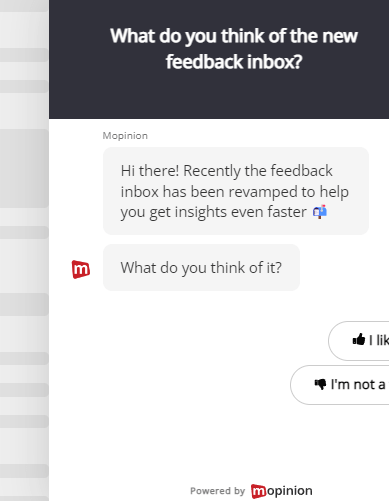
1. Feedback Button/Tab
A feedback button or tab is a passive feedback option that is visible within the mobile website or app. Users can tap it whenever they want to share feedback.
This works well when you want users to have an always-available way to report issues, suggest improvements or share their opinion.
Pros: A feedback button gives users an easy way to share feedback at any point in the journey. It can help capture unexpected issues that may not be covered by triggered surveys.
Cons: Mobile screen space is limited. If the button is too large or badly placed, it can interfere with the user experience. It should be visible enough to use, but not so prominent that it distracts from the main journey.
Best used for: General feedback, bug reports, UX issues and open suggestions.
2. Feedback option in the app navigation
Another option is to place the feedback button inside the app navigation or menu. This keeps it available without taking up space on every screen.
Pros: It is less intrusive and keeps the main interface clean.
Cons: Because the feedback option is hidden in the navigation, fewer users may notice it. This means you may receive less feedback than with a visible button.
Best used for: Apps with limited screen space or experiences where a visible feedback button would interrupt the main task.
Example from DHL:

3. Feedback Forms at end of funnel
You can also collect feedback at the end of a specific journey or process. For example, after a purchase, booking, claim submission, account update or support request.
This type of feedback is often highly valuable because the user has just completed a clear goal.
You might ask:
- “How easy was it to complete this task?”
- “Did you find what you were looking for?”
- “What could we improve about this process?”
Pros: Users are more likely to provide specific feedback because the experience is still fresh. This helps teams understand how much effort it took to complete a task and where improvements are needed.
Cons: In native apps, implementation may require more technical work than on a mobile website. For example, teams may need to use a mobile SDK, feedback API or webview-based form depending on the app setup.
Best used for: Checkout flows, service requests, bookings, onboarding journeys and account processes.
Example from Etos:

Translation: Did you find this page helpful?
4. In-app feedback prompts
In-app feedback prompts are triggered based on specific user behaviour. For example, after a user has tried a new feature, completed onboarding or used the app several times.
These prompts should be used carefully. If they appear too often or at the wrong time, they can feel disruptive.
Pros: They help you collect targeted feedback from users who have completed a specific action or reached a specific point in the journey.
Cons: Poor timing can interrupt the user and reduce the quality of responses.
Best used for: Feature feedback, onboarding feedback, app update feedback and satisfaction measurement.
Best practices for collecting mobile feedback
Mobile feedback should be easy for the user to give and easy for your team to act on.
Here are a few best practices to keep in mind:
Keep forms short
Mobile users do not want to complete long surveys on a small screen. Keep forms focused on one goal and ask only the questions you really need.
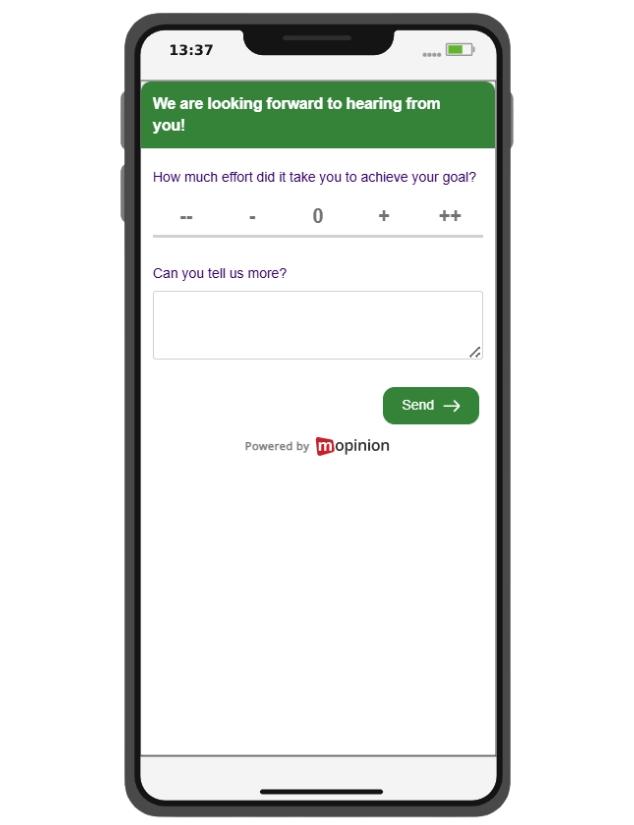
A simple rating question followed by an optional open comment is often enough.
For example:
“How satisfied are you with your experience today?”
Followed by:
“What could we improve?”
Ask feedback at the right moment
Timing matters. Feedback should be collected when the user has enough context to answer, but not while they are trying to complete an important task.
Good moments include:
- After checkout
- After onboarding
- After using a feature
- After submitting a form
- After contacting support
- After completing a booking or claim
Avoid interrupting users too early or while they are still focused on the task.
Make feedback contextual
Generic feedback is harder to act on. Contextual feedback is more useful because it connects responses to a specific screen, feature or journey.
Instead of asking:
“What do you think of our app?”
Ask:
“How easy was it to complete your booking today?”
This makes the feedback clearer for the user and more actionable for your team.
Use open comments
Scores are useful, but they do not always explain the reason behind the experience.
Open comments help users explain what happened in their own words. This can reveal bugs, confusion, missing information and emotional frustration that would not appear in a score alone.
The key is to keep open questions simple and optional.
Avoid interrupting the experience
Mobile feedback should never get in the way of the mobile journey.
Avoid large pop-ups, too many survey triggers or forms that are difficult to close. A feedback form should feel like a natural part of the experience, not an obstacle.
Combine feedback with analytics
Mobile feedback becomes more powerful when combined with analytics, session data, app performance data and customer journey insights.
Analytics can show what happened. Feedback can explain why it happened. Together, they help teams prioritise fixes and measure the impact of changes.
Why the mobile experience will only become more important
Mobile expectations continue to grow. Users expect mobile websites and apps to be fast, simple, reliable and connected to the rest of the customer journey. That means organisations need to keep listening!
Mobile feedback helps teams understand what users experience in the moment. It shows where users struggle, what they value, what they expect and what needs to be improved.
By collecting and acting on mobile feedback, organisations can create mobile experiences that are not only functional, but genuinely useful, intuitive and customer-centred.
How Mopinion helps collect mobile feedback
Mopinion helps organisations collect, analyse and act on feedback across digital channels, including mobile websites and apps.
With Mopinion, teams can gather feedback through mobile-friendly forms, in-app surveys and mobile SDKs. This makes it easier to collect feedback at relevant moments in the mobile journey, such as after checkout, after onboarding, after using a feature or when users want to report an issue.
Mopinion’s mobile SDKs are designed to support feedback collection in native mobile apps, helping teams capture real-time insights without relying only on app store reviews or delayed feedback channels.
As part of Netigate, Mopinion also supports broader experience management use cases, helping organisations bring feedback together, analyse responses and turn customer insights into action.
Ready to see Mopinion in action?
Want to learn more about Mopinion’s all-in-1 user feedback platform? Don’t be shy and take our software for a spin! Do you prefer it a bit more personal? Just book a demo. One of our feedback pro’s will guide you through the software and answer any questions you may have.