

A website survey should help you understand the user experience, not interrupt it. Even a well-designed feedback form can create friction when it appears on the wrong page, disrupts an important task or asks a question that is irrelevant to the visitor’s journey.
Advanced feedback form targeting gives teams greater control over where, when and to whom surveys are shown. Forms can be triggered based on factors such as page URL, user behaviour, device, audience segment, language, region and time spent on the website.
A customisable website survey tool with advanced targeting options helps businesses ask the right questions at the right moment. This makes surveys feel more relevant and less intrusive while producing clearer, more actionable insights for improving the website UX.
TL;DR – Article Summary
Advanced feedback form targeting improves UX by making website surveys more relevant, timely and less intrusive. It enables businesses to:
- show surveys only on relevant pages and journeys
- trigger questions after meaningful user actions
- adapt feedback forms to different devices and audience segments
- control when and how frequently surveys appear
- deliver forms in the appropriate language or regional context
- reduce survey fatigue and unnecessary interruptions
- collect more specific and actionable feedback
The goal is not to display more surveys. It is to make every survey interaction more useful.
In this article:
- What is advanced feedback form targeting?
- Why untargeted website surveys can harm UX
- Which advanced survey targeting options are available?
- How targeting improves the user experience
- Examples of advanced feedback form targeting
- Best practices for targeted website surveys
- What to look for in a customisable website survey tool
- How Mopinion supports advanced feedback form targeting
- Frequently asked questions
What is advanced feedback form targeting?
Advanced feedback form targeting is the process of defining the conditions under which a website survey is shown.
These conditions determine:
- where the survey appears
- when it is triggered
- who sees it
- how often it is displayed
- which version of the survey is shown
Basic survey targeting might display a feedback form on a particular webpage. More advanced targeting combines multiple conditions, such as showing a mobile-specific checkout survey to returning customers who have spent more than 30 seconds on the payment page and appear likely to leave.
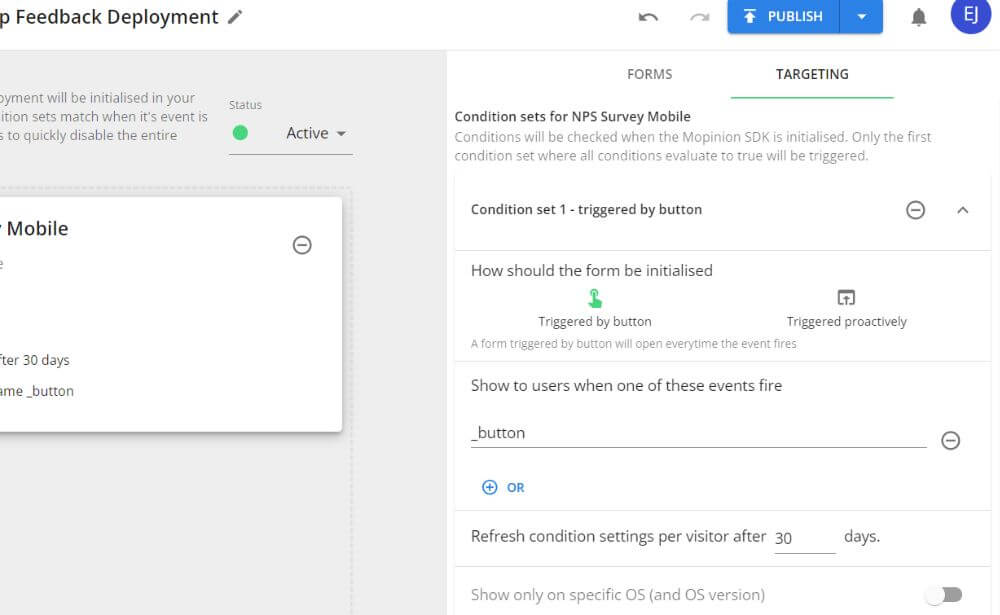
In Mopinion, the rules controlling how, where and to whom forms are displayed are configured through deployments. Teams can use conditions involving URLs, user behaviour, timing and audience characteristics to make feedback collection more precise.
This creates a more contextual experience. Instead of asking visitors to comment on the website in general, you can ask about the specific page, task or interaction they have just experienced.
Why can untargeted website surveys harm UX?
Untargeted surveys treat every visitor as though they have followed the same journey and have the same feedback to provide.
In reality, a first-time visitor reading a blog article has very different goals from a returning customer trying to complete a purchase. Showing both users the same survey is unlikely to produce equally useful feedback.
Poorly targeted forms can create several UX problems.
Research from the Nielsen Norman Group recommends following a “task, then ask” approach to feedback collection. Users should generally be allowed to complete a meaningful interaction before a survey appears. Asking too early can interrupt the task and produce feedback from visitors who have not yet experienced enough of the website to give an informed answer.
This is particularly important when surveys use pop-ups or modal windows. Google’s guidance on intrusive interstitials warns that dialogs which obstruct page content can frustrate users and reduce trust. Advanced targeting helps avoid this by delaying surveys, limiting them to relevant pages and replacing large interruptions with subtler feedback methods where appropriate.
They interrupt users too early
A survey that appears as soon as someone lands on a page asks them to evaluate an experience they have barely begun.
The visitor may close the form immediately, provide an uninformed answer or leave the page altogether. Delaying a survey until someone has had enough time to interact with the content produces a fairer and more relevant question.
They appear during important tasks
A pop-up displayed while someone is entering payment information, completing an application or trying to resolve an urgent support issue can disrupt their concentration.
Feedback requests should support the journey rather than compete with it.
They ask irrelevant questions
A visitor who has not used a feature cannot meaningfully evaluate it. Similarly, someone who has not reached the end of a checkout cannot accurately rate the full purchase experience.
Targeting lets you restrict questions to visitors who have completed, attempted or abandoned the interaction being evaluated.
They create survey fatigue
Even a well-designed form becomes irritating when the same visitor sees it repeatedly or is asked to answer too many questions.
According to the Nielsen Norman Group’s guidance on feedback requests, a feedback survey should generally take around one minute to complete. The organisation recommends prioritising the quality of responses over the number of questions asked.
A review of survey fatigue in questionnaire-based research also identifies repetitive questions, excessive follow-ups, poor survey design and targeting the wrong participants as contributors to survey fatigue.
Frequency controls, suppression rules and audience conditions help prevent people from being over-surveyed. They also allow teams to reserve longer or more detailed questions for users whose experiences make those questions relevant.
They produce less actionable data
When responses come from users with very different intentions and experiences, the results become harder to interpret.
Targeted surveys retain more of the context behind each response. This helps UX teams distinguish between a problem affecting mobile checkout users, for example, and a broader issue across the entire website.
Which advanced feedback form targeting options improve UX?
The most useful targeting strategies combine page context, behaviour, audience characteristics, timing and frequency. Let’s look at these targeting options in more detail.
1. Page and URL targeting
Page and URL targeting allows you to connect a feedback question to a particular piece of content, step or digital journey.
For example, you could show:
- a content feedback form at the end of a help article
- a Customer Effort Score survey after account registration
- a pricing question on a subscription page
- an exit survey during checkout
- a satisfaction survey on a confirmation page
The more closely the question matches the page, the easier it becomes for visitors to understand what they are being asked to evaluate.
Advanced URL conditions also help prevent forms from appearing on similar but irrelevant pages. Mopinion supports precise URL targeting, including an exact-match operator that can distinguish between a page such as /checkout and a later step such as /checkout/payment.
This level of precision is particularly useful for large websites with complex URL structures, multiple product environments or several variations of the same journey.
2. Behaviour and engagement targeting
Behavioural targeting triggers a survey after a visitor performs a specific action or demonstrates a particular pattern of behaviour.
Common behavioural triggers include:
- exit intent
- clicking a button
- hovering over an element
- visiting a sequence of pages
- completing a conversion
- abandoning a task
- interacting with another feedback form
- reaching a particular scroll depth
- opening or closing an on-page element
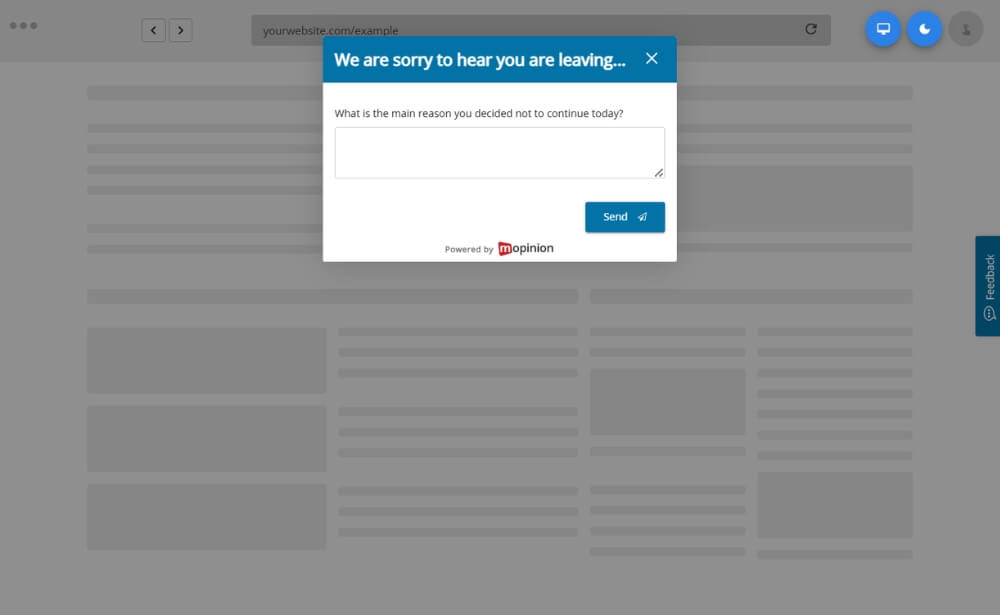
For example, instead of asking every checkout visitor why they did not buy, you could trigger the question only when someone attempts to leave before completing the purchase.
Mopinion can also use page-interaction conditions, including clicks and hovers, as well as form-interaction conditions based on whether another feedback form was shown, closed or completed.
These triggers make the question feel like a logical continuation of the experience:
“You opened the product information but did not continue. Was anything unclear?”
That is considerably more useful than a general question such as:
“What do you think of our website?”
3. Device and audience targeting
A website may technically be responsive while still creating very different experiences across desktop, tablet and mobile.
Device targeting allows you to investigate those experiences separately. You might use it to:
- ask mobile visitors whether navigation was easy
- investigate a mobile-only checkout drop-off
- test the usability of touch-based elements
- avoid displaying a large modal on smaller screens
- use a shorter form for visitors on mobile devices
Audience targeting adds another layer of context by distinguishing between groups such as:
- new and returning visitors
- logged-in and anonymous users
- free and paying customers
- different subscription tiers
- users who have or have not activated a feature
- specific customer or account segments
- visitors from a particular traffic source
- customers included in a research group
Mopinion targeting can incorporate data from cookies, HTML elements and JavaScript variables. Teams can also work with lists of customer identifiers to display forms to defined groups.
This means a business can ask a question that reflects what the user is actually able to access or accomplish, rather than relying on one generic survey for the entire customer base.
4. Timing and frequency controls
Timing determines whether a survey appears at a useful moment or becomes an unwanted interruption.
Depending on the journey, you may want a feedback form to appear:
- after a visitor has spent a set amount of time on a page
- after they have completed a task
- when they attempt to leave
- at a particular time of day
- after several visits
- only once a campaign or feature has been experienced
For content feedback, you might wait until the visitor has scrolled through most of the article. For checkout feedback, exit intent may be more appropriate. For post-purchase satisfaction, the confirmation page provides a natural moment to ask.
Frequency settings are equally important. They can be used to:
- show a form once per session
- suppress it after completion
- prevent it from reappearing after being closed
- wait a defined period before asking again
- limit the survey to a percentage of eligible traffic
Mopinion supports timing conditions and percentage-based sampling, allowing high-traffic websites to collect a manageable and representative volume of responses without asking every eligible visitor.
5. Language and region targeting
Visitors are more likely to understand and complete a feedback form when it reflects the language and context of the website they are using.
Language targeting should also account for the difference between translation and localisation. Translation changes the language of the interface, while localisation adapts the experience to the cultural and practical context of a particular audience.
As the Nielsen Norman Group explains in its guidance on cross-cultural UX, people who speak the same language may still require different content or experiences depending on their country or cultural context. The same principle applies to feedback forms.
A French-language survey used in France, Belgium and Canada might use the same basic translation, for example, while asking different questions about regional prices, delivery services, policies or customer journeys. Combining language and regional targeting makes the form more relevant than translation alone.
Language and regional targeting can help multinational organisations:
- display a translated version of the form
- adapt wording to regional terminology
- ask market-specific questions
- separate feedback from different countries
- evaluate regional campaigns or website versions
- direct responses to the appropriate local team
Depending on the website setup, language-specific forms can be connected to regional URLs, language parameters or audience information passed through cookies and JavaScript variables.
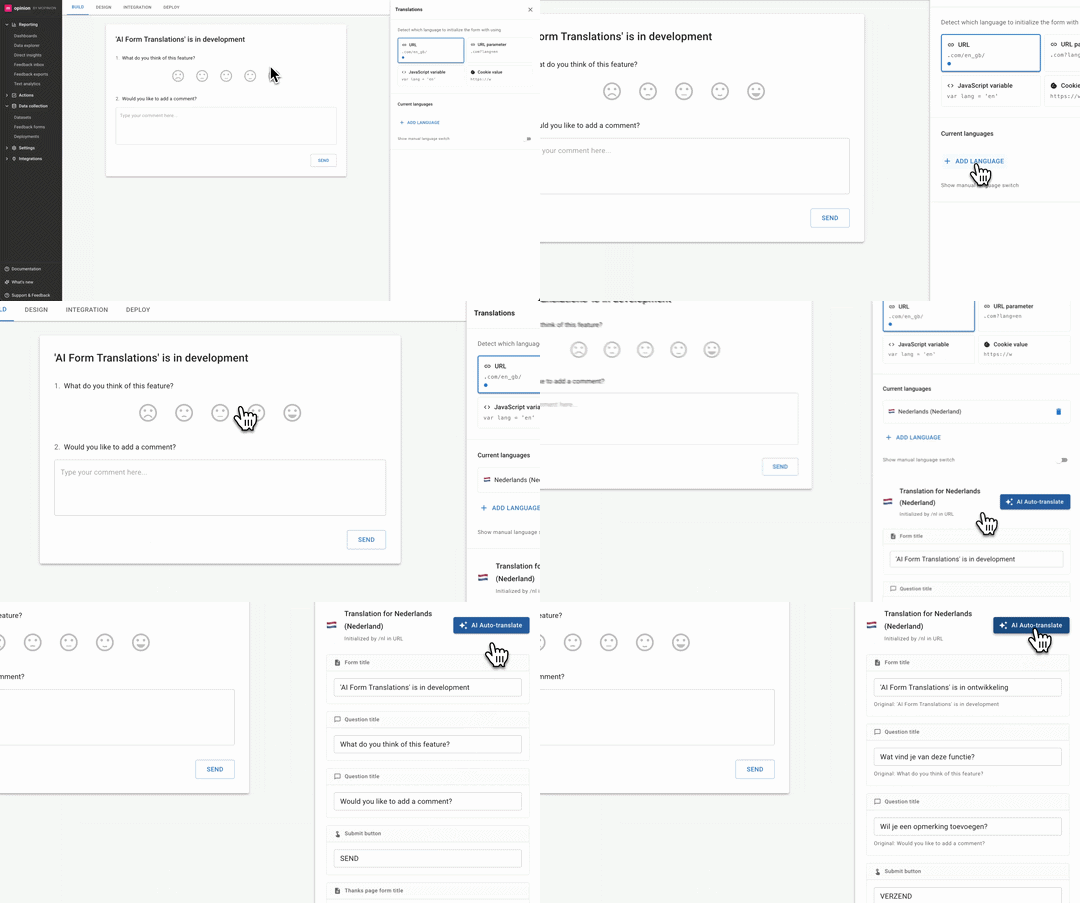
Mopinion also allows multiple translations to be added to a feedback form, helping organisations collect feedback across multilingual digital environments without rebuilding each form from scratch.
Translation alone, however, is not always enough. A visitor in France and a French-speaking visitor in Belgium may use the same language but encounter different delivery options, prices or customer journeys. Regional targeting allows the question to account for that context.
How does advanced targeting create a better user experience?
Advanced targeting improves UX in two interconnected ways.
First, it improves the experience of being asked for feedback. Surveys become less disruptive, more relevant and easier to answer.
Second, it improves the quality of the insights collected. Because the responses are tied to specific pages, behaviours and audience groups, teams can make more informed UX improvements.
Collecting feedback at different stages of a journey is already an established principle in digital service design. The GOV.UK Service Manual, for example, recommends giving users opportunities to provide feedback at multiple stages of a service, including after completion and when they leave before finishing.
Advanced targeting makes this principle easier to apply at scale. Instead of placing the same feedback request across an entire website, teams can connect each question to the stage, action or problem it is intended to investigate.
Surveys feel more relevant
Users are more likely to recognise why a question is being asked when it clearly relates to what they have just done.
After reading a help article:
“Did this article answer your question?”
After using a new feature:
“How easy was it to complete this task?”
When leaving a pricing page:
“Is there any information preventing you from choosing a plan?”
Each question has an obvious connection to the experience.
The journey remains uninterrupted
Targeting helps teams avoid displaying forms during sensitive or demanding interactions.
A passive feedback button may be more appropriate during a complex task, while a triggered survey can appear after the user finishes. The format and timing can be adapted to the amount of attention the visitor is likely to have available.
Questions can be shorter
When the targeting conditions already provide context, the survey does not need to ask the visitor to explain where they were or what they were doing.
Instead of asking:
“Which part of our website were you using, what were you trying to do and did you experience any problems?”
You can ask:
“What prevented you from completing your payment?”
Shorter, more focused forms reduce effort for the respondent.
Feedback becomes easier to act on
A general complaint such as “This was confusing” may be difficult to interpret.
When the response is connected to a particular device, page and action, the same comment becomes far more useful. The UX team can see that the visitor was using a mobile device, had reached the delivery step and left after opening the shipping information.
That context helps teams investigate the right area and prioritise changes more effectively.
Examples of advanced feedback form targeting
The following examples show how targeting can support common UX research goals.
Example 1: Understanding checkout abandonment
Target audience: Visitors who reach checkout but do not complete their purchase
Trigger: Exit intent
Page: Checkout
Frequency: Once per session
Question: “What is preventing you from completing your purchase today?”
This survey captures feedback from the users who experienced the relevant journey without interrupting customers who are still actively checking out.
Checkout abandonment can have many different causes, which is why a generic satisfaction question may not reveal enough. Baymard Institute’s checkout research identifies reasons ranging from unexpected costs and slow delivery to account-creation requirements, website errors and overly complicated checkout processes.
A targeted exit survey can help determine which of these barriers is affecting visitors on a particular website.
Example 2: Improving help-centre content
Target audience: Visitors reading a support article
Trigger: Reaching 75% scroll depth or the end of the article
Page: Individual help-centre article
Question: “Did this article answer your question?”
When someone selects “No”, a conditional follow-up can ask:
“What information were you looking for?”
This helps the content team identify missing or unclear information.
Example 3: Evaluating a new feature
Target audience: Logged-in customers with access to the feature
Trigger: Completing the feature workflow
Frequency: Once after first use
Question: “How easy was it to complete this task?”
Restricting the survey to users who have actually tried the feature produces more reliable feedback.
Example 4: Investigating a mobile UX issue
Target audience: Mobile visitors
Page: Product comparison page
Trigger: Repeated interaction with the comparison table
Question: “Was it easy to compare these products on your device?”
The responses can help determine whether the layout, amount of information or interaction design needs to be adjusted for smaller screens.
Example 5: Researching pricing-page hesitation
Target audience: Returning visitors who have viewed the pricing page more than once
Trigger: Exit intent or prolonged time on page
Question: “Is there anything preventing you from choosing a plan?”
These visitors have shown meaningful interest, making them a particularly relevant group to ask about missing information or purchase barriers.
Example 6: Collecting regional website feedback
Target audience: Visitors using a regional website version
Page: Country-specific delivery information
Language: Local language
Question: “Was the delivery information for your location clear?”
This setup ensures that the wording and subject of the survey match the visitor’s market.
Best practices for targeted website surveys
Advanced targeting can make feedback collection more precise, but adding more conditions does not automatically create a better survey. The targeting strategy should remain easy to understand, test and maintain.
Start with one research goal
Decide what you need to learn before selecting the targeting rules.
A clear goal might be:
- understanding why users leave checkout
- measuring whether visitors find support content useful
- evaluating a new navigation structure
- identifying friction in account registration
- comparing mobile and desktop experiences
The goal determines the audience, page, trigger and question.
Match the question to the trigger
The visitor should immediately understand why the form has appeared.
When a survey is triggered after task completion, ask about the task. When it appears on exit intent, ask what prompted the person to leave. When it is attached to an article, ask about the content.
Keep the form focused
Advanced targeting already provides much of the context you need. Avoid asking respondents to repeat information that can be captured automatically.
In many cases, one rating or multiple-choice question followed by an optional open comment field is enough.
Keep the number of questions proportionate to the moment. A visitor reporting a broken link or rating a completed task should not be required to work through a long questionnaire.
The Nielsen Norman Group recommends keeping feedback surveys short and combining easy-to-answer formats, such as ratings or multiple-choice questions, with an optional field for additional detail. Advanced targeting supports this approach because page, device and behavioural data can supply context without asking the respondent to repeat it. If you’re unsure what to ask, our guide to customer feedback questions has examples for different journeys.
Do not over-target
Combining too many conditions can reduce the audience until very few people qualify for the survey.
Start with the conditions needed to make the question relevant. Add more only when they support a clear research reason.
Use frequency limits
Define what happens after someone sees, closes or completes the form.
Without suppression rules, the same survey can repeatedly interrupt the visitor and damage the very experience you are trying to improve.
Optimise the form for each device
Do not rely solely on device targeting while using an unsuitable design.
Check the form’s size, placement, question length, buttons and input fields across desktop and mobile screens.
Test every condition before publishing
Complex targeting can create conflicting rules or prevent a form from appearing at all.
Mopinion’s Deployment Assistant lets teams preview forms, inspect whether conditions are active or blocked and troubleshoot targeting rules before publication. Deployment Versioning also makes it possible to track and revert changes.
Review response quality
Do not assess success only by the number of responses.
Look at whether the answers are specific, relevant and actionable. A lower volume of contextual responses may be more valuable than a large collection of generic comments.
What should you look for in a customisable website survey tool with advanced targeting options?
A suitable website survey tool should give you control over both the form and its delivery.
Look for a platform that supports:
- customisable questions and survey metrics
- branded form designs
- passive and triggered feedback methods
- exact page and URL conditions
- behavioural and interaction-based triggers
- device and audience segmentation
- customer data passed through cookies or variables
- multilingual feedback forms
- timing and frequency controls
- percentage-based sampling
- conditional question logic
- mobile-responsive forms
- targeting previews and testing
- analysis of quantitative and qualitative responses
These capabilities allow you to adapt feedback collection to different journeys rather than forcing every use case into the same survey format.
How does Mopinion support advanced feedback form targeting?
Mopinion is a digital feedback platform for websites, mobile apps and email. It allows teams to build customisable feedback forms and control when, where and to whom those forms are displayed.
Within website deployments, teams can configure targeting conditions involving:
- page URLs
- exact URL matches
- exit intent
- time on page
- scroll depth
- page and form interactions
- device type
- traffic source
- new or returning visitors
- customer segments
- completed actions
- cookies
- HTML elements
- JavaScript variables
- timing and frequency
- percentage-based sampling
Mopinion’s website feedback capabilities are designed to support targeted questions across specific pages, audiences and behaviours.
Condition sets can also be saved and reused across forms and deployments. This helps teams apply consistent targeting rules across multiple surveys without rebuilding the setup each time.
Once the feedback is collected, teams can bring ratings, survey scores and open-text responses together to investigate friction and prioritise UX improvements.
Interested? Start your free trial today or request a demo.
Ask better questions, not more questions
A website survey does not create a better user experience simply because it collects feedback.
Its value depends on whether the question is relevant, whether the visitor has enough experience to answer it and whether the survey respects the task they are trying to complete.
Advanced feedback form targeting gives businesses the control required to meet those conditions. By combining page, behaviour, audience, device, language, timing and frequency rules, teams can collect feedback in context without unnecessarily disrupting the journey.
The result is a better feedback experience for the visitor and clearer, more actionable UX insights for the business.
With Mopinion, you can create customisable website surveys, target them to specific digital moments and bring the resulting feedback together for analysis.
Frequently Asked Questions
Product feedback is input from users about their experience with a product, feature or service. It can be collected through digital surveys, interviews, support tickets, reviews and social media.
Product feedback helps teams understand what users value, where they encounter problems and which improvements should be prioritised. It allows product decisions to be based on real user insights rather than assumptions.
Product feedback can help teams prioritise their product roadmap, improve existing features, develop more successful products and carry out faster, more informed iterations.
Product feedback should be collected throughout the product lifecycle, including before, during and after a launch. Regular feedback collection helps teams track changing user needs and measure whether improvements are working.
Two commonly used metrics are Net Promoter Score, or NPS, and Customer Satisfaction, or CSAT. NPS measures customer loyalty, while CSAT measures how satisfied users are with a product, feature or experience.
The questions should reflect what you want to learn. You can ask users which features they use most, why they use the product, what they find frustrating and whether they have experienced any errors or technical problems.
Combining feedback with customer data such as user behaviour, demographics or customer segments can provide more context. This helps teams understand which users are experiencing particular issues and identify patterns across different groups.
A product feedback loop is the process of collecting feedback, sharing insights internally, making improvements and informing users about the changes. The process is then repeated so the product can continue to evolve.
Look for software that can collect feedback at relevant moments, connect responses with customer data, support analysis and make it easy to share insights across teams. The right platform should also help teams act on feedback and close the loop with users.
Ready to see Mopinion in action?
Want to learn more about Mopinion’s all-in-1 user feedback platform? Don’t be shy and take our software for a spin! Do you prefer it a bit more personal? Just book a demo. One of our feedback pro’s will guide you through the software and answer any questions you may have.