
When you open your feedback platform, you probably already have an idea of what you need to do.
Maybe you want to check the latest customer feedback. Review a Smart Recap. Continue working in a dashboard. Or see whether a feedback form has recently been updated.
But knowing what you need does not always mean knowing where to find it first.
That is why we are introducing the For You page, a new starting page that brings the information most relevant to your session together in one clear overview.
No unnecessary searching. No opening several parts of the platform just to see what has changed. Simply log in, scan the latest activity and continue where you need to go.
TL;DR – Article summary
- We are introducing the For You page, a new starting page for the platform.
- It gives you an immediate overview of recent feedback, Smart Recaps, feedback forms, insights, exports and notifications.
- The page helps you see what has recently happened and navigate to important areas more quickly.
- You can select which report you want to view from the top-right corner.
- The For You page is available to all Netigate Digital customers and packages at no additional cost.
In this article, we will cover:
- Why the starting point of your feedback platform matters
- Meet the new For You page
- What you can find on the For You page
- How the For You page helps you work more efficiently
- How to access the For You page
- FAQ
Why the starting point of your feedback platform matters
We give you many different ways to collect, analyse and act on customer feedback.
You can create feedback forms, configure deployments, set up triggers and conditions, connect integrations, review dashboards, generate Smart Recaps, explore Direct Insights and export your feedback data.
That flexibility is valuable. But it also means that different users enter with different priorities.
A customer experience professional might want to start by checking recent feedback. A digital analyst may want to return to a dashboard. A marketer may need to see whether a form was recently changed. Another user might want to review their latest exports or notifications.
Until now, users entered Netigate Digital through the dashboard overview. While useful for analysing feedback, a dashboard does not necessarily show everything that has recently happened across the platform.
Your first step could therefore involve looking through several menus before finding the information you need.
Starting your session should be easier.
Meet the new For You page
The For You page is a new landing page that gives you a quick overview of the information most relevant to your work.
Instead of immediately opening a dashboard, you now start with a broader view of what has recently happened within Netigate Digital.
The page brings together six widgets covering different areas of your feedback programme:
- Smart Recaps
- Recent feedback
- Feedback forms
- Direct Insights and dashboards
- Feedback exports
- Notifications
This means you can quickly scan recent activity, identify anything that needs your attention and navigate directly to the right part of the platform.
Think of it as your starting point: not another dashboard to configure, but a practical overview that helps you decide what to do next.
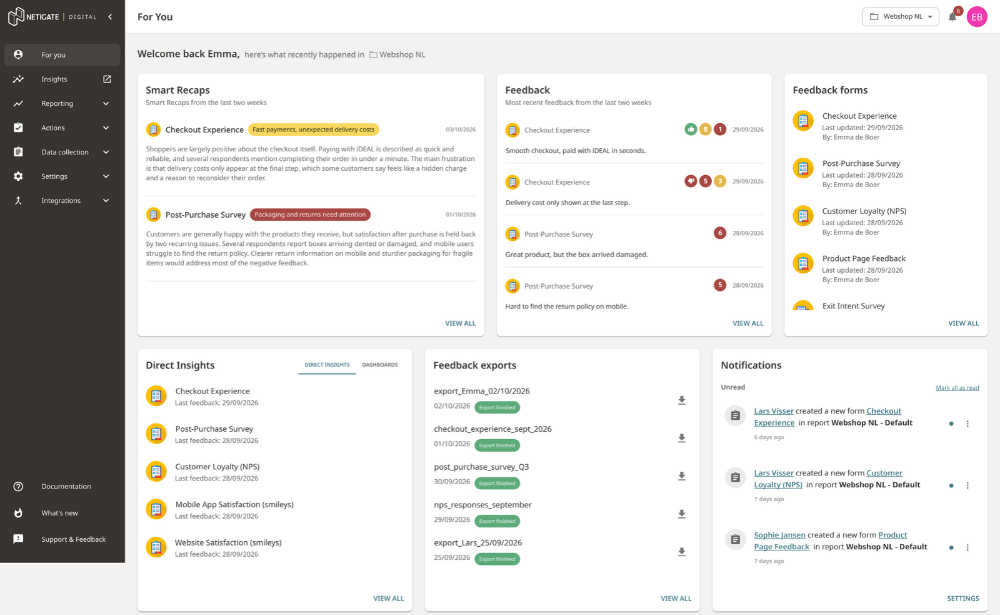
What can you find on the For You page?
The For You page consolidates information that would otherwise be spread across different parts of Netigate Digital.
Here is what each section shows.
Smart Recaps
The Smart Recaps widget gives you direct access to recent AI-generated summaries of your customer feedback.
You can quickly see which topics or developments have been identified without first navigating to a separate analysis environment.
This makes it easier to begin your session with an understanding of what customers have recently been saying.
Recent feedback
Want to check what has just come in?
The feedback widget shows your latest feedback items, helping you spot recent scores, comments or noteworthy responses at a glance.
From there, you can continue to the full feedback inbox when you need a more detailed overview.
Feedback forms
The feedback forms widget shows recently updated forms associated with your selected report.
This is particularly useful when several people work in the same environment. You can quickly see which forms have changed without opening the form builder and checking them individually.
Direct Insights and dashboards
The For You page also gives you shortcuts to your Direct Insights and dashboards.
This lets you continue analysing your feedback without navigating through several menu levels first.
Whether you want a quick AI-generated insight or a more detailed visual report, you can reach it directly from your starting page.
Feedback exports
The exports widget gives you an overview of your recent feedback exports.
You can see whether an export has recently been created and continue to the exports section when you need to review or manage it.
Notifications
The notifications widget brings important platform updates into the same overview.
Rather than checking a separate area to see whether anything needs your attention, you can view your latest notifications as soon as you enter Netigate Digital.
A quicker overview of what matters
The main benefit of the For You page is simple: it reduces the amount of searching required at the beginning of a session.
Instead of asking yourself where to start, you can immediately see:
- What customers have recently said
- What Smart Recaps are available
- Which feedback forms have changed
- Which insights and dashboards you can return to
- Whether exports have been created
- Whether you have new notifications
This creates a softer and more useful landing experience.
You are not dropped directly into one specific analysis view. Instead, you are given the context needed to decide what deserves your attention.
For occasional Netigate Digital users, this can make the platform easier to navigate. For frequent users, it can save time during every session.
Choose the report that is relevant to you
The information displayed on the For You page is connected to a Netigate Digital report.
You can see which report is currently selected in the top-right corner of the page and switch to another report when needed.
The widgets then give you an overview of the relevant feedback, forms, recaps and activity associated with that report.
This makes the page useful for teams managing multiple websites, apps, brands, markets or feedback programmes within the same environment.
You can move between reports while keeping the same clear starting-point experience.
How to access the For You page
The For You page becomes your new starting page when you enter the Netigate Digital platform.
You can also return to it at any time by selecting For You from the main navigation menu.
From there, simply:
- Check which report is selected in the top-right corner.
- Scan the widgets for recent activity.
- Select the feedback, recap, form, dashboard, export or notification you want to explore.
- Continue working in the relevant part of Netigate Digital.
There is nothing additional to configure before you can begin using it.
Available to all Netigate Digital customers
The For You page is available to Netigate Digital customers across all packages at no additional cost.
Once the feature is available in your environment, it will provide a new starting point whenever you enter the platform.
Start every Netigate Digital session with a clearer view
A feedback platform can contain a lot of valuable information. The challenge is knowing what deserves your attention right now.
The For You page makes that easier by bringing recent feedback, recaps, forms, insights, exports and notifications together in one place.
So the next time you enter Netigate Digital (formerly Mopinion), you will not have to begin by searching.
You can begin with what matters.
Frequently Asked Questions
The For You page is Netigate Digital’s (formerly Mopinion) new starting page. It brings together recent activity and important information from across the platform, helping users quickly understand what has happened and decide where to go next.
Yes. The For You page is the first page users see when they enter the Netigate Digital platform. It replaces the dashboard overview as the default starting point.
The For You page includes six widgets covering Smart Recaps, recent feedback, feedback forms, Direct Insights and dashboards, feedback exports and notifications. Users can select an item or widget to continue to the relevant area of Netigate Digital.
The For You page will always show the latest report used on return.
To see a different one, select it from the top-right corner of the page. The widgets will then display information associated with the selected report.
Yes. The For You page is available to all Netigate Digital customers and packages at no additional cost.
No. The For You page is available as a ready-to-use, static overview. Users do not need to configure it before they can start viewing recent feedback activity and navigating to other areas of the platform.
Yes. Users can return to the page at any time by selecting For You from the main navigation menu.
No. The For You page does not replace dashboards, Direct Insights or other parts of Netigate Digital. It acts as a central starting point, giving users an overview and direct access to the tools and information they need.