

User behaviour analytics can help increase website conversions by showing where visitors hesitate, abandon key actions or encounter friction in the customer journey. By looking at signals such as clicks, navigation paths, form abandonment and exit behaviour, teams can identify the moments that may be holding users back from converting.
But knowing what users do is only part of the picture. A visitor leaving your pricing page, for example, could be reacting to unclear information, an unexpected cost, a technical issue or simply a lack of confidence in the offer.
For conversion optimisation, the real value comes from combining behavioural data with direct user feedback. Behaviour analytics points you towards the problem, while feedback helps explain why it is happening, giving you stronger evidence for what to improve next.
TL;DR – Article summary
- User behaviour analytics helps you spot where visitors hesitate, abandon journeys or encounter friction before converting.
- Focus first on high-intent pages and actions, such as pricing pages, checkout, sign-up forms and demo requests.
- Behavioural data shows what users are doing, but direct feedback helps explain why they are doing it.
- Combining behavioural signals with targeted website feedback makes it easier to identify the real cause of conversion problems.
- Use these insights to prioritise changes, test improvements and continuously optimise the customer journey.
In this article, we’ll cover:
- What is user behaviour analytics?
- How does behaviour analytics help increase website conversions?
- 4 ways to use behaviour analytics to improve conversions
- Behaviour analytics tells you what. Feedback tells you why.
- How Mopinion connects user behaviour with feedback
- What behaviour should you analyse first?
- Turn behavioural signals into conversion insights
- Frequently asked questions
How to use user behaviour analytics to increase your conversions
User behaviour analytics helps increase website conversions by showing where visitors hesitate, drop off or struggle to complete important actions. By analysing signals such as clicks, navigation paths, form abandonment and exit behaviour, teams can identify the parts of the customer journey that are creating friction.
But behavioural data only tells part of the story. It can show you that users are leaving your pricing page or abandoning a form, but not necessarily why. Was the information unclear? Was something missing? Did the experience feel too complicated, or did the offer simply not meet their needs?
That is where combining behaviour analytics with user feedback becomes especially valuable. Behavioural signals help you identify where to investigate, while targeted feedback gives users an opportunity to explain what is happening in their own words. Together, these insights can help you make more informed optimisation decisions and focus on the changes most likely to improve conversions.
What is user behaviour analytics?
User behaviour analytics is the process of examining how visitors interact with your website so you can understand how they move through the customer journey, where they engage and where they encounter friction.
This can include data such as page views, navigation paths, clicks, scroll depth, session recordings, heatmaps, form abandonment and conversion funnel activity. Together, these signals can reveal patterns that traditional performance metrics may not show on their own.
For example, a conversion funnel might tell you that a large number of users leave during the final step of a sign-up process. Session recordings or click data can then show whether users are struggling with a particular field, repeatedly interacting with an element or navigating back to find missing information.
However, behavioural analytics still primarily shows what users are doing, not what is driving that behaviour. A user leaving a checkout page could be reacting to an unexpected cost, a confusing form, a technical issue or simply a change of mind. To understand the reason behind the behaviour, you need another layer of insight: direct user feedback.
4 ways to use behaviour analytics to improve conversions
1. Find where users drop out of the conversion journey
One of the most useful applications of behaviour analytics is identifying where users abandon a journey before completing a conversion.
This could happen during checkout, while filling in a demo request, during sign-up, on a pricing page or halfway through a form. Funnel data, navigation paths and abandonment patterns can help you pinpoint the exact stage where users are dropping out.
That tells you where the problem occurs, but not necessarily what caused it.
Research from the Baymard Institute illustrates just how varied those causes can be. In ecommerce checkout, for example, users may abandon because of unexpected additional costs, slow delivery, trust concerns or a checkout process that feels too complicated.
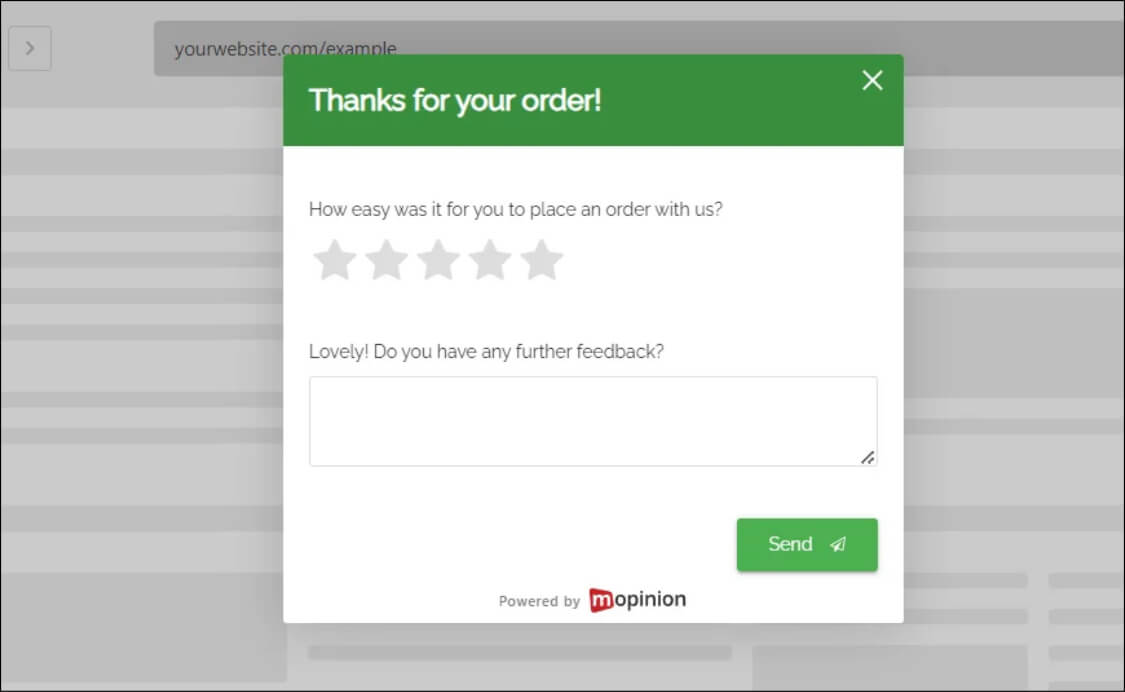
This is where targeted feedback can add valuable context. By triggering a short feedback form when a user hesitates, attempts to leave or abandons a key step, you can ask directly what prevented them from continuing.
Depending on the journey, you might ask questions such as:
- What stopped you from completing your purchase?
- Is there any information missing from this page?
- What prevented you from signing up today?
The answers can help distinguish between very different conversion barriers, such as unclear pricing, missing information, technical issues or a confusing user experience. Instead of guessing why users abandon the journey, you can use their feedback to prioritise the changes most likely to make a difference.
2. Identify friction on high-intent pages
Some pages matter more for conversion than others. Pricing pages, product pages, checkout flows, trial or sign-up pages and contact forms all attract visitors who are already showing a stronger level of intent.
Behaviour analytics can help you spot signs that these users are getting stuck. Repeated clicks, unusually long dwell times, excessive scrolling, returning to the same page or leaving after interacting with a particular element can all signal potential friction. Microsoft Clarity, for example, uses behavioural metrics such as rage clicks, dead clicks, excessive scrolling and quick backs to help teams identify possible points of user frustration.
The challenge is that the same behaviour can have several explanations. Spending a long time on a pricing page, for example, could mean a visitor is carefully comparing plans, struggling to understand the differences between them or looking for information that is not there.
This is where behaviour-based feedback targeting becomes useful. Instead of showing the same survey to every visitor, you can trigger feedback based on specific behaviours or moments in the journey. That helps you collect input from users while the experience is still fresh and gives you more context around the behavioural signals you are seeing.
3. Understand why users hesitate before converting
Hesitation is one of the clearest examples of where behavioural data needs additional context.
Analytics might show that visitors repeatedly return to your pricing page, pause before submitting a form or leave just before completing a purchase. But the underlying reason could be anything from price and missing information to a lack of trust, confusing UX, technical problems or uncertainty about whether the product is right for them.
Without asking users, it is easy to optimise based on assumptions.
Contextual feedback gives you a way to validate those assumptions before making changes. A short question triggered at the right moment can reveal what is holding users back and help you determine whether the problem lies in the content, design, functionality or offer itself.
For example, if visitors consistently abandon a checkout page, you might assume the flow is too complicated. Feedback could reveal instead that users only discover the delivery costs at the final step. That distinction matters, because each problem requires a very different solution.
Combining behaviour analytics with feedback therefore helps you move from “users are hesitating here” to “this is what is making them hesitate.”
4. Validate whether your optimisation actually worked
Behaviour analytics is just as useful after you make a change as it is when identifying the original problem.
Once you have optimised a page or journey, look at whether the behaviour that first signalled friction has changed. Are fewer users abandoning the form? Are visitors moving through checkout more smoothly? Has the conversion rate improved?
User feedback can add another layer to that validation. You can compare feedback before and after the change, ask visitors whether the experience has become easier and monitor open-text responses for recurring issues that may still need attention.
This creates a continuous optimisation loop:
Identify the behaviour → collect feedback → make a change → measure the result.
Rather than treating conversion optimisation as a series of isolated fixes, this approach helps you continually test whether the changes you make are actually improving the experience and influencing user behaviour.
Behaviour analytics tells you what. Feedback tells you why.
Behaviour analytics is valuable because it shows you what users are doing. But on its own, it can still leave an important question unanswered: why are they doing it?
A drop-off, repeated click or unusually long pause is a signal, not an explanation. To turn that signal into a useful conversion insight, you need context from the user experiencing it. This is where website feedback can add the missing layer, helping you understand the frustration, confusion or expectations behind the behaviour.
A simple way to think about it is:
Behaviour signal → Feedback → Insight → Optimisation
For example:
Behaviour: Visitors frequently leave the pricing page without converting.
Feedback: Users say they cannot tell which plan includes the features they need.
Insight: The issue may be clarity rather than price.
Optimisation: Improve the pricing comparison and monitor whether conversion behaviour changes.
This combination helps reduce the guesswork in conversion optimisation. Instead of seeing a behavioural pattern and immediately deciding what it means, you can use feedback to validate the cause before making changes.
That matters because the same behaviour can have very different explanations. A user abandoning a form may find it too long, encounter a technical problem or simply need information that is not available on the page. Behaviour analytics highlights the moment of friction. Feedback helps uncover the reason behind it.
How Mopinion connects user behaviour with feedback
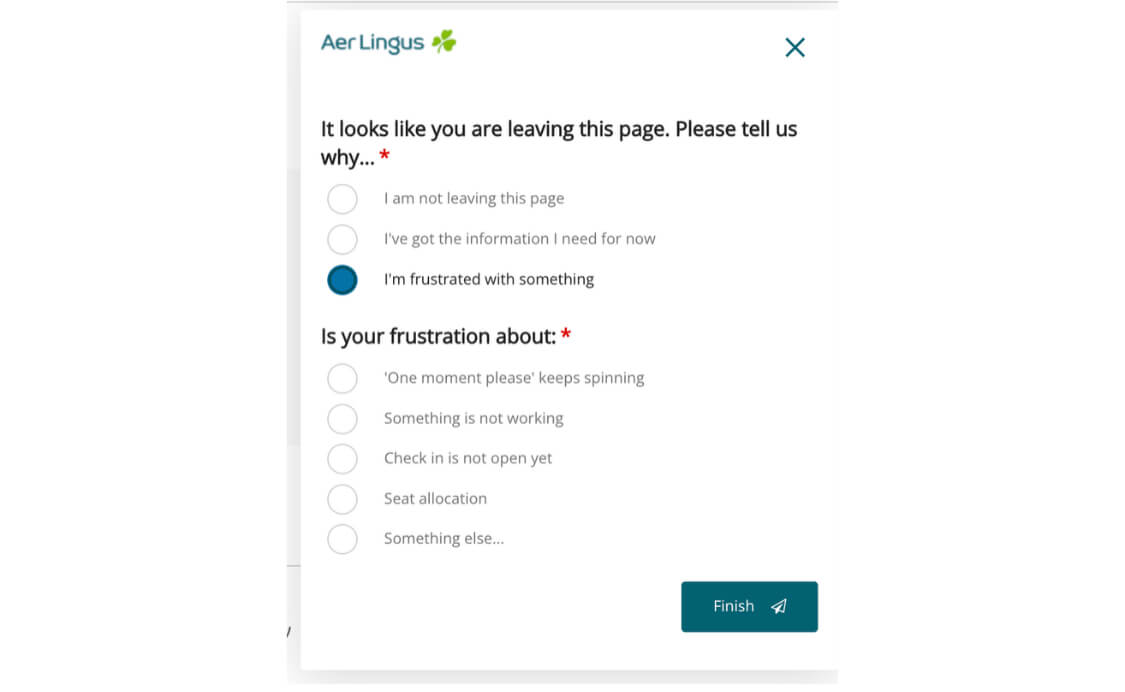
Mopinion helps teams use behavioural and contextual signals to collect feedback at the moments where it is most relevant.
Rather than displaying the same feedback form to every website visitor, you can target surveys based on where users are in the journey and how they interact with your website. With advanced feedback form targeting, it is possible to gather feedback around specific conversion moments, such as hesitation on a high-intent page or abandonment during an important process.
With Mopinion, teams can use targeting options such as:
- Page and URL targeting to collect feedback on specific parts of the customer journey, such as pricing, checkout or sign-up pages.
- Behaviour-based triggers to display feedback after particular visitor actions or engagement patterns.
- Exit and abandonment targeting to ask users why they are leaving before completing an important action.
- Timing and frequency controls to decide when a feedback form appears and avoid repeatedly surveying the same visitors.
- Audience and device targeting to collect feedback from specific visitor segments or experiences.
- Open-text feedback analysis to identify recurring themes and understand the issues behind behavioural patterns.
The aim is not to replace behaviour analytics, but to add the customer perspective to it. Behavioural data can show you where something worth investigating is happening. Mopinion can then help you ask the right users for feedback at that moment, giving you more context for deciding what to optimise next.
This is especially useful when you already have behavioural or digital analytics tools in your stack. Instead of treating each source of data separately, you can use behavioural insights to guide your feedback strategy and use open-text feedback analysis to identify recurring themes, sentiment and patterns within the responses you collect.
What behaviour should you analyse first?
Not every behavioural signal deserves the same level of attention. If your goal is to increase conversions, start with behaviours that are closely connected to a meaningful business outcome.
That could include:
- Users abandoning conversion forms, such as checkout, sign-up or demo request forms.
- Visitors leaving high-intent pages, including pricing, product or checkout pages.
- Users repeatedly encountering the same friction point, such as clicking an unresponsive element or returning to the same section for information.
- Visitors showing strong intent without converting, for example by viewing several product pages or repeatedly returning to pricing.
- Users completing the journey but reporting a poor experience, which could point to friction that may affect repeat purchases, retention or future conversions.
The goal is not to track every possible interaction. Start with behaviour that has a clear connection to a business outcome and a question you actually want to answer. For example, collecting feedback around conversion friction on checkout, sign-up, demo request or pricing pages can help you investigate the moments where users are expected to take action.
Collecting more behavioural data is not automatically better if you do not know what decision it will help you make. Focus on the signals that can lead to a specific action, then use feedback to understand what is behind them.
Turn behavioural signals into conversion insights
Increasing conversions is not simply about collecting more analytics. It is about identifying where behaviour signals friction, understanding why that friction exists and using that evidence to make better optimisation decisions.
Behaviour analytics provides the first clue. It shows you where users hesitate, abandon a journey or behave in unexpected ways. Contextual feedback fills in the missing explanation by giving those users a chance to tell you what went wrong.
Together, they turn behavioural patterns into something much more actionable: an understanding of what users are doing, why they are doing it and what you can improve as a result.
With the right behavioural signals and targeted feedback in place, conversion optimisation becomes less about guessing what users need and more about responding to what they actually experience. A strong customer feedback management strategy can then help you turn those individual insights into a continuous process of collecting, analysing and acting on customer feedback.
Ready to see Mopinion in action?
Want to learn more about Mopinion’s all-in-1 user feedback platform? Don’t be shy and take our software for a spin! Do you prefer it a bit more personal? Just book a demo. One of our feedback pro’s will guide you through the software and answer any questions you may have.
Frequently asked questions
Behaviour analytics is the process of analysing how users interact with a website or digital product. It can include data such as clicks, navigation paths, scroll behaviour, form abandonment, session recordings and conversion funnel activity. These signals help teams understand where users engage, hesitate or encounter friction.
Behaviour analytics can increase website conversions by showing where users abandon important actions, struggle with a page or experience friction during the customer journey. Teams can then investigate those areas, collect additional user feedback and make targeted improvements based on the evidence.
Common signals include abandoning checkout or sign-up forms, repeatedly clicking the same element, spending an unusually long time on a high-intent page, navigating back and forth, or leaving after interacting with a particular part of the website. These behaviours do not always indicate a problem, but they can highlight areas worth investigating.
Behaviour analytics primarily shows what users are doing, while user feedback helps explain why they are doing it. For example, analytics may show that visitors are abandoning a pricing page, while feedback can reveal whether the reason is unclear pricing, missing information or uncertainty about the product.
You can use behavioural signals to determine when and where a website survey should appear. For example, you might trigger a feedback form when someone attempts to leave a checkout page, spends a certain amount of time on a pricing page or abandons a conversion process. This allows you to collect feedback in the context of the behaviour you are trying to understand.
Start with behaviour that is closely connected to a meaningful business outcome, such as checkout abandonment, sign-up drop-off or exits from high-intent pages. Prioritising these signals helps you focus your analysis on behaviour that could have a direct impact on conversions rather than tracking interactions without a clear purpose.