

AI customer feedback analysis helps teams summarise, tag, and interpret large volumes of customer feedback from surveys, reviews, support tickets, NPS comments, and in-app feedback.
Summarisation is one part of AI-powered feedback analysis. Combined with text analytics, sentiment analysis, categorisation, and trend detection, it helps teams turn unstructured customer comments into actionable insights.
With capabilities such as Smart Recaps, sentiment analysis, dashboards, and action management, Mopinion helps digital teams understand what customers are saying and decide what to do next.
TL;DR-Article Summary
- AI can analyse customer feedback by grouping, summarising, tagging, and interpreting large volumes of open-text responses.
- Summarisation is one part of AI-powered feedback analysis, alongside text analytics, sentiment analysis, categorisation, and topic detection.
- AI is especially useful for analysing survey responses, NPS comments, website feedback, in-app feedback, reviews, support tickets, and product feedback.
- Sentiment analysis helps teams understand how customers feel, detect negative experiences faster, and prioritise the issues that affect customer experience most.
- The best AI customer feedback analysis tools help teams move from raw comments to clear insights, dashboards, and follow-up actions.
- AI feedback analysis still needs human judgement, especially when interpreting context, validating summaries, managing bias, and handling sensitive data.
What is AI customer feedback analysis?
AI customer feedback analysis is the process of using artificial intelligence to organise, summarise, and interpret customer comments at scale. Instead of manually reading through every open-text response, AI can help identify recurring themes, detect sentiment, categorise feedback, and highlight the issues that need attention first.
This type of AI feedback analysis is especially useful for unstructured feedback, such as:
- open-ended survey responses
- NPS, CSAT, and CES comments
- website and in-app feedback
- product feedback
- online reviews
- support tickets or chatbot conversations
For example, if hundreds of customers mention that a checkout page is confusing, AI can group those comments under a theme such as “checkout experience”, summarise the main issue, and show whether the overall sentiment is negative, neutral, or positive.
This gives CX, UX, product, and digital teams a faster way to understand what customers are saying, spot patterns, and decide which improvements to prioritise.
Why open-text feedback is hard to analyse manually
Open-text feedback gives teams valuable context that scores alone cannot provide. A low NPS or CSAT score might show that something is wrong, but the customer’s written comment explains why. The challenge is that these comments are often unstructured, inconsistent, and difficult to compare at scale.
Manual open text feedback analysis can quickly become time-consuming because customer comments vary in length, tone, language, and level of detail. One customer might write “checkout was confusing”, while another says “I couldn’t find the payment button after entering my delivery details”. Both comments may point to the same issue, but they are phrased very differently.
This is especially true for survey text analysis, where teams may need to review hundreds or even thousands of open-ended responses. Without AI or text analytics, it can be difficult to:
- group similar comments into clear themes
- identify recurring issues across different feedback channels
- detect sentiment accurately
- separate urgent problems from minor frustrations
- avoid human bias when tagging or interpreting responses
- spot trends over time
As a result, important insights can stay buried in individual comments. Teams may know they have a lot of feedback, but struggle to turn it into a clear picture of what customers need, what is causing friction, and which improvements should be prioritised first.
According to MIT Sloan, 80–90% of data is unstructured, which includes text-based sources such as comments, logs, social media, and other free-form inputs. For customer experience teams, this reinforces why open-text feedback can contain valuable insights that are difficult to analyse manually.
How AI customer feedback analysis summarises open-text feedback
AI helps teams summarise customer feedback by scanning large volumes of open-text comments and identifying the main themes, patterns, and sentiment behind them. Instead of treating every response as a separate data point, AI looks for similarities across comments and turns them into a clearer, more digestible summary.
For example, if many customers mention slow loading times, confusing navigation, or problems completing a form, AI can group those comments into topics and generate a short summary of the issue. This helps teams understand not just what customers are saying, but which problems are coming up most often.
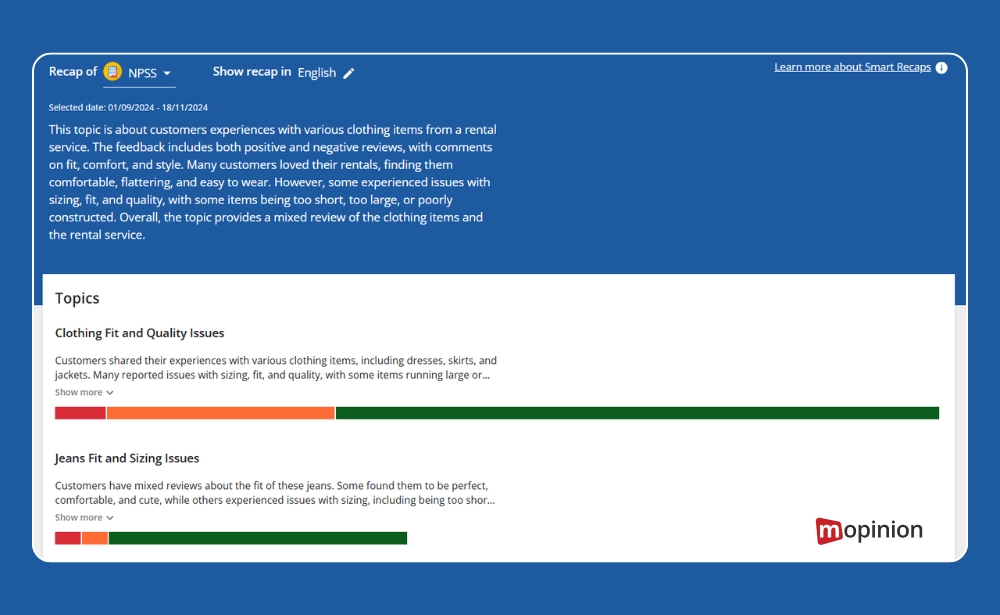
This process is closely linked to text analytics for customer feedback. Text analytics uses AI and natural language processing to interpret unstructured text, such as survey responses, NPS comments, reviews, and website feedback. It can help identify:
- recurring topics and themes
- positive, neutral, or negative sentiment
- frequently used words or phrases
- customer pain points
- emerging trends
- feedback that requires urgent attention
The goal is not to replace human interpretation completely. AI-generated summaries give teams a faster starting point, helping them quickly understand the bigger picture before digging into individual comments for more detail and context.
Step-by-step: how to use AI for customer feedback analysis
The best way to use AI for customer feedback analysis is to treat it as part of a broader customer feedback management process. Start with a clear feedback source, apply the right analysis techniques, and then turn the results into action. AI can speed up analysis, but the quality of the insights still depends on what you collect, how you structure the feedback, and how your team follows up.
1. Collect open-text feedback from the right channels
Start by gathering feedback from the places where customers are already sharing their thoughts. This could include:
- website feedback forms
- in-app feedback
- NPS, CSAT, or CES surveys
- product feedback
- online reviews
- support or chatbot conversations
In Mopinion, teams can collect feedback across digital channels and bring it into one platform, making it easier to analyse comments alongside scores, metadata, URLs, device types, and customer journey context.
2. Choose what you want to analyse
Before applying AI, decide what you want to learn from the feedback. For example:
- What are customers complaining about most often?
- Which parts of the website or app cause friction?
- Why are customers giving low satisfaction scores?
- Which recurring issues should be prioritised?
- Are there positive trends worth learning from?
This helps you use the right customer feedback analysis techniques, rather than analysing everything without a clear goal.
3. Use AI to summarise the main themes
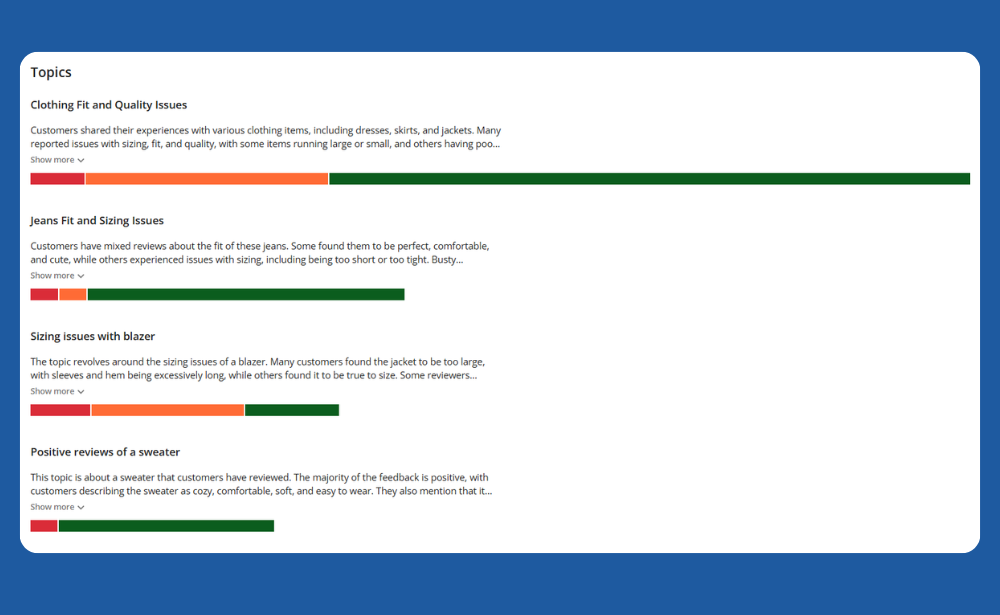
Once enough feedback has been collected, AI can scan open-text comments and generate a summary of the most common topics. This helps teams quickly understand what customers are talking about without manually reading every response.
With Mopinion’s Smart Recaps, for example, teams can generate AI-powered feedback summaries, view recurring topics, and quickly understand key themes from large volumes of website or app feedback.
4. Categorise feedback into topics
After summarising the feedback, AI can group comments into categories such as “checkout”, “navigation”, “pricing”, “login issues”, “delivery”, or “mobile experience”. This makes it easier to see which issues appear most often and which areas of the customer journey need attention.
In Mopinion, automated categorisation can help group open comments by category using labels, so teams can filter and organise feedback more efficiently.
5. Analyse sentiment and urgency
Not every piece of feedback has the same level of importance. AI sentiment analysis can help identify whether feedback is positive, negative, or neutral, while also showing which topics may require faster action.
For example, a recurring negative topic around “payment errors” may need immediate attention, while a neutral comment about “more filter options” may be useful for the product backlog.
6. Drill down into the original comments
AI summaries are useful, but they should not replace the original customer voice. Once AI highlights a theme or trend, teams should review the underlying comments to understand the full context.
This is especially important when:
- the issue affects conversion or retention
- the sentiment is strongly negative
- the feedback relates to a specific page, form, or app screen
- the team needs examples to support a business case
In Mopinion, teams can move from summaries and dashboards into individual feedback items, making it easier to connect high-level trends with real customer comments.
7. Turn insights into actions
The final step is to decide what to do with the insights. AI feedback analysis is only valuable if it leads to better decisions, faster fixes, or improved customer experiences.
Teams can use the results to:
- prioritise bugs or UX issues
- improve website or app journeys
- adjust survey questions
- inform product roadmap decisions
- share insights with stakeholders
- close the feedback loop with customers
Mopinion supports this step with dashboards, alerts, notes, reminders, integrations, and action management features, helping teams move from analysis to follow-up.
Key AI feedback analysis methods: sentiment, topic detection, categorisation and summarisation
AI feedback analysis uses several techniques to turn unstructured customer comments into useful insights. The most common methods include sentiment analysis, topic detection, categorisation, and summarisation. Each method plays a different role in helping teams understand what customers are saying and what needs attention.
Sentiment analysis
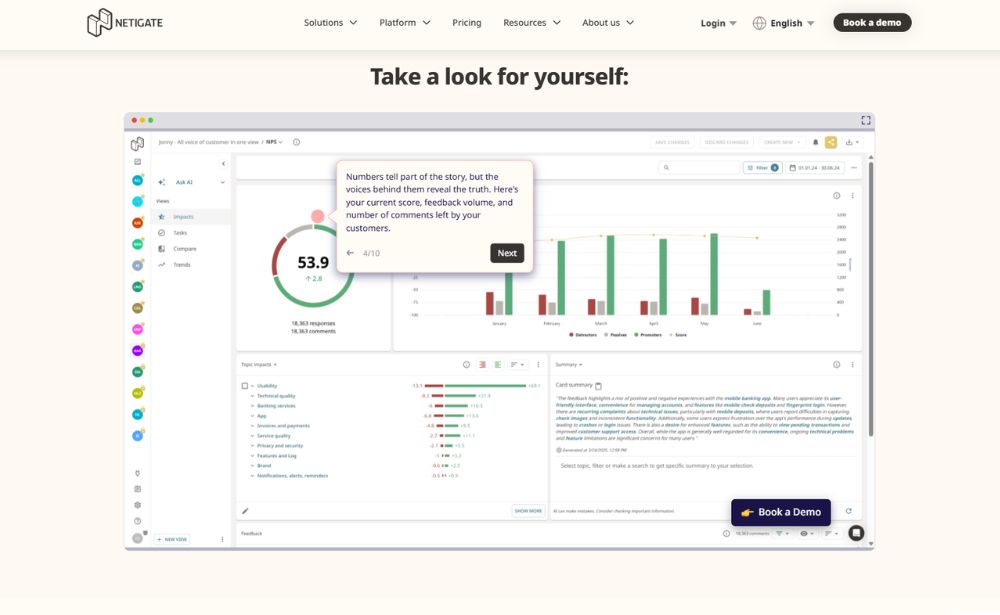
AI sentiment analysis helps teams understand the emotional tone behind customer comments. IBM describes sentiment analysis in CX as a way to understand how customers feel about a product, service, or brand, while AWS defines it as analysing text to determine whether the tone is positive, negative, or neutral. More advanced sentiment analysis methods can also detect stronger signals, such as frustration, urgency, confusion, or satisfaction.
Read IBM’s explanation of sentiment analysis in customer experience.
For example, a comment like “I tried to complete my order three times, but the payment kept failing” would likely be classified as negative and urgent. This helps teams prioritise issues that may be affecting conversions or customer satisfaction.
Topic detection
Topic detection helps identify recurring themes across large volumes of feedback. Instead of reading every comment manually, AI can detect patterns such as “checkout issues”, “delivery delays”, “login problems”, “pricing confusion”, or “mobile app performance”.
This makes it easier to see which topics are mentioned most often and where customers are experiencing friction.
Categorisation
Categorisation takes topic detection one step further by assigning feedback to specific labels or groups. These categories can be based on product areas, customer journey stages, teams, issue types, or business priorities.
For example, feedback could be grouped into categories such as:
- website usability
- payment and checkout
- product information
- account management
- customer support
- technical issues
This helps teams filter feedback, compare trends, and route insights to the right department.
Summarisation
Summarisation condenses large amounts of open-text feedback into a shorter overview. Instead of reviewing hundreds of individual comments, teams can use AI-generated summaries to quickly understand the main issues, recurring themes, and overall customer sentiment.
This is especially useful for weekly reporting, stakeholder updates, and identifying where deeper analysis is needed.
Together, these methods make customer feedback analysis faster, more consistent, and easier to scale. They do not remove the need for human judgement, but they give teams a clearer starting point for deciding what to investigate, prioritise, and improve.
How sentiment analysis improves customer experience
Sentiment analysis improves customer experience by helping teams understand not only what customers are saying, but also how they feel about an interaction, product, service, or digital journey. This makes it easier to identify friction points, prioritise urgent issues, and respond before small problems become bigger customer experience risks.
It helps teams detect negative experiences faster
If customers repeatedly leave negative comments about a checkout form, login process, or mobile app feature, sentiment analysis can highlight that issue early. Instead of waiting for a drop in conversion rates or satisfaction scores, teams can identify negative patterns in open-text feedback and investigate the cause sooner.
It adds context to feedback categories
Sentiment becomes more useful when combined with topic detection or categorisation. A negative comment about “delivery” means something different from a negative comment about “payment errors”, “account access”, or “product information”.
By combining sentiment with categories, teams can understand both the emotional tone and the context behind the feedback. This helps them see which issues are creating the most frustration and which parts of the customer journey need attention first.
It helps prioritise customer experience improvements
So, how can sentiment analysis be used to improve customer experience? In practice, it helps teams:
- detect frustration, confusion, or dissatisfaction in open-text feedback
- identify which pages, products, or touchpoints create the most negative sentiment
- compare sentiment across channels and customer journeys
- prioritise issues that affect satisfaction, conversion, or retention
- track whether sentiment improves after changes are made
- identify positive feedback that shows what customers value most
For CX, UX, product, and digital teams, sentiment analysis is more than a reporting metric. It is a practical way to monitor customer experience, prioritise improvements, and make decisions based on the voice of the customer.
Examples of feedback AI can analyse
AI can analyse many types of customer feedback, especially when the feedback includes open-text comments. These comments often contain the most useful insights because they explain the reasons behind customer scores, behaviour, and satisfaction levels.
Survey responses
Open-ended survey responses are one of the most common sources for AI feedback analysis. For example, customers might explain why they gave a low NPS score, what frustrated them during a website visit, or what would improve their experience.
AI can help summarise these responses, detect sentiment, and group them into themes such as “pricing”, “navigation”, “product information”, or “customer support”.
Website and in-app feedback
Website and in-app feedback can show where customers experience friction during a digital journey. This could include comments about checkout issues, broken forms, confusing navigation, slow-loading pages, or missing information.
For digital teams, this type of feedback is especially valuable because it is often tied to a specific page, journey, or interaction. In platforms like Mopinion, this context can help teams connect customer comments to the exact digital experience they are trying to improve.
NPS, CSAT and CES comments
Customer satisfaction metrics become more useful when they are combined with written feedback. A score shows the level of satisfaction, but the comment explains the reason behind it.
AI can analyse NPS, CSAT, and CES comments to identify why customers are promoters, passives, or detractors, and which recurring issues are affecting satisfaction or effort.
Online reviews
AI can also support online review analysis by identifying common complaints, positive themes, and sentiment patterns across review platforms. This can help teams understand how customers describe their experience publicly and whether the same issues appear across different channels.
Support tickets and chatbot conversations
Support tickets and chatbot conversations often contain detailed information about customer problems. AI can analyse these interactions to detect repeated issues, common questions, unresolved pain points, and topics that may need better self-service content or product improvements.
Product feedback
Product feedback can come from surveys, feedback forms, interviews, reviews, or support conversations. AI can help group this feedback by feature request, bug, usability issue, or customer need, making it easier for product teams to prioritise roadmap decisions.
By analysing these different feedback sources together, teams can build a more complete view of the customer experience and identify which issues are isolated, recurring, or becoming more urgent over time.
How to choose an AI customer feedback analysis tool
The right customer feedback analysis tool should do more than generate a quick summary. It should help your team collect feedback, analyse open-text comments, identify trends, and turn insights into action.
When comparing the best AI tools for analysing customer feedback, look for a platform that supports the full feedback workflow, from collection to follow-up.
1. Look for open-text feedback analysis
Choose a tool that can analyse unstructured comments from surveys, website feedback, in-app feedback, NPS responses, and other open-text sources. This is important because written comments often explain the reason behind customer scores.
The tool should be able to:
- summarise large volumes of comments
- identify recurring themes
- group similar feedback
- detect sentiment
- help teams drill down into individual responses
Mopinion’s Smart Recaps, for example, uses AI to generate feedback summaries, highlight key trends, and help teams prioritise feedback based on sentiment.
2. Check whether it supports categorisation and sentiment analysis
A strong AI feedback analysis tool should not only tell you that customers are unhappy. It should help explain what they are unhappy about and where the issue occurs.
Look for features such as:
- automated feedback categorisation
- sentiment analysis
- topic detection
- filtering by page, device, journey, or feedback type
- trend monitoring over time
This makes it easier to compare feedback across different parts of the customer journey and identify which issues need attention first. Mopinion supports automated categorisation, sentiment analysis, filtering, dashboards, and drill-down analysis for feedback comments.
3. Make sure insights are easy to act on
AI-generated summaries are useful, but they only create value when teams act on them. The best tools help teams assign follow-up actions, share insights, set alerts, and connect feedback to existing workflows.
For example, a CX team might use AI to identify a recurring checkout issue, send the insight to the ecommerce team, create a task in a project management tool, and track whether sentiment improves after the fix.
Mopinion supports this through dashboards, alerts, notes, reminders, integrations with tools such as Trello, Jira and Asana, and action management features.
4. Consider security and data control
Customer feedback can contain sensitive information, so data security should be part of the decision. Before choosing a tool, check how the AI functionality is hosted, how data is processed, and whether the platform fits your organisation’s privacy requirements.
5. Choose a tool that fits your team’s workflow
The best AI customer feedback analysis tool is not always the one with the most AI features. It is the one your team can actually use to make better decisions.
Before choosing a platform, ask:
- Can we collect feedback from the right digital channels?
- Can we analyse open-text responses at scale?
- Can we combine AI summaries with dashboards and reporting?
- Can we filter feedback by journey, page, device, or customer segment?
- Can we assign actions and close the feedback loop?
- Can different teams access the insights they need?
For digital teams, this is where a platform like Mopinion is especially relevant. It combines feedback collection, AI-powered summarisation, text and sentiment analysis, reporting, and action management in one customer feedback analysis workflow.
Risks and limitations of AI feedback analysis
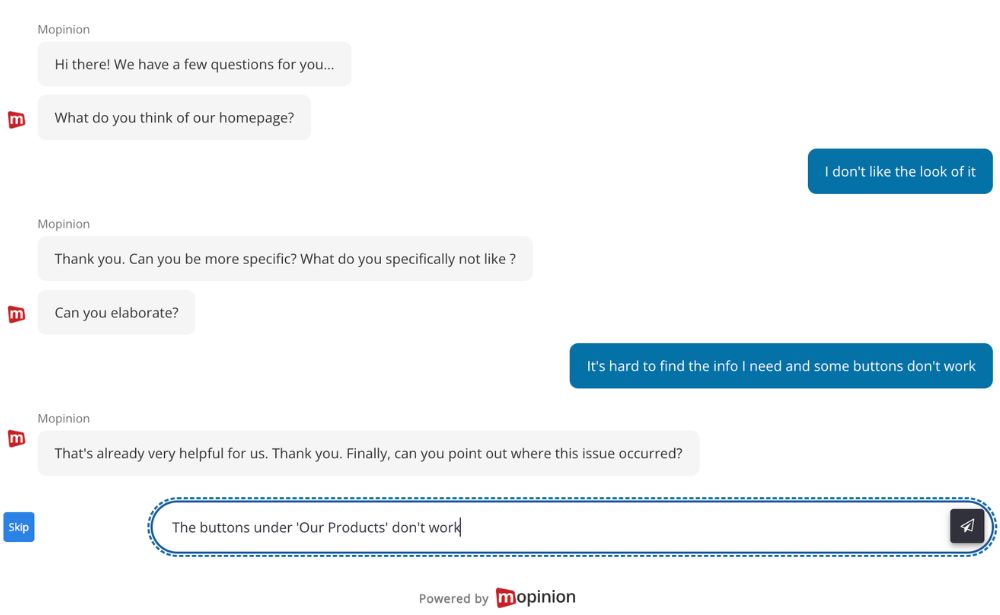
AI feedback analysis still needs governance. NIST’s AI Risk Management Framework focuses on managing AI risks to individuals, organisations, and society, while the ICO provides guidance for assessing AI-related data protection risks.
AI can miss context
Customer comments are often short, vague, emotional, or tied to a specific experience. AI may detect a negative sentiment or recurring topic, but it might not fully understand the wider context behind the feedback.
For example, a comment like “Great, another broken checkout flow” may be sarcastic. Without enough context, AI could misread the tone or classify the feedback incorrectly.
Summaries can oversimplify feedback
AI-generated summaries are useful for spotting patterns, but they can also flatten important details. A summary might show that customers are frustrated with “delivery”, but the original comments may reveal several different problems, such as unclear delivery costs, missing tracking information, or delays in a specific region.
This is why teams should use summaries as a starting point, not as the final answer.
Categorisation is not always perfect
AI can group similar comments into categories, but feedback does not always fit neatly into one label. A single comment might mention pricing, usability, and customer support at the same time.
For more accurate analysis, teams should regularly review categories, check example comments, and refine the way feedback is tagged.
AI can reflect bias in the data
AI feedback analysis depends on the feedback data available. If most responses come from one customer segment, one channel, or mostly unhappy users, the analysis may not represent the full customer base.
Teams should consider where the feedback comes from, who is represented, and whether important customer groups are missing.
Sensitive data needs careful handling
Open-text feedback can include personal or sensitive information, especially in support tickets, complaints, or account-related comments. Before using AI to analyse customer feedback, teams should check how the tool processes, stores and protects customer data.
This is especially important for organisations with strict privacy, compliance, or data governance requirements.
Human judgement is still essential
AI can help teams process feedback faster, but it cannot decide business priorities on its own. A recurring complaint may be important, but teams still need to consider factors such as customer impact, commercial value, technical effort, and strategic priorities.
The strongest approach is to use AI as a support layer: let it summarise, group, and highlight patterns, then let people validate the findings and decide what to do next.
Ready to see Mopinion in action?
Want to learn more about Mopinion’s all-in-1 user feedback platform? Don’t be shy and take our software for a spin! Do you prefer it a bit more personal? Just book a demo. One of our feedback pro’s will guide you through the software and answer any questions you may have.