

Your customers literally don’t all speak the same language. So why should your feedback forms?
Whether you’re collecting feedback across countries, regions or multilingual user groups, the language of your feedback form matters. If the questions, answer options or buttons are not shown in a language users understand, the form can quickly become harder to complete.
That’s where AI form translations come in.
No endless copy-pasting. No waiting on translators. No awkward “who here speaks Italian?” moment in the team chat. Just faster multilingual feedback forms, ready to help you collect better feedback from more users.
TL;DR – Article summary
- Mopinion now offers AI form translations, making it easier to create multilingual feedback forms without manual translation work.
- You can simply select the language(s) to add, and Mopinion will automatically translate your form copy for you.
- This helps teams save time, support more markets and collect feedback from more users.
- Manual edits and fine-tuning are still possible.
- Supports 109 languages across web, mail and app webview, and is available to all Mopinion customers at no extra charge.
- For teams working across regions, Mopinion also offers a paid feedback translation add-on, which can translate incoming feedback into selected languages.
In this article, we’ll cover:
- Why multilingual feedback forms matter
- The problem with manual form translations
- Meet AI form translations
- What can you translate automatically?
- How AI form translations work in Mopinion
- From translated forms to translated feedback
- How do I set up translations in Mopinion?
- Start collecting feedback in every language
- FAQ
Why multilingual feedback forms matter
Your customers can only give useful feedback if they understand what you’re asking.
That may sound obvious, but language is often overlooked in feedback collection. A form might be perfectly timed, beautifully designed and shown on the right page, but if the wording is unclear or not available in the user’s preferred language, the experience still falls short.
At best, users have to work harder to understand the question. At worst, they abandon the form altogether.
This is especially important for companies operating across multiple countries, regions or multilingual audiences. A one-language feedback form may be enough for one market, but it can quickly create friction when your customer base grows.
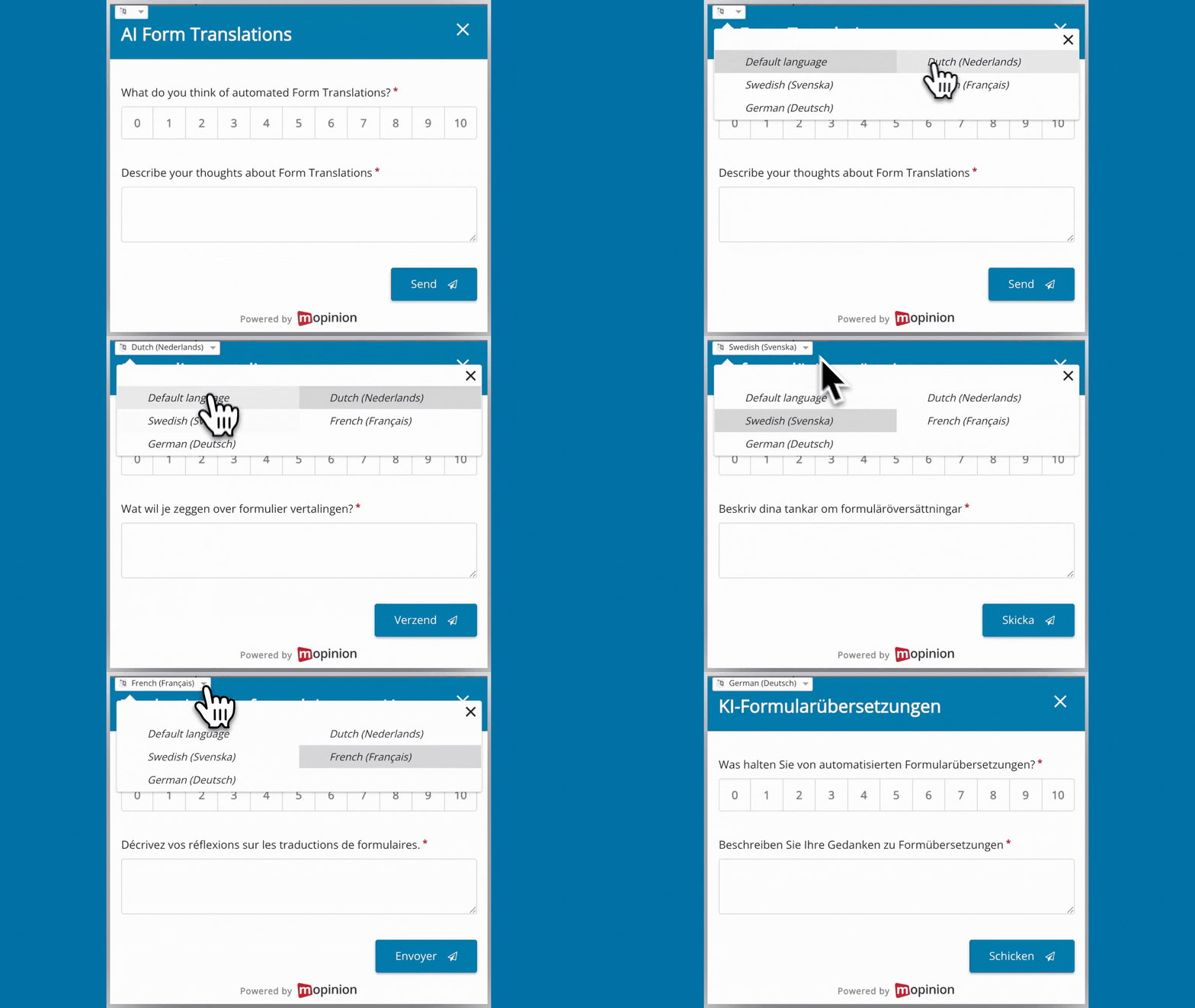
Multilingual feedback forms help remove that barrier. They make it easier for users to understand the question, choose the right answer and explain what they experienced in their own words.
And that matters because better understanding often leads to better feedback. When users feel comfortable with the language of the form, they are more likely to share specific, accurate and useful insights.
In short, multilingual feedback forms make your feedback programme more inclusive, while also helping you collect feedback that better reflects the people using your website, app or digital service.
The problem with manual form translations
In reality, manual form translations often take more time than expected.
Every question, answer option, button, placeholder and thank-you message needs to be translated manually, and if your form changes later, those translations need to be updated manually too. One small copy change can quickly turn into extra work across every language version.
Then there’s the question of who actually does the translating.
Maybe someone in your team speaks the language. Maybe you need to ask another department. Maybe you rely on an external translator. Or maybe you end up copying text into a translation tool and pasting it back into the form yourself.
Either way, the process adds friction.
For teams managing feedback across multiple websites, apps, countries or campaigns, manual translations can slow things down. Forms take longer to launch, language versions become harder to maintain, and small inconsistencies can easily sneak in.
And when multilingual feedback collection becomes too much effort, teams may put it off altogether.
That means users are still asked for feedback in a language that may not feel natural to them. And as a result, companies risk missing out on valuable insights from the very audiences they want to understand better.
Meet AI form translations
That’s where AI form translations come in.
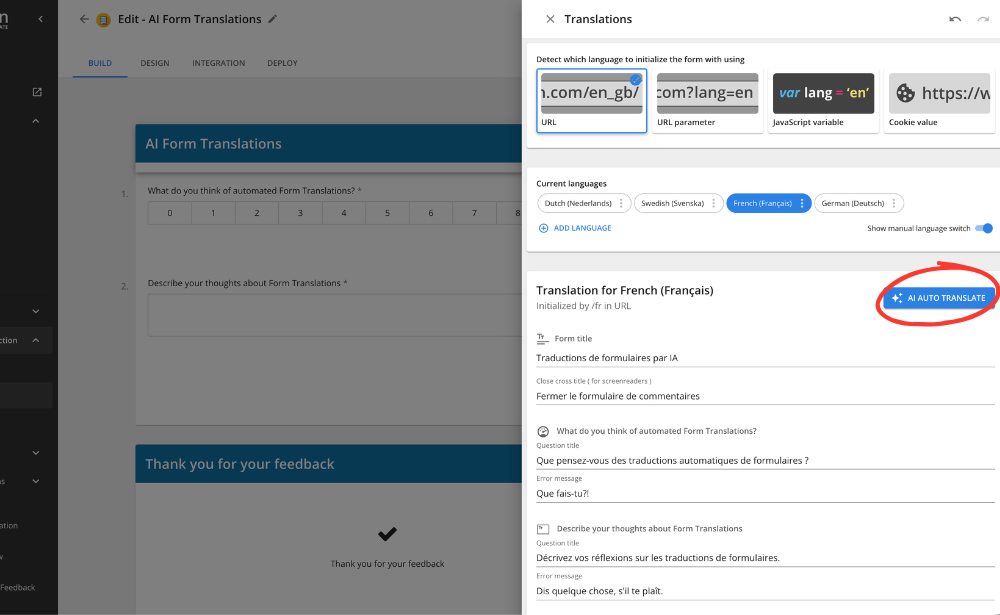
With this new Mopinion feature, you can translate your feedback forms into different languages without having to enter every translation manually. Simply select the language or languages you want to add, and Mopinion automatically translates the form copy for you.
This includes the text your users see in the form, such as questions, answer options, buttons and other written elements.
So instead of building a form in one language and then repeating the same translation process over and over again, you can create multilingual feedback forms much faster.
And you still stay in control.
Once the translation has been generated, you can review the copy and make manual edits where needed. That means you can use AI to speed up the process, while still fine-tuning the final version to match your tone, terminology or market-specific wording.
The result? Less manual work for your team, faster multilingual form creation and an easier way to collect feedback from users in the language they understand best.
What can you translate automatically?
With AI form translations, Mopinion translates the copy in your feedback form, so you don’t have to recreate each language version manually.
This includes the written elements your users interact with, such as:
- Questions
- Answer options
- Buttons
- Labels
- Placeholder text
- Thank-you messages
- Other form copy
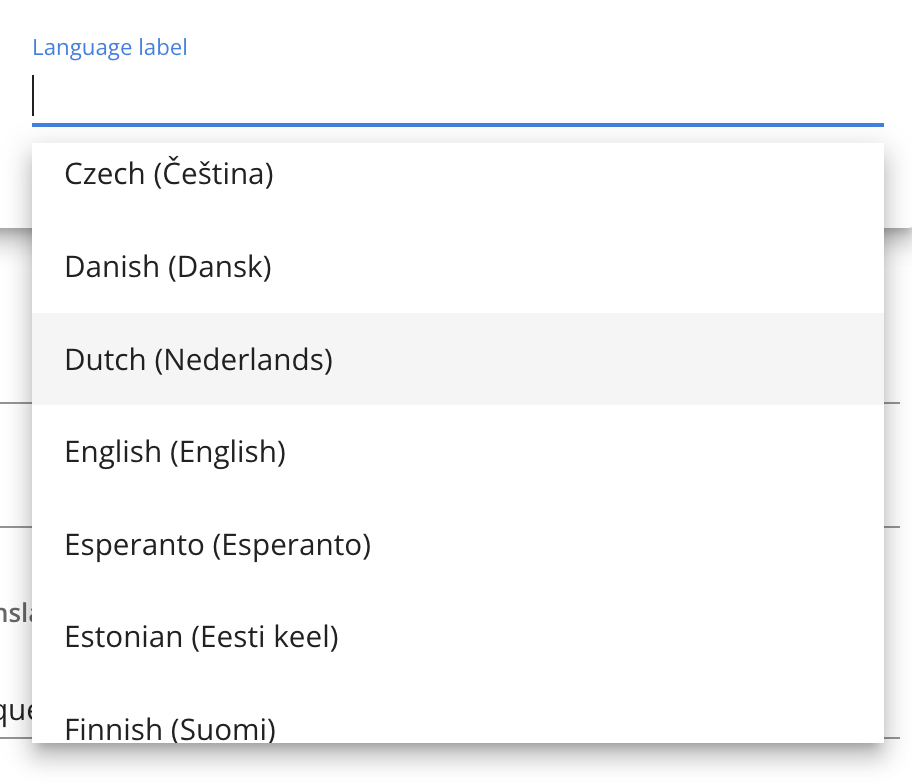
You can add multiple languages to the same feedback form, depending on the markets, regions or user groups you want to support. Mopinion currently supports 109 languages, making it easier to collect feedback across a wide range of audiences.
How AI form translations work in Mopinion
With Mopinion’s AI form translations, creating multilingual feedback forms becomes a whole lot easier.
Let’s break it down:
- Automated form translations: Translate the copy in your feedback forms with the help of AI, without manually entering every translated version yourself.
- Support for multiple languages per form: Add more than one language to the same feedback form, depending on the audiences you want to reach.
- 109 supported languages: Choose from a wide range of supported languages, sorted by the most relevant and frequently used options.
- Flexible language display: Show forms based on different variables, such as URL parameters, JavaScript variables or cookie values.
- Language selector option: Give users the option to select their preferred language directly in the feedback form.
- Manual editing remains possible: Want to adjust a translation? No problem. You can still manually edit automated translations after they have been generated.
- No extra charge: AI form translations are available to all Mopinion customers without additional costs.
Pretty straightforward, right?
You create the feedback form in your original language, select the language or languages you want to add, and Mopinion helps translate the form copy for you.
From translated forms to translated feedback
AI form translations help you ask for feedback in the right language. But for international teams, the language challenge does not always stop there.
Once the responses start coming in, your team still needs to understand, analyse and act on that feedback. And if users are leaving comments in Dutch, German, French, Spanish or any other language, that can quickly become difficult for teams working across different countries or departments.
That’s where feedback translations come in.
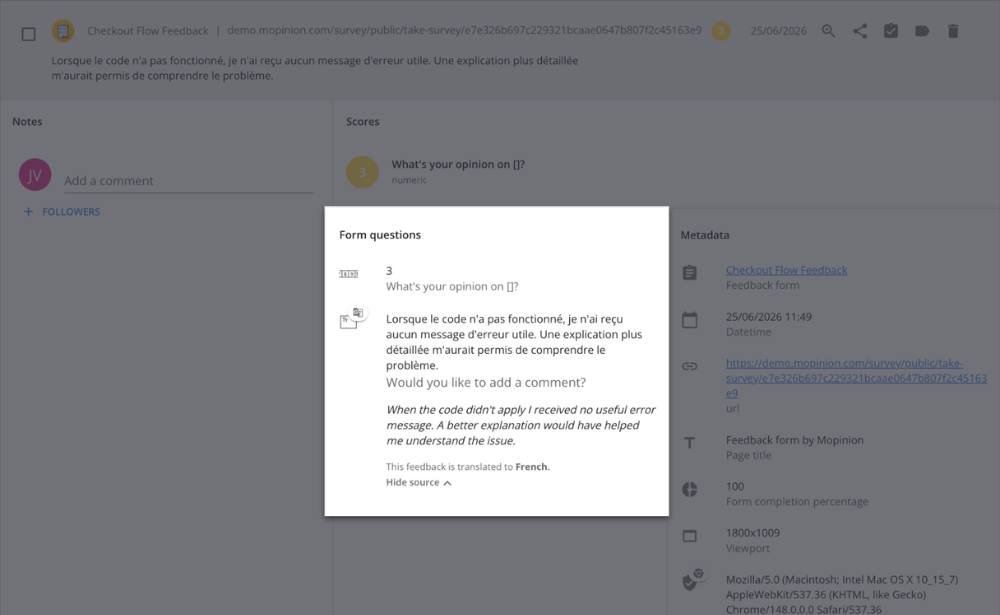
In addition to form translations, Mopinion also offers a paid feedback translation add-on. With this add-on, incoming feedback can be translated into a selected language, making it easier for teams to work with responses from different markets.
So, your users can leave feedback in the language they feel most comfortable with, while your internal teams can review and act on that feedback in the language they prefer.
Together, form translations and feedback translations help close the loop on multilingual feedback collection. You can ask questions in the user’s language, collect more accessible feedback and make those insights easier for your team to use.
Contact your Customer Success Manager for more information!
How do I set up translations in Mopinion?
Setting up translations in Mopinion is simple.
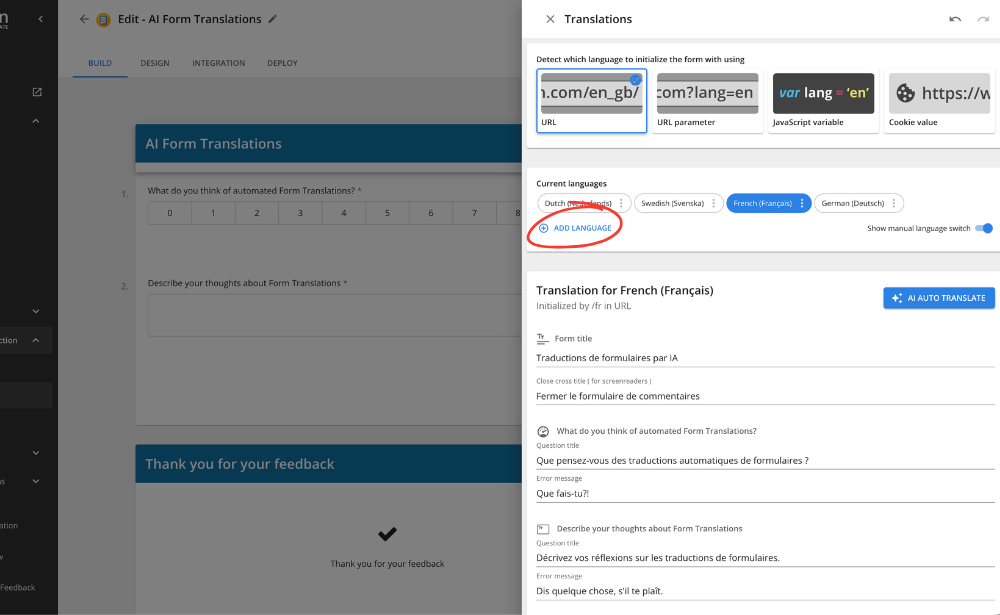
In the Mopinion software, go to the feedback form builder. Once you are inside the form builder, open the Form tab. This is where you can manage the languages for your feedback form.
From there, you can:
1. Create or open the feedback form you want to translate.
2. Go to the Form tab in the feedback form builder.
3. Select the language or languages you want to add.
4. Let Mopinion automatically translate the form copy.
5. Review the translations and make manual edits if needed.
6. Save your form and publish it as usual.
You can also decide how the translated version of the form should be shown to users. For example, you can display it based on URL parameters, JavaScript variables or cookie values. Or you can add a language selector to the form, so users can choose the language themselves.
That’s all there is to it.
No complicated translation workflow. No endless copy-pasting. No need to track down that one colleague who took French in high school.
Start collecting feedback in every language
Your customers are not all the same. They come from different countries, speak different languages and interact with your digital channels in different ways.
Your feedback forms should be able to keep up.
With AI form translations in Mopinion, you can create multilingual feedback forms faster, support more users and collect feedback without unnecessary translation hassle.
Now all that’s left to do is select your languages, review your forms and start collecting feedback from more users, in more places.
Ready to see Mopinion in action?
Want to learn more about Mopinion’s all-in-1 user feedback platform? Don’t be shy and take our software for a spin! Do you prefer it a bit more personal? Just book a demo. One of our feedback pro’s will guide you through the software and answer any questions you may have.
Frequently Asked Questions
With Mopinion, you can decide how and when different language versions of your feedback form are shown. This gives you more control over the feedback experience, especially when you manage multiple websites, regions, audiences or campaigns.
For example, you can show a translated feedback form based on different variables, such as:
- The page URL
- URL parameters
- JavaScript variables
- Cookie values
If enabled, end users can switch between languages as well and choose the language which suits them most.
Yes. If enabled, end users can change the language through a drop-down menu. But they can only change between the languages added to the form.
In addition to form translations, Mopinion also offers a paid feedback translation add-on. With this add-on, incoming feedback can be translated into a selected language, making it easier for teams to work with responses from different markets.
Yes. Once the translation is finalised, you can edit it with full control over the text.
Mopinion currently supports 109 languages worldwide.
Here’s the full list:
Afrikaans
Albanian
Amharic
Arabic
Armenian
Azerbaijani
Basque
Belarusian
Bengali
Bosnian
Bulgarian
Catalan
Cebuano
Chinese (Simplified)
Chinese (Traditional)
Corsican
Croatian
Czech
Danish
Dutch
English
Esperanto
Estonian
Finnish
French
Frisian
Galician
Georgian
German
Greek
Gujarati
Haitian Creole
Hausa
Hawaiian
Hebrew
Hindi
Hmong
Hungarian
Icelandic
Igbo
Indonesian
Irish
Italian
Japanese
Javanese
Kannada
Kazakh
Khmer
Kinyarwanda
Korean
Kurdish
Kyrgyz
Lao
Latin
Latvian
Lithuanian
Luxembourgish
Macedonian
Malagasy
Malay
Malayalam
Maltese
Maori
Marathi
Mongolian
Myanmar (Burmese)
Nepali
Norwegian
Nyanja (Chichewa)
Odia (Oriya)
Pashto
Persian
Polish
Portuguese (Portugal, Brazil)
Punjabi
Romanian
Russian
Samoan
Scots Gaelic
Serbian
Sesotho
Shona
Sindhi
Sinhala (Sinhalese)
Slovak
Slovenian
Somali
Spanish
Sundanese
Swahili
Swedish
Tagalog (Filipino)
Tajik
Tamil
Tatar
Telugu
Thai
Turkish
Turkmen
Ukrainian
Urdu
Uyghur
Uzbek
Vietnamese
Welsh
Xhosa
Yiddish
Yoruba
Zulu